Private AI skill management needs three controls: approve a specific package, distribute the reviewed version, and withdraw access when it should end. Treat every update as a new review event. Removing catalog access isn’t the same as deleting a downloaded file or revoking permission to a business system.
This matters when skills are copied between repositories and nobody can reliably identify the maintained version. A shared catalog helps, but the team still needs a review and release process.
We build Jarvis Skill Gateway, part of Jarvis Registry, an open source project maintained by ASCENDING Inc. The process below is a recommended evaluation framework, not a report of customer test results.
Key Takeaways
- Approve the complete package and an exact revision, not just the
SKILL.mddescription.- A proposed update needs review before distribution. A scanner pass isn’t human approval.
- Record what actually reached the developer’s client, not only what changed in the catalog.
- Test access removal separately for Registry, managed local files and any connected business systems.
How do teams approve agent skill packages?
Give each skill an accountable owner and approve a specific revision for a defined audience. A useful approval record answers what changed, who reviewed it and where it can be used.
Review the entire package, including scripts, references and network destinations. Anthropic’s enterprise skills guidance recommends inspecting those files, testing scripts in a sandbox and checking the tools a skill invokes. A familiar author or a passing scan doesn’t remove that work.
Use a record like this in your existing review system. These are proposed process fields, not a list of built-in Jarvis fields.
| Record | What the reviewer needs |
|---|---|
| Purpose and owner | The task, intended users and the person responsible for future changes |
| Source and revision | Repository or package source, exact reviewed revision and all included files |
| Access and data | Tools, scripts, network destinations and data the skill may use |
| Review decision | Reviewer, date, accepted risks and the audience approved to receive it |
| Test evidence | Representative inputs, expected outcomes, observed failures and client/model versions |
| Recovery plan | Previous approved revision, release operator and the procedure to withdraw or restore the package |
For higher-risk skills, separate the author from the approver. Route changes involving sensitive data or write actions to the relevant security and system owners. Keep secrets outside the skill package.
How should teams review and release an update?
Review the differences from the approved revision, then test the full resulting package. A changed reference file or script can matter as much as a changed instruction.
| Stage | Team action | Evidence before moving on |
|---|---|---|
| Propose | Explain the change and identify affected tasks, files and access requirements | Diff linked to the previous approved revision |
| Review | Check instructions, dependencies, scripts and destinations; obtain the required approvals | Review decision tied to the proposed revision |
| Pilot | Try representative tasks with a small permitted group and the actual client versions | Results compared with the previous package, including failures |
| Release | Distribute only the accepted revision through the chosen delivery path | Source revision, distribution time and a check of installed content |
| Restore or withdraw | Stop a problematic rollout and use the agreed recovery procedure | Recorded action and a repeat of the affected checks |
Automation can propose an update without approving it. For example, Skills Update Action documents path allowlists and reviewable pull requests, with no automatic merge. That’s an example of a review pattern, not a tested Jarvis integration or a recommendation to install it unchanged.
Keep the previous approved package available before a rollout. Establish whether your delivery system can restore it, how that restoration reaches clients and who can trigger it. Don’t assume that a version number implies a working rollback path.
What moves from GitHub to the developer’s tool?
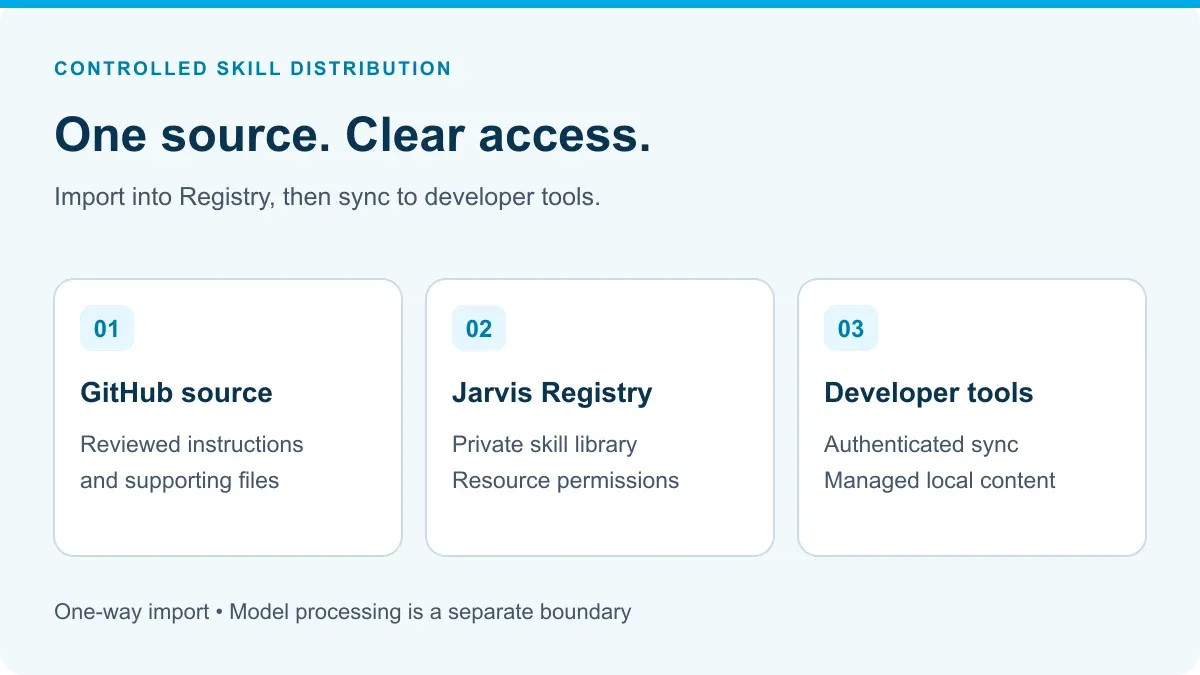
A skill contains a SKILL.md file and may include supporting material. The Skill Gateway documentation describes importing a selected GitHub repository revision into Registry, where access to each skill can be managed. Import is one-way: GitHub → Registry. Registry does not push edits back to GitHub.
The AI Skills CLI delivers accessible skills into Claude Code, Codex or GitHub Copilot environments. A developer authenticates and syncs; the client manages the local arrangement for that integration. Those are the documented skill-sync clients. Confirm the delivery path before including another client in the rollout.
For imported skills, choose GitHub as the maintained source and use its review process before import. If someone also edits the Registry copy, agree how to reconcile that change. The two locations aren’t automatic bidirectional version control.
This is where the review process needs an enforcement check: verify who can change, import or share a package after approval. A written approval policy doesn’t prove the configured product prevents bypasses. For public packages, use the detailed checklist in is it safe to use public agent skills.
Match the management layer to the problem
| Team need | Jarvis component | Implementation decision |
|---|---|---|
| Share reusable instructions privately | Skill Gateway stores and organizes skill content | Assign an owner and a review process for each shared skill |
| Limit who can obtain or change a skill | Registry resource permissions cover viewing, editing, deleting and sharing | Map people and groups to the appropriate permissions |
| Distribute maintained content to developers | AI Skills CLI syncs accessible skills | Choose personal or project scope and a sync process |
| Connect the assistant to live business tools | MCP Gateway and Registry provide governed resource access | Configure runtime authorization and downstream permissions separately |
If the requirement is a live call to an internal system, a skill library alone is not enough. See AI skills versus MCP tools for the distinction between instructions and tool invocation.
An example: standardize a code-review skill
Consider a platform team maintaining a skill that asks a coding assistant to check a change against internal review conventions. This is an illustrative rollout, not a customer result.
The team keeps the skill and its checklist in GitHub, reviews changes there and imports the selected revision. It grants a pilot engineering group access in Registry. Those developers sync the skill and try it on the same representative changes.
Suppose the next revision adds a script that reads a repository and calls a new external service. The owner treats that as a new access and data-handling decision, not a harmless text update.
The team checks whether the assistant follows the instructions, whether its suggestions are useful and whether any tool it calls is authorized. A shared skill doesn’t replace code review or establish that a model has satisfied a security policy.
Once the pilot works, the owner can expand access and agree how developers receive subsequent revisions. Record the source revision and the local version used in an evaluation so an unexpected result can be investigated.
How do teams revoke access to private agent skills?
Remove the permissions that let the person obtain the skill, then test the affected account. Check direct and group-based grants; changing one grant may leave another access path.
The important distinction is what you’re revoking:
| Boundary | What to verify | What it doesn’t prove |
|---|---|---|
| Registry access | The affected account can no longer list or download the private skill through the tested paths | Previously downloaded files have disappeared |
| CLI-managed local content | What the configured sync removes or reconciles, including changed local files | An offline device or separately copied package has been cleaned up |
| Business-system access | The relevant gateway, account or credential no longer permits the operation | The instruction package itself has been deleted |
The CLI documents access-aware reconciliation during sync. That isn’t a promise of immediate remote deletion. Decide how offboarding handles devices that don’t sync, unmanaged copies and previously shared content.
If a skill can call a sensitive system, remove the relevant system access separately. Hiding the skill from a catalog isn’t an authorization boundary for a request made another way. See AI skills versus MCP tools for that separation.
Test updates and access removal before wider distribution
Use a permitted test account, a denied account and a maintainer role. Record the configured permissions and each result. The checks below are acceptance criteria, not claims that a Jarvis deployment has already passed them.
- First delivery: confirm the permitted account receives the reviewed package and the denied account can’t obtain it. Check the included files, not only the catalog title.
- Change control: confirm who can edit, import and share. Verify the configured process prevents an unreviewed revision from reaching the pilot audience.
- Update: distribute the next approved revision and inspect the installed content. Record the source revision and client version used for the test.
- Local changes: modify a disposable local copy before syncing. Observe collision handling and recovery; don’t discover these behaviors on a developer’s active work.
- Removal: withdraw the test account’s access and check both Registry access and the next sync. Check runtime permissions separately if the skill uses a business tool.
Use the CLI behavior reference for the exact integration steps. If an outcome differs from the requirement, record the gap and change the rollout plan. Don’t label the test passed because the sign-in or sync command succeeded.
Private skill hosting and private model processing are different
Hosting skill artifacts in a private Registry controls where that library is managed. It does not decide where a connected coding assistant sends the instructions, code or other context it uses.
Review the selected model provider, assistant configuration and tool destinations before adding sensitive material to a skill. A cloud model API may receive content even when the Registry itself runs in the customer’s account. Avoid placing passwords, tokens or production records in reusable instruction files.
If your teams use more than one coding client, see Codex alternatives for enterprise engineers for how Codex, Claude Code and GitHub Copilot differ in governance and portability.
Evaluate one skill before expanding the library
Start with a recurring developer task and one maintained skill. Compare Registry-based distribution with the team’s current repository or manual-copy workflow. Our private skill marketplace guide explains when a private Git repository or native client features may be enough.
Measure review effort, revision consistency and the usefulness of the resulting work. Centralization has an operating cost; it needs to solve a real distribution or control problem, not just add another catalog.
Request a Jarvis demo with that skill and the coding tools your team uses. Ask to see the source import, permitted and denied access, a local update and an access-removal test in the proposed configuration.
Product documentation checked October 19, 2026. The workflow and test criteria are recommendations, not a completed deployment benchmark.
References
- Anthropic: enterprise skill review and governance
- Skills Update Action: reviewable update workflows
- Jarvis Skill Gateway documentation
- AI Skills CLI delivery workflow
- CLI installation and behavior reference
- Registry role and resource permissions
Private skill management questions
How do teams approve and update agent skill packages?
Assign an owner, review the complete package and record the exact source revision. Test the proposed change before releasing it to a pilot group, then verify what reaches each supported client. Treat later changes as new review events, not automatic approval. Keep the previous approved revision and a tested recovery procedure.
Does Registry write skill changes back to GitHub?
No. GitHub import runs in one direction, from the repository into Registry. Changes made in Registry are not automatically committed back to the source repository. Teams should define where imported skills are maintained.
Which developer tools can receive skills through the CLI?
The documented integrations are Claude Code, Codex and GitHub Copilot. The CLI supports personal or project environments and handles each integration's local layout. Verify the versions and configuration used by your team.
How do teams revoke access to private agent skills?
Remove the relevant Registry permissions and check for other grants that still allow access. Test that the affected account can no longer obtain the skill. Separately verify what happens to CLI-managed files during sync and remove any runtime credentials or system permissions that should end. These actions don't erase independently copied content.
Does removing access erase every copy of a skill?
No. Registry access, managed local files and copied content are different boundaries. The CLI reconciles managed skills during sync, but that doesn't guarantee removal of separate copies or information already read by a user or model. Device cleanup and data-retention requirements need their own process.