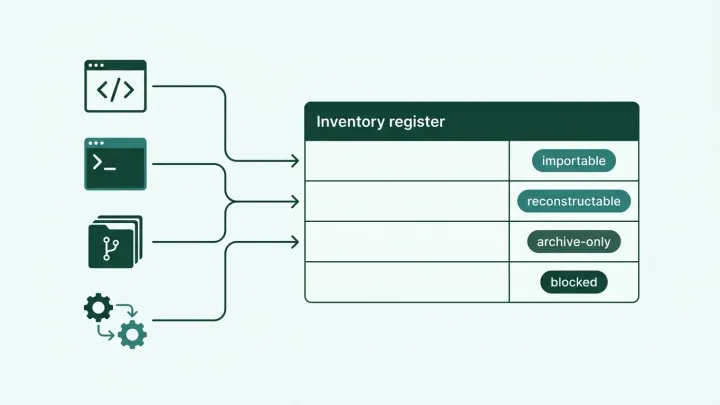
A developer can add an MCP server to an editor without creating a cloud resource or opening a firewall ticket. If the editor launches it over stdio, the MCP conversation stays between two processes on the device. Your network proxy never sees it.
That makes an approved-server catalog an incomplete inventory. It tells you what someone registered, but not necessarily what people configured elsewhere or still run under an old setup.
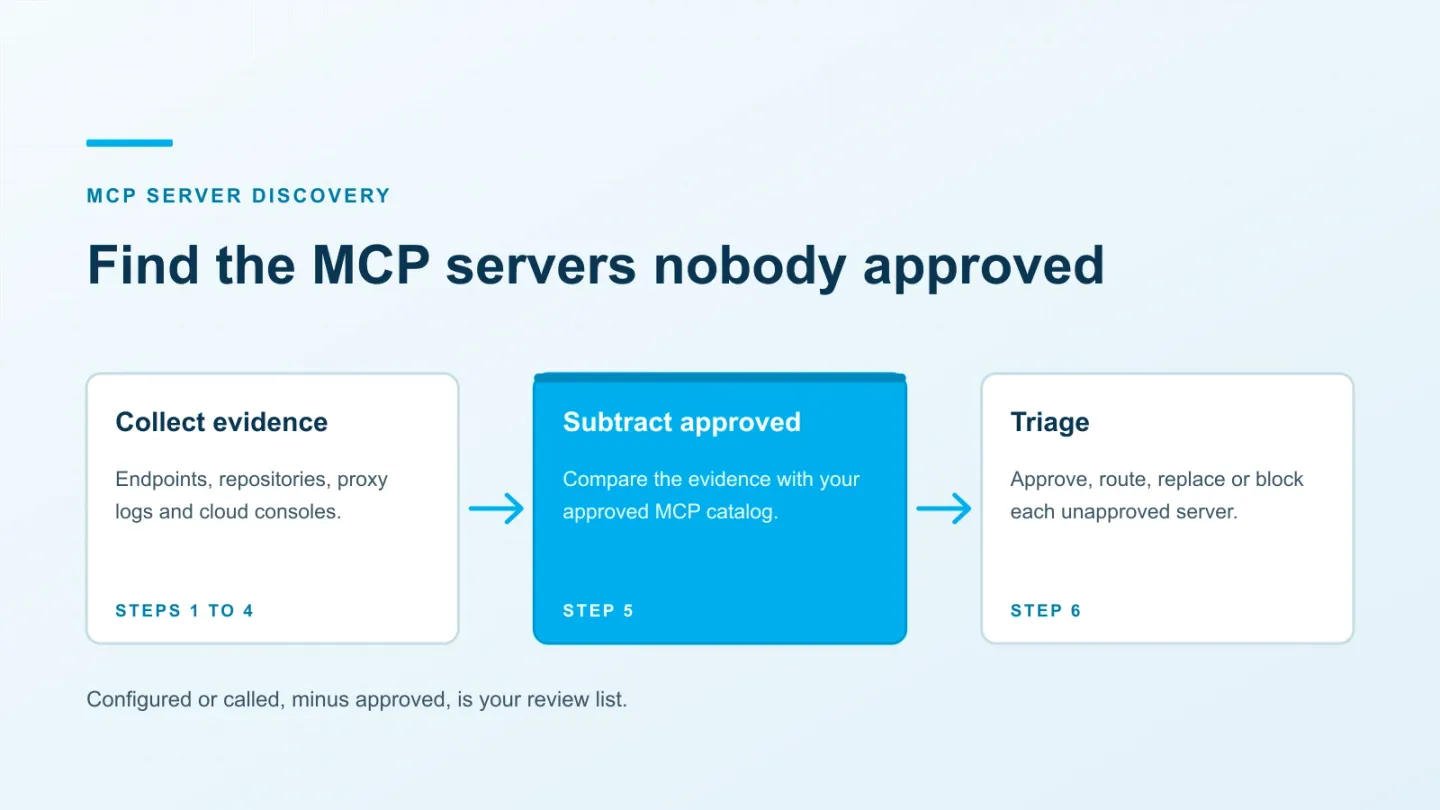
The practical approach is to combine endpoint, repository, network and cloud evidence. Keep the source of each observation, match it against approvals, and assign an owner to the exceptions. This article walks through that process in six steps.
ASCENDING publishes this blog and maintains Jarvis Registry, an open source MCP registry and gateway. It can provide an approved catalog and routed-call records; it doesn’t replace endpoint discovery.
Decide what counts as evidence
For security operations, MCP server discovery means identifying server configurations and deployments across the environment. Protocol-level discovery has a narrower purpose: a client contacts a known endpoint to learn what it offers.
Keep at least three observed states in your inventory:
- Configured: a client file, platform setting or deployment definition refers to the server.
- Running: process or workload evidence shows a server instance was started.
- Called: telemetry records a request to the server, ideally identifying the method and outcome.
These states aren’t interchangeable. A repository may contain a test fixture. A process may start without receiving a tool call. An approved server with no recorded use may simply sit outside your logging coverage.
The following sources answer different parts of the question:
| Source | What it can establish | What it can miss |
|---|---|---|
| Endpoint configuration | A client is configured to launch a command or connect to a URL | Session-only definitions, plugins and unmanaged devices |
| Process telemetry | A particular executable or container ran | Short-lived processes outside the collection window; what the process actually called |
| Repository search | A project defines a client connection or implements a server | Uncommitted settings and externally hosted connectors |
| Proxy or gateway logs | Traffic used an observed route | Stdio, loopback traffic and direct connections outside that route |
| Cloud and platform inventory | A managed resource or connector is configured | Resources in other accounts, regions, tenants or hosting systems |
A local HTTP server can listen on a port. A stdio server normally doesn’t need one for MCP communication. Port scans therefore can’t substitute for endpoint collection.
1. Collect configurations from managed endpoints
Use your endpoint-management or EDR tooling to inspect the AI clients installed on managed devices. Collect from each relevant user profile and development workspace, including remote development environments where the client actually runs.
Extract the server name, transport, URL or launch command, arguments, working directory and source file. Redact secret values before sending records to a central inventory. Credentials may appear in URLs and command arguments as well as env and headers blocks.
Configuration locations to check
These are documented locations reviewed on October 6, 2026. Custom configuration directories, older releases and remote workspaces need separate handling.
| Client | User configuration | Project configuration |
|---|---|---|
| Claude Desktop | macOS: ~/Library/Application Support/Claude/claude_desktop_config.json; Windows: %APPDATA%\Claude\claude_desktop_config.json | Inspect installed extensions and their settings separately |
| Claude Code | ~/.claude.json, including entries scoped to individual project paths | .mcp.json |
| VS Code | The active profile’s mcp.json; locate it with MCP: Open User Configuration | .vscode/mcp.json or portable .mcp.json; also inspect dev container configuration |
| Cursor | ~/.cursor/mcp.json | .cursor/mcp.json |
| Codex | ~/.codex/config.toml, under mcp_servers | .codex/config.toml for trusted projects |
| Gemini CLI | ~/.gemini/settings.json, under mcpServers | .gemini/settings.json |
| Devin Local / CLI | ~/.config/devin/mcp_config.json; Windows: %APPDATA%\devin\mcp_config.json | .devin/mcp_config.json and .devin/mcp_config.local.json |
Don’t treat a filename as the full configuration contract. VS Code supports both its servers object and the portable mcpServers format. Its documented user-profile file and .vscode/mcp.json remain relevant collection targets.
Devin’s older releases kept MCP entries in config.json and config.local.json. Include those during a mixed-version rollout. For any client, inspect installed plugins and extensions; they can supply servers without an entry in the files above.
Follow wrappers to the actual destination
The label github tells you little about what will execute. Record the endpoint or executable behind it.
For example, a command using mcp-remote to connect to https://tools.example.com/mcp represents a remote endpoint reached through a local bridge. Keep both the wrapper package and the destination in the inventory.
Similarly, one Docker entry can represent several servers. Docker’s CLI documentation shows clients launching docker mcp gateway run under the name MCP_DOCKER. Inspect the profiles behind that entry:
docker mcp profile list
docker mcp profile server ls
These commands inspect the Docker configuration available to the current user. Run collection in the relevant user context, and check the installed CLI’s help when profiles aren’t available. A gateway entry isn’t evidence that every backend in its catalog was used.
Use endpoint telemetry to fill the gaps
Microsoft Defender for Endpoint can discover supported local AI agents and their configured MCP servers. The documented prerequisites include Plan 2, onboarded devices and active, updated Defender protection in a supported commercial-cloud environment. macOS support is currently in preview.
Check whether that inventory already covers your installed clients before building another collector. Confirm its coverage with a known test configuration. Treat the results as configuration evidence, not a history of tool calls.
Process telemetry adds another signal: an editor launching npx, uvx, a Python executable or a container. These commands also have ordinary development uses. Correlate the parent process, arguments and package identity before classifying them as MCP activity.
2. Search repositories and deployment definitions
Repository search finds shared configurations and in-house implementations. Start with the filenames above, then inspect package manifests, container definitions and infrastructure code.
A filename-only search is a useful first pass. In a checked-out repository, this command lists common candidates without printing their contents:
rg --files --hidden \
  -g '!.git' -g '!node_modules' -g '!.venv' \
  -g '.mcp.json' -g 'mcp.json' -g 'mcp-config.json' \
  -g 'mcp_config*.json' -g '.codex/config.toml' \
  -g '.gemini/settings.json' -g 'devcontainer.json'
This is a shell example, not a fleet scanner. It respects ignore rules, so it deliberately won’t find every ignored local configuration. Endpoint collection must cover those separately.
Look for MCP SDK dependencies and server entry points in candidate projects. A dependency alone isn’t proof of a deployed server: it may belong to a client, a test or an abandoned experiment.
Use CODEOWNERS, deployment metadata and recent maintainers to identify an owner candidate. Ask that owner where the service runs, which credentials it uses and whether it is still needed. Put suspected findings into review rather than automatically blocking every repository with an MCP dependency.
3. Look for remote traffic on the routes you monitor
For remote servers, proxy and secure web gateway logs can establish that a client contacted an endpoint. How much they reveal depends on TLS inspection and the protocol revision.
Under the 2026-07-28 Streamable HTTP specification, requests include protocol-version and method headers. Tool calls, resource reads and prompt retrieval also carry Mcp-Name.
Earlier Streamable HTTP revisions use an initialize exchange and may use a session ID. The version header was introduced in 2025-06-18 and isn’t present on every legacy request. A detection rule should account for both generations.
Headers are useful indicators, not proof of authorization or a trustworthy server identity. Validate the rule with traffic from your deployed clients. A /mcp or /sse path is only a clue; servers can use other paths, and unrelated services can use those names.
Without TLS decryption or logs from a terminating service, you usually won’t see the HTTP path, headers or method. Destination metadata may still identify candidates, depending on your network configuration. It can’t reliably distinguish all MCP calls from ordinary HTTPS traffic to the same service.
Stdio messages and local loopback connections won’t cross the corporate proxy. Neither will every cloud-to-cloud call or off-network device connection. Record those coverage gaps instead of treating an empty search as a clean result.
4. Check cloud resources and platform connectors
Some servers never appear in an endpoint configuration. A team may deploy one in a cloud account, or add a connector in an AI platform’s administration console.
On AWS, inventory AgentCore gateways and targets across the accounts and regions you operate. ListGateways and ListGatewayTargets provide the current configuration. For runtimes, inspect protocolConfiguration.serverProtocol in the GetAgentRuntime response to identify MCP endpoints.
AgentCore CloudTrail management events can show who created or changed gateways and targets. They describe configuration changes; data events are a separate source for invocation evidence and require explicit enablement.
If you use AWS Agent Registry organization auto-detection, use its discovered records too. It covers supported AgentCore runtimes and gateways, not arbitrary servers on EC2, ECS or EKS. Runtime records are classified as AGENT, including MCP runtimes, so inspect their protocol details.
For other environments, review Kubernetes workloads, ingress routes, load balancers, VM services and serverless deployments. Search for known images and configuration patterns, then confirm candidates with their owners. A resource doesn’t need “mcp” in its name to host an MCP server.
Finally, export connector inventories from the AI platforms your organization administers. Review associated service principals, OAuth grants and service accounts where available. An identity record can help identify an owner, but it won’t list every server or every connection method.
5. Reconcile observations with approvals
Merge the evidence without throwing away its context. Keep the original source, the collection time and the distinction between a configuration, a running process and a call.
For remote endpoints, retain the scheme, host, port and meaningful path or tenant parameters. Don’t collapse every URL on the same hostname into one server. Remove secret values from stored URLs without silently merging distinct tenant endpoints.
For local servers, keep the executable or package, version or image digest, arguments and working directory. Two relative commands can resolve to different programs on different machines. Shared gateway URLs also need a relationship to their registered backends.
A useful record contains:
| Field | Why it matters |
|---|---|
| Endpoint or executable identity | Matches observations without relying on a user-chosen display name |
| Device, account, repository and client | Identifies where the configuration or activity was observed |
| Evidence type and timestamps | Separates current activity from an old configuration |
| Version, digest or resolved package | Shows what was actually installed, when available |
| Credential reference and data access | Helps prioritize review without collecting secret values |
| Owner, approval status and expiry | Makes the next action and its responsible person explicit |
Compare each record with the approved inventory. Approval should include scope: an approved package version doesn’t necessarily authorize every deployment, data source or credential attached to it.
Consider a developer who configured an approved database server package with a production write credential. The package matches the catalog, but that use may exceed the approval. A name-only comparison would miss it.
Records without matching approval enter triage. Approved records without observed calls deserve an owner check, not automatic retirement. First confirm that telemetry covers the relevant clients and time window.
6. Resolve findings and verify the control
An unapproved server is a review item, not automatically a confirmed incident. Prioritize unknown code with powerful credentials, exposed endpoints and evidence of suspicious activity.
For each finding, choose an action appropriate to its use:
| Finding | Likely action |
|---|---|
| A legitimate server with a known owner and acceptable access | Review it, record the approved version and scope, and set a review date |
| A useful remote server that needs central access controls | Route it through the approved gateway and restrict bypass paths |
| Repeated local installations that only wrap a remote API | Consider a centrally operated instance, after checking user identity and isolation needs |
| A stale configuration | Remove it and revoke credentials that are no longer needed |
| A suspicious or compromised deployment | Contain affected instances and revoke or rotate credentials according to the incident response process |
A floating package tag or a token in a local configuration deserves investigation. Neither alone proves compromise. Record why a credential needs rotation rather than turning every inventory result into an incident.
Managed client rules help enforce the decision. For example, Claude Code’s managed MCP controls support command and URL matching. Its authoritative allowlist uses allowedMcpServers with allowManagedMcpServersOnly, subject to documented version requirements and exceptions.
Test the actual rollout on representative clients, including plugins and organization-provided servers. Confirm that changing a display name can’t bypass the rule. A policy in one editor won’t control an unmanaged client or another execution path.
Our MCP governance checklist covers ownership, approval and retirement responsibilities. The gateway buyer’s guide helps evaluate the access-control layer once you know what must pass through it. For what that layer checks on every call, see what an MCP gateway does.
Use the registry as one source of evidence
Jarvis Registry, maintained by ASCENDING under Apache 2.0, can hold registered servers and provide records for calls routed through its gateway. Our MCP gateway page describes its tool permissions and telemetry.
Those records can contribute to this inventory. They won’t reveal a server launched on a laptop that never connects to the gateway. Registration also needs an approval process with an owner and a defined scope.
Whether you use Jarvis, another registry or a spreadsheet, keep discovery evidence separate from approval decisions. Repeat collection after a rollout and after client upgrades. The useful measure is whether exceptions reach an owner and a verified resolution.
References
- VS Code MCP configuration
- Claude Code MCP configuration and managed access controls
- Microsoft Defender for Endpoint local AI agent discovery
- MCP Streamable HTTP specification, revision 2026-07-28
- AWS Agent Registry organization auto-detection
Documentation reviewed October 6, 2026. Verify paths and policy behavior against the client versions installed in your environment.
Questions about finding unapproved MCP servers
Where should I start looking for unapproved MCP servers?
Start with configurations on managed endpoints, then add repository searches, network observations and cloud or platform inventories. Keep configured, running and called as separate states. A config entry identifies something to investigate; it doesn't prove the server ran.
Can network monitoring find local MCP servers?
It can't see the MCP messages exchanged over stdio between a client and a local subprocess. Local HTTP traffic may also stay on the device and bypass your network proxy. Endpoint configuration and process telemetry are needed to cover those cases.
Does Microsoft Defender for Endpoint discover MCP servers?
It discovers configured MCP servers for supported local AI agents on eligible onboarded devices. Microsoft's current documentation requires Plan 2 and other prerequisites; macOS support is in preview. This inventory doesn't, by itself, prove a server was invoked.
Can an MCP gateway replace discovery?
A gateway can record traffic that passes through it and enforce rules on that traffic. It won't discover an unrelated local process or a direct connection that bypasses it. Reconcile its catalog and call records with endpoint, repository and cloud evidence.
Should every unapproved server be blocked immediately?
Triage the finding according to its source, permissions, data access and business use. An undocumented internal read-only server and a suspicious package holding production credentials need different responses. Confirmed compromise calls for containment and credential revocation; a stale config may only need removal.