If your team uses Docker MCP Toolkit, moving to a central MCP gateway involves more than changing an endpoint. Docker may also be starting the server containers, supplying credentials and restricting what those processes can access.
Replacing the gateway can leave that work without an owner. Keeping Docker behind another gateway avoids some migration work, but introduces a different problem: the outer gateway may know the user while the server still runs under a shared credential.
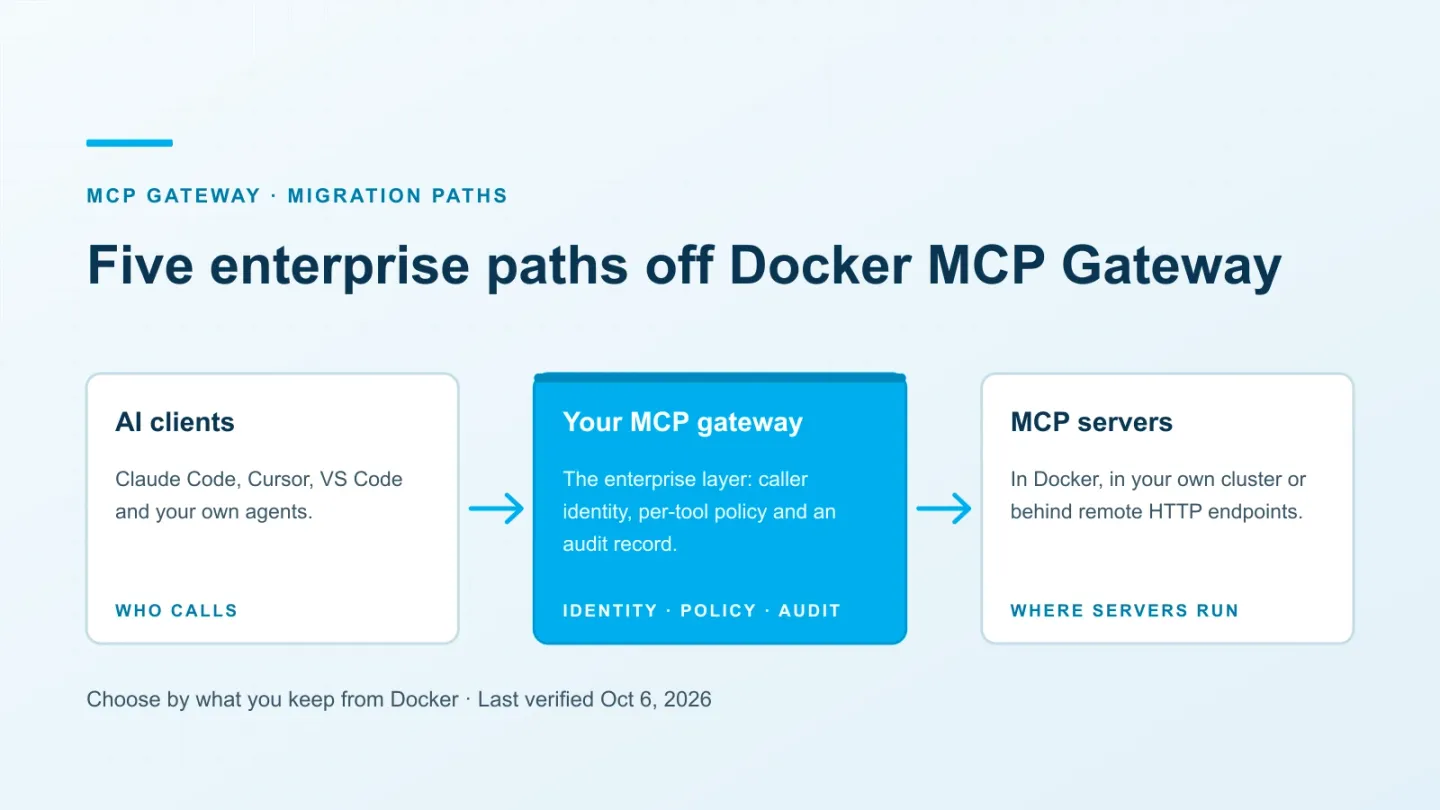
There are five practical paths. The right one depends on which parts of the current setup you need to retain, and which controls are missing.
ASCENDING publishes this blog and maintains Jarvis Registry, an open source option discussed below. Product descriptions are based on public documentation reviewed on October 6, 2026; the integration patterns still need testing in your environment.
First, identify which Docker product you use
Docker’s MCP offerings have different configuration and enforcement boundaries. Features described for one shouldn’t be assumed to exist in another.
| Product | Role | What to verify |
|---|---|---|
| Open-source Docker MCP Gateway and the Desktop MCP Toolkit | The MIT-licensed gateway runs or connects to servers; Toolkit provides the Docker Desktop interface | Installed version, enabled servers, runtime restrictions and authentication |
| Docker Sandboxes MCP gateway with organization governance | A host-managed gateway provides MCP access to supported agents inside sandboxes | Governance subscription, policy activation and which requests actually pass through it |
| Docker MCP Enterprise Gateway | A commercial offering whose product page describes IdP sign-in, tool policy and audit events | Contracted features, deployment model, supported clients and operating responsibilities |
Docker explicitly says the Sandboxes gateway is separate from Desktop’s MCP Toolkit. Toolkit server settings aren’t shared with Sandboxes. Moving between them requires registration and configuration work; buying a subscription doesn’t convert an existing profile into organization policy.
The Enterprise Gateway page lists a Docker-operated deployment in your cloud and an air-gapped Kubernetes appliance. Treat that page as a description to validate during procurement. Ask for the deployment and support documentation for the option you intend to buy.
What you would lose by replacing the local gateway
The open-source gateway does useful work around server execution. Its security model describes restricted container execution, scoped secrets and validation of host mounts.
For Docker’s signed mcp/ images, signature verification is enabled by default and requires digest references. That doesn’t extend Docker’s signing trust to arbitrary third-party images.
Network access needs separate attention. Egress isn’t globally denied by default. Check the server’s network configuration and any restrictions you enabled before assuming those controls will survive a migration.
The gateway flag reference documents resource limits, secret blocking and selectable transports. Its current defaults include one CPU and 2 GB of memory per server. Inventory overrides as well as defaults.
A gateway that only forwards HTTP requests won’t reproduce these runtime settings. You must retain Docker, choose a platform that hosts the servers, or assign that work to another runtime.
Where a shared deployment needs additional controls
Docker’s local security model trusts the operating-system user and local configuration. That is a reasonable boundary for a developer controlling a workstation. It is a different boundary from a service shared by employees with different permissions.
The documented HTTP transports use a configured or generated bearer token. Possessing that token doesn’t tell the gateway which employee is calling. Local tool selections also don’t establish a centrally managed rule for each identity.
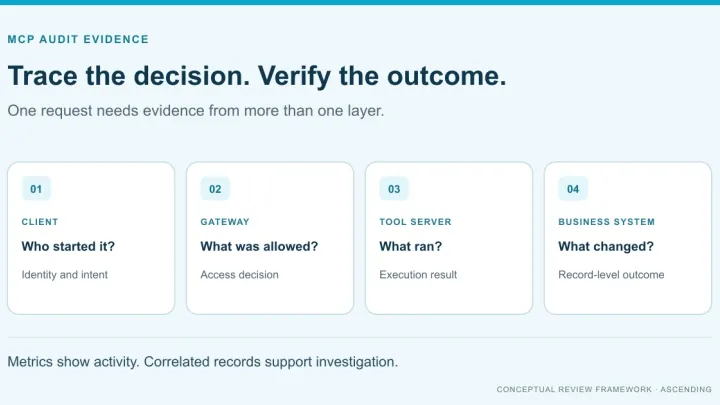
Default call logs record the tool name and argument shape without raw argument values. That is a deliberate data-minimization choice. If your investigation needs user identity and policy decisions, collect those at a layer that has that context. More payload logging isn’t automatically better: it can also copy sensitive business data into a new store.
The practical question is whether the complete deployment meets your requirements. A local gateway can remain useful inside an enterprise architecture. Its version number or product label alone doesn’t answer whether a particular shared deployment is ready. For a checklist, see what an MCP gateway should enforce on each call.
Five migration paths
1. Use Docker’s governed offerings
This is worth evaluating when Docker Sandboxes already provides the agents’ execution environment, or when Docker’s enterprise deployment options fit your operating model.
The Sandboxes MCP access-policy documentation describes organization- and team-scoped policies. When enforcement is active, requests need a matching permit, and a matching forbid takes precedence. Without active enforcement for a user, the documentation says MCP activity is permitted.
That last detail belongs in the rollout test. A policy file existing in an admin console isn’t evidence that every user is governed.
The docs also warn that local stdio servers run on the host, outside the sandbox VM. An OCI package started with host Docker still uses the host’s Docker boundary. Check the server process itself when assessing isolation.
For the commercial Enterprise Gateway, request a demonstration of your IdP, required clients, denial events and revocation behavior. Confirm migration support for existing catalogs and profiles. These are related Docker offerings, but they aren’t interchangeable configuration targets.
2. Keep Docker as the runtime behind another gateway
This path fits teams whose server containers work well but need central authentication and tool permissions. Expose Docker’s streaming HTTP endpoint only to the front gateway. The front gateway authenticates callers and applies policy; Docker continues running the servers.
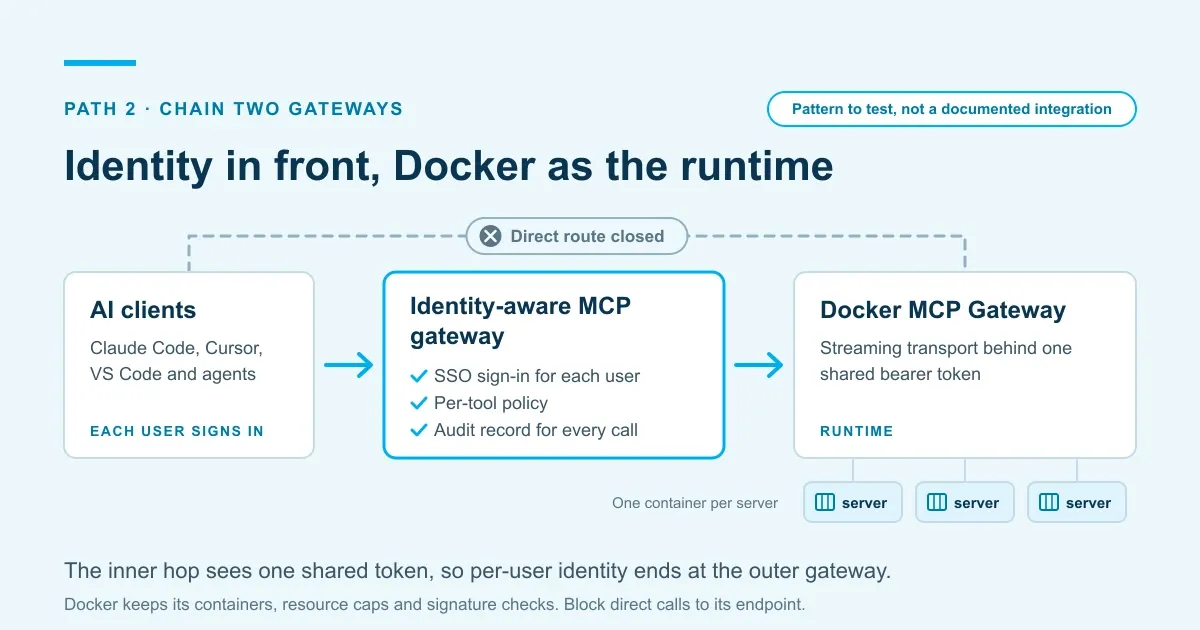
Treat this as an architecture to test, not a guaranteed integration between arbitrary products. Verify tool naming, list filtering, denied calls, streaming behavior and protocol versions across both hops.
Also verify the upstream account. If Docker uses one shared OAuth grant, the outer gateway doesn’t automatically turn it into separate user grants. A user-specific policy decision and a user-specific backend credential are different requirements.
Docker’s container-mode authentication advisory identifies a fix in 0.43.1. That is the patch for that issue, not a permanent minimum-version recommendation. Review the current advisory list and test a supported, patched release.
This arrangement adds a second service and a second configuration surface. It is often a manageable cost when preserving the runtime would otherwise require rebuilding many server deployments.
3. Move to another self-hosted platform
Self-hosted products differ in how much execution infrastructure they provide. Compare that before comparing feature lists.
Obot can host MCP servers as Docker containers or Kubernetes workloads, and documents request/response recording. That makes it relevant when you need both a gateway and somewhere to run the servers. Its repository recommends Kubernetes for production or multi-tenant installations.
Check the identity-provider edition before planning a rollout. Obot’s authentication documentation says Entra, Okta, JumpCloud and Auth0 require free Community registration or an Enterprise license.
IBM ContextForge documents team membership and private, team and public resource access. Evaluate it if you need a shared catalog with those boundaries. You still need to establish how your server processes are hosted and maintained.
agentgateway documents MCP authorization rules using CEL expressions and JWT claims. It may fit a platform team that wants to assemble the gateway into its own infrastructure. That also leaves the catalog, approval process and operational integration to that team.
Jarvis Registry is another self-hosted candidate, described below. With any of these options, decide who patches the gateway and its dependencies, backs up configuration and handles incidents.
4. Extend your existing API gateway
If your team already operates Kong or Azure API Management, evaluate their MCP support before adding another gateway service.
Kong’s AI MCP Proxy documents tool ACLs and audit logging. It requires an AI Gateway Enterprise license. Verify the exact release and the authentication configuration alongside the MCP plugin.
Azure API Management can expose REST operations as MCP tools or front an existing MCP server. Its overview documents policy scope across a server’s exposed tools and limitations on resources, prompts and workspaces. Include any capabilities you depend on in the trial.
Both approaches need reachable HTTP backends. If Docker currently launches stdio servers, retain an adapter and runtime or rehost those servers. Reusing an API gateway saves operational work only if the required MCP behavior fits its supported configuration.
5. Use a managed gateway service
Amazon Bedrock AgentCore Gateway is an AWS-managed option for connecting agents to tools and APIs. Cloudflare MCP server portals provide another route for aggregating remote servers under access policies.
These options reduce the gateway infrastructure you operate. They don’t automatically move a local stdio process into the cloud. Plan where each server will run and how the managed service reaches it.
Check direct access as well. Cloudflare documents that a user may bypass portal Access policies through the server’s direct URL unless the server’s authentication also enforces Access. A central endpoint is only an enforcement point for traffic required to use it.
Our MCP gateway buyer’s guide covers audit scope and tenancy questions for managed and self-hosted deployments.
Choose based on the work you want to retain
| Your current constraint | Start by evaluating | Main cost to account for |
|---|---|---|
| Agents already run in Docker Sandboxes | Docker governance or Enterprise Gateway | Registration changes, policy coverage and commercial terms |
| Existing Docker server containers work well | A front gateway with Docker retained | Two services, two configurations and possible shared backend credentials |
| You need a central catalog and server hosting | A self-hosted platform with a documented runtime | Cluster operations, upgrades and server maintenance |
| You already have an API gateway team | Kong or API Management MCP support | Protocol limits and HTTP hosting for local servers |
| You want managed gateway infrastructure | AgentCore Gateway or Cloudflare portals | Cloud connectivity, service dependencies and server rehosting |
Staying with the local gateway is also a valid outcome when each developer operates their own approved setup. Centralization adds value when you need shared policy and evidence, but it can remove useful local access or add infrastructure without solving the actual problem.
Migrate one workflow before the whole catalog
Start with one server that has a clear owner and a representative use case. A pilot should include a read operation, a controlled write operation and a user who must be denied.
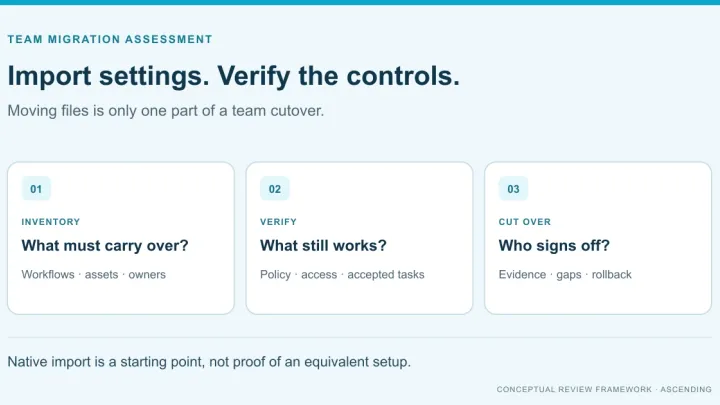
Capture the current configuration
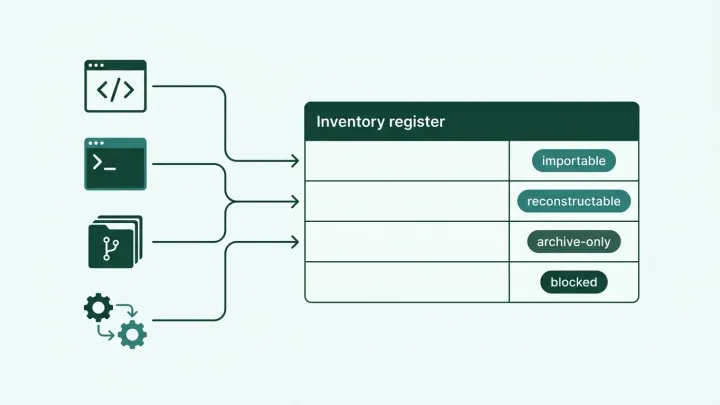
Export profiles and record enabled servers, tools, image versions, mounts, network settings and resource limits. Docker’s CLI reference documents profile listing, inspection and export commands.
Record which credentials each server uses and who owns them. Store references in the migration inventory, not secret values. Also look for MCP configurations outside the approved Docker profiles.
A profile describes the current setup; it isn’t automatically a complete access policy. Map its tools to actual user groups and data permissions, and have the owner review that mapping.
Set up credentials and runtime controls
Decide whether the new route uses a shared service identity or per-user grants. Reauthorize users where required, then confirm which identity the backend sees during the pilot.
Keep the existing route available only as long as the approved rollback plan requires. Revoke unused credentials after validating the replacement and checking other dependencies. Deleting credentials before that check can break unrelated profiles or workflows.
For each local server, choose its new host. If it requires a developer’s local files, moving it to a central cluster changes its behavior. If it only wraps a remote API, central hosting may be simpler.
Recreate the necessary mounts, resource limits, image checks and network restrictions. Test them against a harmless fixture: for example, a server attempting to reach a destination the policy should block.
Verify access and evidence before cutover
Call the permitted tool, then attempt a forbidden tool directly by name. Revoke access and repeat from an existing session. Inspect both successful and denied events.
The audit record should identify the caller, destination, tool, outcome and relevant policy context. Add redacted arguments only when the investigation requirement justifies them. Use identifiers for credentials; never log their values.
Retire the old access paths
If you’re retiring Desktop’s Toolkit, Docker documents enableDockerMCPToolkit in its managed settings reference. Disable and lock the setting through the supported management mechanism for your installation.
That setting controls a Desktop feature. It doesn’t, by itself, remove standalone CLI installations, stop containers or block another MCP client’s direct connection. Review those paths separately using endpoint, network and backend authentication controls.
If you’re keeping Docker behind the front gateway, retain that runtime and restrict direct client access to it. Test from an ordinary user’s device after the cutover. A successful call through the new URL doesn’t prove the old route is closed.
Where Jarvis Registry fits after Docker
Jarvis Registry is ASCENDING’s Apache 2.0 registry and gateway. It is relevant when you want to manage a shared catalog and tool access in infrastructure you operate.
Our MCP gateway page describes identity federation, per-tool permissions and call telemetry. The public README describes HTTP-based connectivity. Establish a supported adapter and hosting plan for local stdio servers during evaluation.
Don’t assume that registering a Docker endpoint recreates Docker’s execution controls or preserves separate upstream identities. Test that proposed chain with the same access, credential and bypass checks described above. We aren’t presenting it as a prevalidated Docker integration.
Jarvis can supply the registry and access-control layer. Your deployment still needs owners for server execution, upgrades, availability and evidence retention. For a team that only needs a local container runtime, those additional responsibilities may not be justified.
References
- Docker MCP Gateway security model
- Docker MCP Gateway flag reference
- Docker Sandboxes MCP gateway and MCP access policies
- Docker MCP Enterprise Gateway product page
- Docker container-mode authentication advisory
- Docker Desktop managed settings reference
Documentation reviewed October 6, 2026. Check the installed release, current advisories and contracted feature scope before migration.
Questions about replacing Docker MCP Gateway
What are the main alternatives to Docker MCP Gateway?
You can evaluate Docker's governed offerings, put an identity-aware gateway in front of the existing runtime, or move to another self-hosted platform. You can also extend an existing API gateway or use a managed service. The choice depends on whether you need server hosting, central user permissions, or both.
Is Docker MCP Gateway suitable for enterprise use?
It can be part of an enterprise deployment, especially for managed local development or as an execution layer behind other controls. A shared HTTP bearer token doesn't establish individual user identity. Assess the complete deployment, including authentication, server isolation, logging, upgrades and bypass prevention.
Does the open-source Docker MCP Gateway provide SSO?
Its documented HTTP authentication uses a configured or generated bearer token, not individual identity-provider sessions. Docker Sandboxes governance and Docker MCP Enterprise Gateway have different identity and policy models. Evaluate the specific product rather than assuming their features apply to the open-source gateway.
Can we keep Docker as the runtime?
Yes, if the front gateway can connect to Docker's HTTP endpoint and enforce the required policies. Restrict direct access, test protocol compatibility and determine which credentials Docker uses downstream. An outer gateway can identify the caller without automatically giving each caller a separate upstream OAuth identity.
Does disabling MCP Toolkit prevent all Docker MCP use?
No. The setting controls the Toolkit feature in Docker Desktop. An independently installed CLI, container or other MCP client needs separate controls. If you retain Docker behind the new gateway, keep that approved runtime and close only the routes your policy prohibits.