

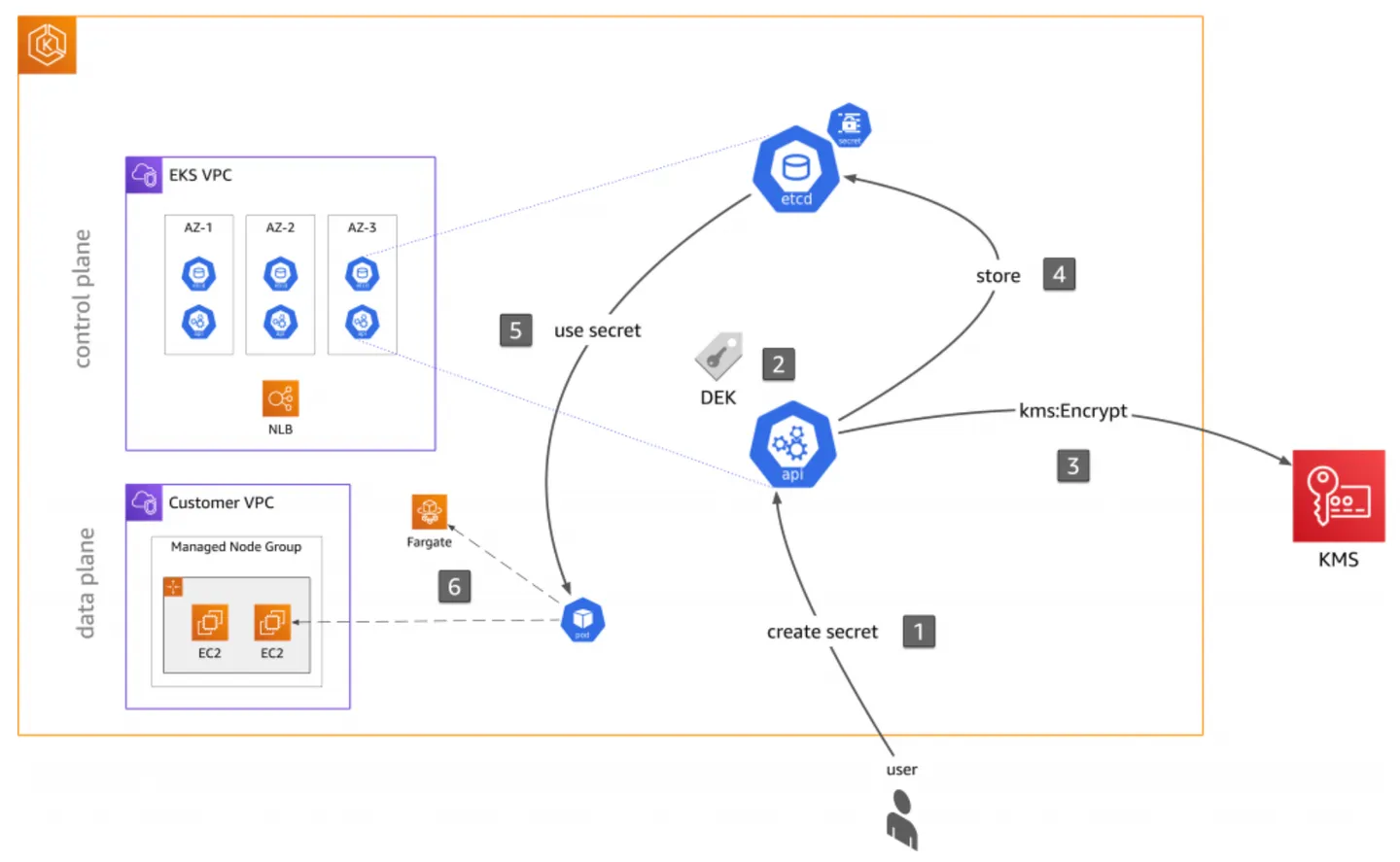
In the previous EKS Secrets Management post, we talked about three options for securing your secrets in EKS. In this post, we will walk through the details of KMS for envelope encryption.
KMS Envelope Encryption
Use AWS KMS for envelope encryption of Kubernetes secrets and audit the use of Kubernetes Secrets. For secrets that are like login credentials, use an external secrets provider to rotate your secrets periodically. If you have secrets that cannot be shared between applications in a namespace, create a separate namespace for those applications.
ASCENDING Approach
In ASCENDING, we implement our EKS cluster using the infrastructure as code(IaC) tool - Terraform. Creating an EKS secret in Terraform is easy, we can just use the kubernetes_secret_v1 resource to create an empty secret in EKS. The more important part is how to pass the sensitive data into the EKS secret.
There’re some requirements and factors we take into consideration when designing the secret store approach:
-
We’re okay with storing the encrypted secrets in the GitHub repo for version control purposes.
-
We want to know who uses the secrets.
-
We want to minimize the cost.
-
We want to make the secret retrieval process easier.
The secret store approaches should be designed accordingly based on different situations. Considering the above factors, we decide to use Amazon KMS to encrypt the data and push the encrypted data to version control. We’ll also turn on EKS audit logs and create a CloudWatch metrics filter to log the secret usage.
STEP 1 - Create a KMS service in AWS
    resource "aws_kms_key" "eks" {
      description                           = "EKS Secret Encryption Key"
      deletion_window_in_days = 7
      policy                                     = coalesce(data.aws_iam_policy_document.this[0].json)
    }
    # Add an alias to the key
    resource "aws_kms_alias" "eks" {
      name                = "alias/${var.alias}"
      target_key_id = aws_kms_key.eks.key_id
    }
STEP 2 - Use the KMS key to encrypt the data
First, we save our data in a file called db-creds.yml, then we use the generated KMS to generate the encrypted file db-creds.yml.encrypted. We can check the encrypted file into version control and delete the original file.
  aws kms encrypt \
    --key-id <YOUR KMS KEY> \
    --region <AWS REGION> \
    --plaintext fileb://db-creds.yml \
    --output text \
    --query CiphertextBlob \
    > db-creds.yml.encrypted
STEP 3 - Decrypt the file in Terraform
To use Terraform to create EKS secret and pass value in, we need to decrypt the file
  data "aws_kms_secrets" "creds" {
    secret {
      name    = "db"
      payload = file("${path.module}/db-creds.yml.encrypted")
    }
  }
  locals {
    db_creds = yamldecode(data.aws_kms_secrets.creds.plaintext["db"])
  }

  resource "kubernetes_secret_v1" "mysql-root-secret" {
    metadata {
      name = "mysql-root-pass"
      namespace = "poll"
    }
    data = {
      username = local.db_creds.username
      password = local.db_creds.password
    }
    type = "kubernetes.io/basic-auth"
  }
What Envelope Encryption Actually Buys You
It is worth being precise about the problem being solved, because “Kubernetes secret” implies more protection than the primitive provides.
A Kubernetes Secret is base64-encoded, not encrypted. Base64 is an encoding, reversible by anyone with the string. By default the object lands in etcd in that form, which means the security of every credential in the cluster reduces to the security of the etcd volume and of any backup taken from it.
Envelope encryption changes the shape of that risk. The API server generates a data encryption key, uses it to encrypt the Secret, then asks KMS to encrypt the data key itself. What etcd stores is ciphertext plus a wrapped key; the key that would unwrap it lives in KMS under an IAM policy you control. An attacker holding an etcd snapshot now holds ciphertext, and reading it requires a separate, logged, revocable KMS call.
The distinction matters when scoping the control. Envelope encryption protects secrets at rest. It does nothing about a Pod that mounts the secret and prints it to stdout, a service account with over-broad read access, or a developer running kubectl get secret -o yaml. Those are RBAC and audit problems, and they need the controls in the section below.
Rotation and the Cost of Getting It Wrong
Two operational details tend to surface only after the pattern is in production.
Key policy is the real access boundary. The KMS key policy — not the cluster — decides who can decrypt. Scope it to the cluster role and the specific principals that legitimately need plaintext, and resist adding a broad kms:Decrypt grant to make a pipeline work. A wildcard here silently undoes the whole design.
Deletion is irreversible and slow. A scheduled KMS key deletion has a mandatory waiting period, and once it completes, every secret encrypted under that key is unrecoverable — including secrets inside etcd backups you were relying on. Treat key deletion as a change requiring the same review as deleting the cluster.
For credentials that must rotate on a schedule, the encrypted-file-in-Git approach has a natural ceiling: rotation means a commit, a plan, and an apply. Where that cadence is too slow, an external provider is the better fit. The External Secrets Operator and the Secrets Store CSI driver both sync values from AWS Secrets Manager or Parameter Store into the cluster, so rotation happens in the secret store and the cluster follows. The trade-off is a live runtime dependency on that store, against Git-committed ciphertext that is fully self-contained.
Auditing Who Reads a Secret
Encryption without an audit trail answers the wrong half of the question. Enable the EKS control plane audit log and ship it to CloudWatch Logs, then build a metric filter over the audit events that touch Secret resources. Because the audit record includes the requesting identity, the resource name, and the verb, a filter on get and list against secrets gives you a usage signal you can alarm on.
Two signals are worth alerting on specifically: a human identity reading a secret that only a workload should need, and any read from a principal outside the expected namespace. Neither is a certain sign of a problem, but both are worth a question — and neither is visible at all without the audit log turned on first.