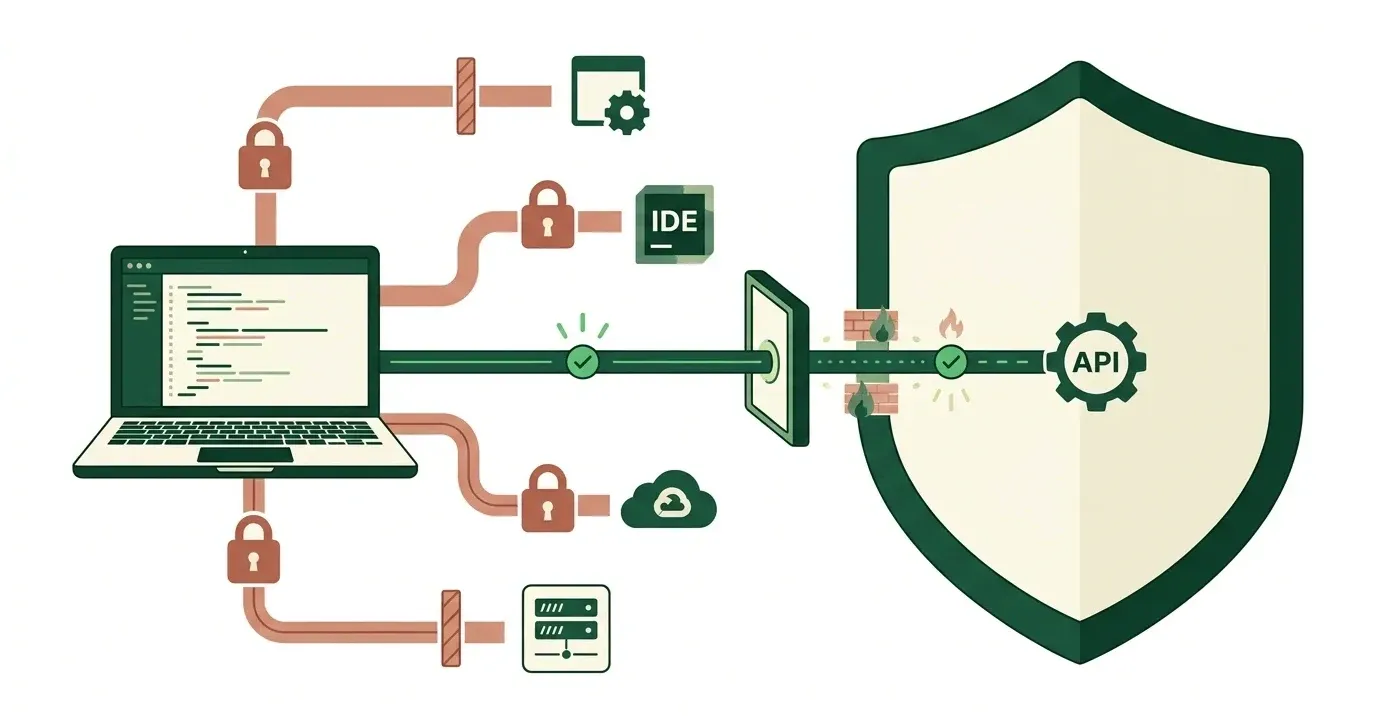
Claude isn’t “HIPAA compliant” by default, and for Claude Code the answer depends on the route a developer takes. On Claude Enterprise, the Primary Owner can apply a HIPAA configuration. The Business Associate Agreement (BAA) then covers Claude Code in local mode when developers sign in with an Enterprise account and connect directly to Anthropic. IDE extensions, cloud sessions, and cloud-provider or gateway routes fall outside it.
An IT lead asked “can we use Claude Code on a codebase that touches patient data (protected health information, or PHI)?” finds contradictory answers online. Some say a zero data retention agreement is mandatory. Others answer by plan tier and stop. Neither tells you how to keep developers on the covered route.
This guide gives the scoped answer, then the controls and tests that enforce it. Product details were checked against Anthropic’s documentation on 2026-10-11. For policy file locations, precedence, and rollout stages, see our Claude Code managed settings guide. This is not legal advice.
Key Takeaways
- HIPAA has no product certification. Anthropic offers a BAA and a HIPAA configuration, and your organization stays responsible for its own safeguards.
- The HIPAA configuration is an Enterprise setting. The Primary Owner applies it, and Anthropic describes it as a one-way decision.
- Coverage is a routing problem. The same developer can be inside or outside the BAA depending on sign-in, provider, and client.
- Enforce the route with SSO,
forceLoginMethod,forceLoginOrgUUID,allowedProviders, and a version floor. Then test that blocked routes fail. - Local transcripts, GitHub, cloud credentials, and MCP servers are your responsibility, not Anthropic’s.
Is Claude HIPAA Compliant? What the BAA Covers
Claude is HIPAA-ready under stated conditions, not compliant by default. Anthropic’s BAA article says Enterprise Primary Owners can accept the BAA directly in organization settings. It also says Anthropic provides a BAA for its first-party API after sales activation. It excludes the consumer plans. Anthropic’s HIPAA-ready page says the offering is available for Enterprise plans only. Confirm your plan with your Anthropic account team before you rely on either.
Anthropic’s HIPAA-ready Enterprise page adds three details:
- The BAA is click-to-accept for the Enterprise flow.
- Only the Primary Owner can enable HIPAA, and it is a one-way decision.
- BAAs signed after December 2, 2025 can cover API usage and the Enterprise plan under one agreement. Earlier API BAAs do not extend to Enterprise.
Which Claude Code surfaces the BAA covers
Anthropic’s setup guide for HIPAA-ready organizations defines “local mode” as a local session, not a cloud session. The table below applies that definition to the routes IT teams actually see.
| How a developer uses Claude Code | BAA coverage | Why |
|---|---|---|
| Terminal, Claude Enterprise sign-in, direct to the Claude API | Covered once the configuration is applied | Eligible route |
| Code tab in Claude Desktop (local) | Covered once the configuration is applied and an Owner turns the Desktop toggle back on | Local mode; applying the configuration turns the Code tab off until then |
| VS Code or JetBrains extension | Not covered | Keeps working, but outside the BAA |
| Cloud sessions, Remote Control | Not available | Turned off by the configuration |
| Amazon Bedrock, Google Cloud’s Agent Platform, Microsoft Foundry, Claude apps gateway, LLM gateway, custom base URL | Not eligible | Configuration applies only to direct connections |
| Claude Console API key or federation credentials | Separate agreement | Belongs to a Console organization |
A developer on the VS Code extension looks identical in daily use and sits outside the agreement.
Does Claude Code Need Zero Data Retention for HIPAA?
Not once the HIPAA configuration is applied, according to Anthropic’s current documentation. Anthropic’s support article on Claude Code in a HIPAA-ready plan states that you don’t need zero data retention (ZDR) to apply the configuration. Anthropic’s ZDR page says Enterprise organizations with HIPAA enabled can bring the Claude Code CLI and the Code tab under the BAA without ZDR. It adds that organizations without the configuration still need ZDR for BAA coverage of Claude Code.
Several third-party explainers still say ZDR is mandatory in every case. Search results and AI answers keep repeating that version. Check any compliance summary against Anthropic’s own pages and note the date.
Three related facts:
- Standard commercial retention is 30 days, and Anthropic does not train on code or prompts under commercial terms (data usage).
- ZDR is not part of the standard Enterprise plan. Your Anthropic account team enables it per organization.
- ZDR does not cover third-party tools or MCP servers, so those need their own review.
How Do You Keep Developers Inside the Covered Route?
Coverage is a routing problem, so enforce the route. SSO, SCIM, and seat assignment are configured at the Claude account level; Anthropic points to its Claude Enterprise Administrator Guide for those steps. Managed settings then keep developers on the Enterprise sign-in and the direct route.
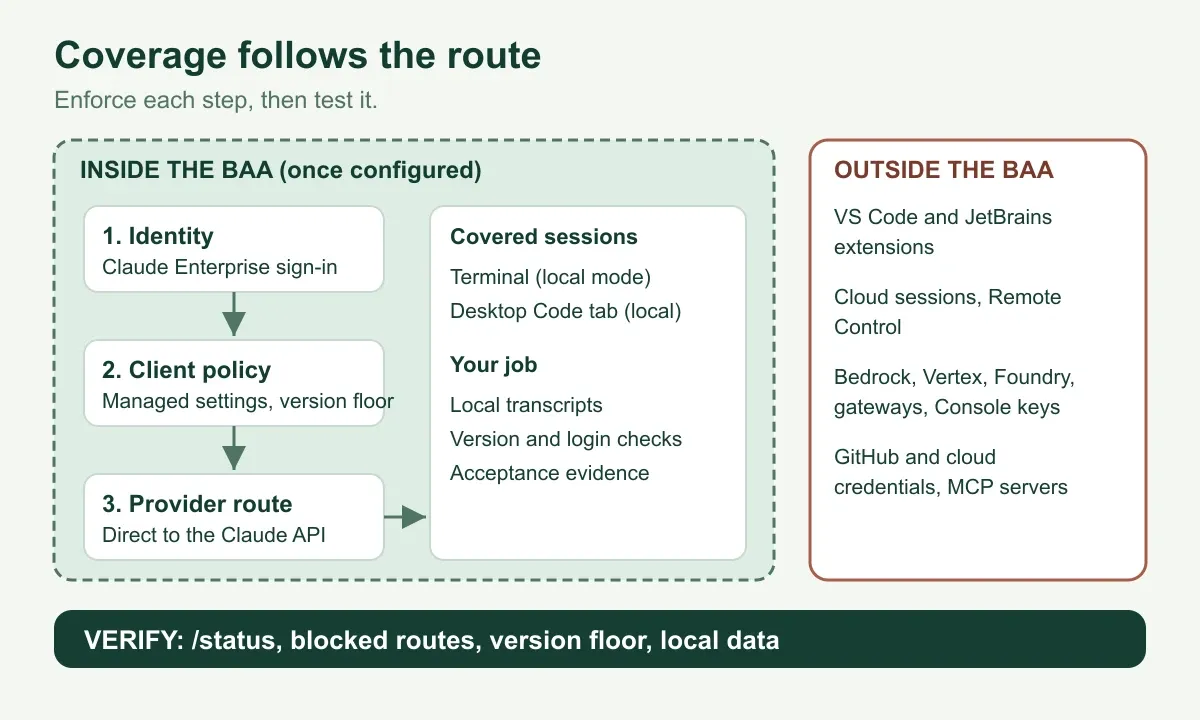
Enforce each step on the route, then test that every route outside the boundary fails.
Anthropic’s setup guide offers this sample as a starting point. Replace the placeholder with the organization ID from your claude.ai admin settings:
{
  "forceLoginMethod": "claudeai",
  "forceLoginOrgUUID": "xxxxxxxx-xxxx-xxxx-xxxx-xxxxxxxxxxxx",
  "allowedProviders": ["anthropic"],
  "cleanupPeriodDays": 30
}
Anthropic warns that a wrong forceLoginOrgUUID makes Claude Code exit at startup for every developer who signs in with a claude.ai account. Check the value before you deploy it. Anthropic describes the sample as a recommendation your organization must adapt, not a complete policy.
What the keys don’t block
Even with these keys, some sessions can run outside the HIPAA configuration. Anthropic lists these cases:
- Console and federation credentials.
forceLoginOrgUUIDchecks only claude.ai sign-ins. - Server-managed settings. If you also use them, have an Owner add the same keys there.
- Older clients. Versions before v2.1.285 ignore
allowedProviders. AddrequiredMinimumVersionset to"2.1.285"to make v2.1.163 through v2.1.284 refuse to start. Update anything older than v2.1.163.
The configuration itself requires Claude Code v2.1.285 or later. Anthropic’s servers reject requests from older versions for organizations with the HIPAA configuration.
What Can IT Control Centrally in Claude Code?
Managed settings are the enforcement layer, and the admin console covers models, spend, and analytics. Anthropic’s admin setup guide maps the controls. The table summarizes the ones that matter most for a governed rollout.
| Control | What it does |
|---|---|
| Permission lockdown | Makes managed settings the only source of permission rules and disables bypass mode |
| Sandboxing | Applies OS-level filesystem and network isolation with domain allowlists |
| MCP and plugin controls | Restricts which MCP servers and plugin marketplaces developers can use |
| Customization lockdown | Limits skills, agents, hooks, and MCP servers to plugins or managed settings |
| Login and provider enforcement | Restricts the sign-in method, organization, and API provider |
| Model restrictions | Limits which models appear and which one is the default |
| Version floor and range | Stops downgrades, or refuses to start outside an approved range |
| Telemetry opt-out | Turns off Anthropic-bound metrics and surveys |
Permission lists such as permissions.allow and permissions.deny merge across sources. Developers can extend managed lists but cannot remove entries from them.
Permission rules and sandboxing cover different layers. Anthropic notes that denying WebFetch blocks Claude’s fetch tool, but curl and wget still work if Bash is allowed. Sandboxing closes that gap with a network allowlist.
For visibility, Anthropic documents OpenTelemetry export, an analytics dashboard, and spend controls on Teams and Enterprise. If you need request-level audit logs, Anthropic recommends a gateway. The trade-off is covered below.
What the BAA Doesn’t Cover: Local Data, GitHub and MCP
Anthropic’s BAA covers Anthropic’s eligible services. Whatever Claude Code sends elsewhere is your responsibility. Four areas need an owner.
- Local session data. Claude Code stores transcripts in plaintext under
~/.claude/projects/. The default is 30 days, andcleanupPeriodDaysin managed settings sets one value for every machine. Anthropic says securing and deleting this data is the customer’s job. - Deletion and offboarding.
claude purge(v2.1.288 and later) removes most session data, but not everything. Paths such aspaste-cache/remain. Removing a developer’s seat deletes nothing on the laptop, so offboarding means wiping the device. - Downstream credentials. The configuration does not remove cloud provider or GitHub credentials. A command that pushes to GitHub still works, and the BAA doesn’t cover the data it sends there.
- Hooks and MCP servers. Claude Code strips Anthropic credentials such as
ANTHROPIC_API_KEYfrom the environment of commands, hooks, and MCP servers it starts. A script that depended on them stops authenticating.
Gateways add one more trade-off. A self-hosted Claude apps gateway records a per-request audit log with identity provider identity. Sessions through a gateway are not eligible for the HIPAA configuration. Decide which control matters more for each team, and record the decision.
For MCP, use our MCP governance checklist and the MCP gateway evaluation criteria. Client policy and server-side authorization should each hold when the other fails.
What Should You Verify Before Developers Touch PHI?
Run a short acceptance check on one managed machine and keep the output. Anthropic’s guide describes these checks. Save the Claude Code version with the results. Labels change between releases.
- Run
claude --versionand confirm v2.1.285 or later. - Start
claudeand confirm the startup notice says some features are limited by your organization’s policy. - Confirm the footer shows
HIPAA configured(it readHIPAAbefore v2.1.286). - Run
/status. ConfirmHIPAAappears on the Organization configuration line. - In the same view, confirm
Setting sourceslistsEnterprise managed settings. - Confirm
Allowed providersreadsAnthropic API (managed allowedProviders). - Confirm
api.anthropic.compasses through your proxy. Claude Code fetches the HIPAA policy there at startup and about hourly. - Try a Claude Console login and an Amazon Bedrock session. Both should fail.
- Open a VS Code extension session and record it as outside BAA scope.
- Run a purge on a sample machine and list what remains.
- Have counsel and your Anthropic account team confirm the BAA terms against the Implementation Guide.
If HIPAA is missing from /status, Anthropic’s checklist points to three causes in order: the wrong account or connection, a blocked policy fetch, or a configuration the Primary Owner hasn’t applied yet.
Where ASCENDING and Jarvis Fit
We build a product in this category. Jarvis is an open source project built and maintained by ASCENDING Inc, and it governs MCP servers, agents, and skills through Jarvis Registry, with an MCP Gateway, an Agent Gateway, and a Skill Gateway. The route checks above apply to any setup.
Teams that run Claude Code next to Cursor or Codex need one governance policy across tools. That is a governance problem across MCP servers, agents, and skills, and the enterprise AI governance framework covers the platform requirements. If your developers are moving from Cursor, see what maps from Cursor to Claude Code. To scope a review around one identity provider and one repository, use our contact page.
Conclusion
Scope the answer by route, not by plan.
- Anthropic’s HIPAA configuration brings Claude Code local mode under the BAA for Enterprise sign-ins that connect directly to Anthropic.
- Zero data retention is not required once that configuration is applied, per Anthropic’s current pages.
- Enforce the route with SSO and managed settings, then prove it with blocked-route tests.
- Own local transcripts, GitHub, cloud credentials, and MCP servers yourself.
Re-check Anthropic’s pages before each rollout stage, because they change often. Last verified: 2026-10-11.
References
- Anthropic: Set up Claude Code (local mode) for a HIPAA-ready organization
- Anthropic: Use Claude Code (local mode) and Cowork (local mode) on a HIPAA-ready Enterprise plan
- Anthropic: HIPAA-ready Claude Enterprise offering
- Anthropic: Business Associate Agreements for commercial customers
- Anthropic: Zero data retention
- Anthropic: Data usage
- Anthropic: Set up Claude Code for your organization
- Anthropic Trust Center
Claude Code HIPAA and governance questions
Is Claude HIPAA compliant?
Not by default. HIPAA has no product certification. On Claude Enterprise, the Primary Owner can accept a BAA and apply a HIPAA configuration. Anthropic's BAA article also covers the first-party API. Free, Pro and Max plans are excluded. Coverage then depends on which services and routes your team uses.
Is Claude Code covered by Anthropic's BAA?
Claude Code in local mode is covered once the HIPAA configuration is applied. Local mode means the terminal and the Code tab in Claude Desktop. Developers must sign in with a Claude Enterprise account and connect directly to Anthropic. See Anthropic's HIPAA setup guide.
Do I need zero data retention to use Claude Code with PHI?
Not once the HIPAA configuration is applied, according to Anthropic's support article checked on 2026-10-11. Organizations without that configuration still need zero data retention for BAA coverage of Claude Code, per Anthropic's ZDR page.
Does the VS Code extension count as covered?
No. The VS Code and JetBrains extensions keep working with the HIPAA configuration applied, but the BAA does not cover them. Treat them as a separate rollout entry and block or restrict them if PHI could reach a session.
How do I enforce SSO and a single organization for Claude Code?
Configure SSO and SCIM at the Claude account level. Then deploy forceLoginMethod and forceLoginOrgUUID in managed settings. The organization check covers claude.ai sign-ins, not Claude Console logins. Our managed settings guide covers delivery and testing.