

A private MCP registry is a catalog of MCP servers your organization controls. Use one when several teams need one place to find reviewed servers and their owners. It should also define which users can reach each server. Keep reviewed client configuration if one team can still manage that work reliably. For a platform team ready to run a shared catalog and gateway, Jarvis Registry by ASCENDING is one option to evaluate.
Start with the Registry product overview for orientation. It introduces the platform. The checks below help you assess the setup your team would run.
Key takeaways
- Keep the current setup while one owner can track its users, server changes and access rules.
- Evaluate a private catalog when teams need shared discovery and distinct server audiences.
- Test access with an allowed user and an excluded user before choosing a platform. Name the people who will run it.
Start with the problem your current setup cannot solve
A longer server list does not, on its own, justify another platform. Ask what breaks when a new team, client or server joins. Can people find the right endpoint and its owner? Can the owner share it with the right users and withdraw access when needed?
An internal README and reviewed configuration can cover a small pilot. Keep that approach while one owner can maintain the client list, server references and access rules. Reconsider it when each new user adds manual work that the process can no longer handle.
Which changes make a private catalog useful?
- Several teams reuse the same integrations. They need one way to find the maintained server and its support owner, rather than copying endpoints from separate chats.
- Different audiences need different server access. One shared list no longer describes what each signed-in person or group may discover and reach.
- Server changes affect users you cannot readily identify. The team needs a record of the maintained endpoint, the accepted change and who must be told or retested.
- Internal server details need controlled access. Share endpoints, descriptions and integration details through a private route for the intended audience.
Use these triggers to set the scope of your review. Decide which approval records you need and where to keep them. A catalog helps when it makes that work easier. Filling it with records that have no owner carries the same problem into a new tool.
Do you need a registry, a gateway or a public catalog?
The public MCP Registry is a discovery service for publicly available servers. Its working-group charter also describes an ecosystem of registries and sub-registries. Finding a public server and approving it for your company are separate decisions.
An MCP gateway is a request path between clients and MCP servers. It can handle sign-in and route permitted calls. A catalog entry alone does not prove that a forbidden call will be blocked. Check which component enforces each access rule.
| Your immediate need | Starting point to evaluate | Question to resolve |
|---|---|---|
| Find publicly available integrations | Public catalog or aggregator | How will your team review a server before using it? |
| Run a bounded pilot with a small maintained server list | Reviewed configuration and a named owner | Can the owner keep consumers and changes under control? |
| Give teams a private discovery source with defined audiences | Private registry or internal catalog | Who maintains records and which identities can access each resource? |
| Authenticate and route MCP requests | MCP gateway and server authorization | Which component rejects a prohibited request? |
| Provide private discovery and a governed request route | Connected registry and gateway design | Do the catalog, identity and runtime controls work together? |
Check what your API inventory or gateway already provides before adding a service. Test the same discovery, identity and operating needs. An inventory screen does not prove that your MCP clients will work with it. Nor does a successful sign-in prove that every downstream action is allowed.
For the detailed control model, use our enterprise MCP registry architecture. First identify the missing job. Then choose the smallest setup that can do it.
Be ready to operate the catalog you choose
Name the team that will run the service and the people who own each registered integration. Agree who reviews a new endpoint, who changes its audience and who responds when it fails. Approval may stay in your ticket or Git review process. Decide how that approval becomes an access rule in the service.
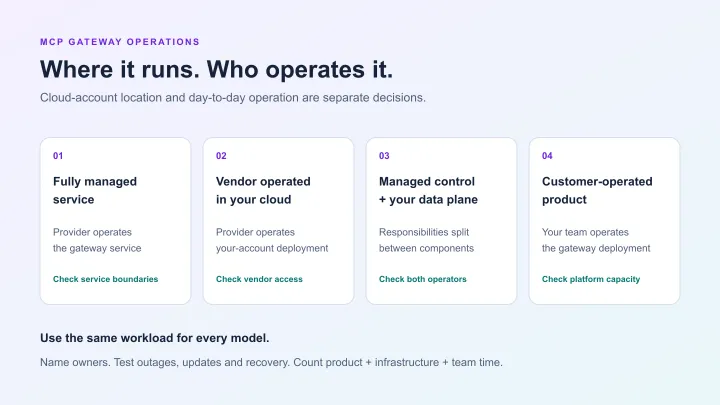
Customer-operated hosting also means cloud operations. Include identity setup, upgrades, data storage, backups and incident response in your review. Check model endpoints and business tools separately. Hosting a catalog in your account does not, by itself, determine where each request or response goes.
If nobody can own that work yet, keep the pilot small while you assign those roles. Buying a registry does not settle who will run it.
Evaluating a customer-operated registry
Jarvis Registry fits a platform team that wants to run a private catalog and gateway for existing internal MCP servers. The team registers reachable server endpoints, then shares each server resource with named users or groups. Signed-in MCP-compatible clients can discover the resources they may use. The gateway routes permitted requests. The MCP Gateway documentation describes how the catalog, identity and server-access controls work together.
Use the production deployment guide to assess the operating work. It documents a Helm-based reference on an existing Amazon EKS or Azure AKS cluster. Check those prerequisites against your team’s cloud setup and support capacity.
A server grant is permission to reach a registered server resource. It does not prove permission to every tool or business record behind that server. Map the server and downstream controls to your actual needs. Catalog membership is one check in that path, rather than the whole authorization design.
Use one workflow to make the decision
Consider an illustrative pilot: one team maintains an internal ticket-search server. Reviewed client configuration may be enough while its owner knows all consumers. When another department adopts it, compare two approaches: maintaining separate client lists or using a private catalog with named owners and server audiences. Base the decision on the work and access rules you need, rather than a fixed server count.
A change of owner is another useful check. For example, when the ticket service moves to a new team, can you find its endpoint, update the support owner and identify which clients need retesting? Use the same change in both setups. Record where a maintainer must make edits and who needs to be told. This is a proposed check, not a reported customer result.
Choose one non-sensitive server and two test identities. Use the two-user MCP access walkthrough to check an allowed account and an excluded account. Then test your real client and server setup, including the downstream permissions the workflow needs.
- Confirm that the intended user can discover the maintained server and complete the permitted task.
- Confirm that the excluded user cannot obtain access through the routes you intend to govern.
- Change access and repeat the checks, including any direct route that could bypass the gateway.
- Record who operates the service, who owns the integration and what remains outside the selected controls.
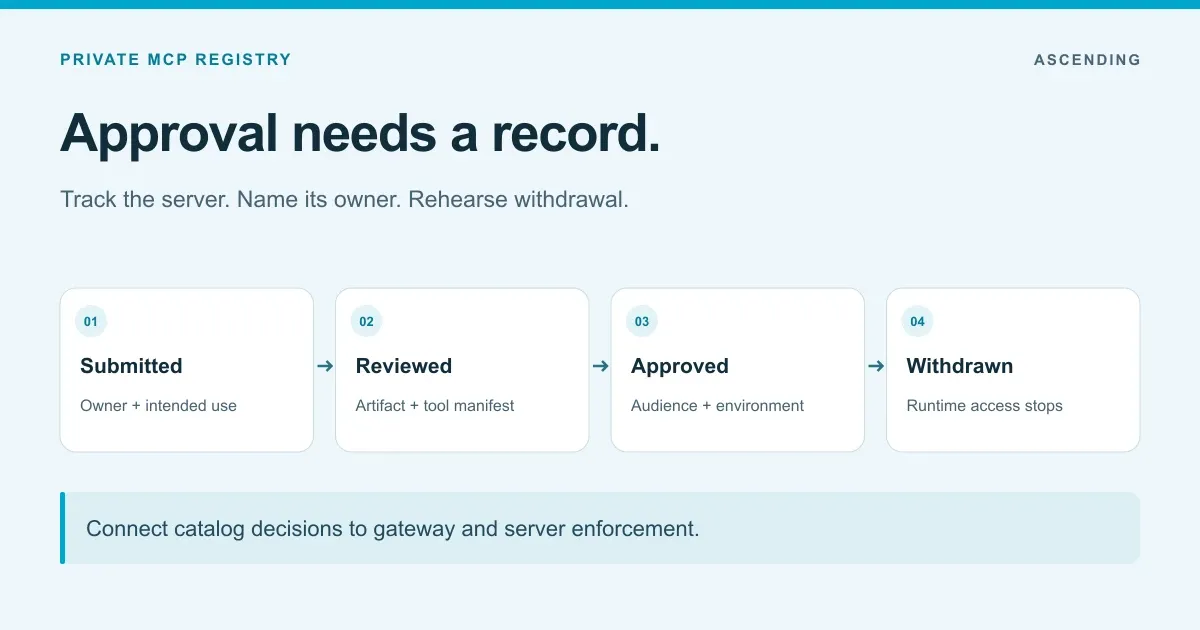
Record the results before choosing an operating model. Our private MCP registry records guide covers the ownership, approval and withdrawal details to keep.
Make the next step proportionate to the gap
Keep the current setup if it meets your shared-discovery, audience and change needs. Evaluate a private registry when those jobs need a maintained service. Assess the gateway wherever live requests need enforcement.
When you request a Jarvis demo, bring that server, its intended users and the operating roles you need to settle. Ask the team to show the catalog and request path against those needs. That gives the review a concrete choice to make.
Sources and review method
This adoption guide uses the MCP Registry working-group charter for public discovery, Jarvis’s gateway documentation for server sharing, and its deployment guide for the EKS/AKS operating path. The examples are proposed evaluation steps, not measured deployment results. Use the access-control walkthrough for the exact checks and the registry records guide for the evidence to retain.