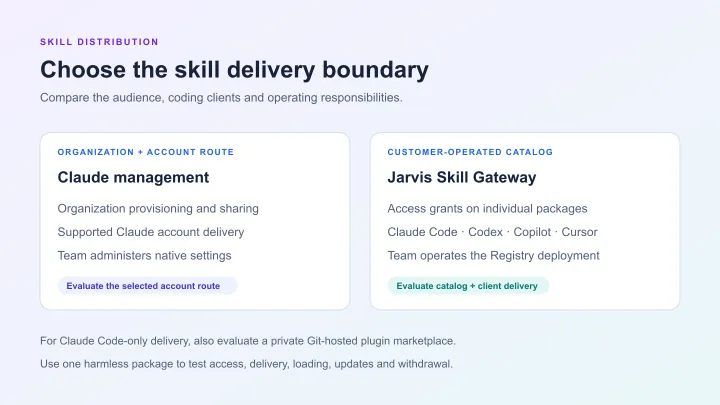


To share private AI skills across Claude Code, Codex and Cursor, use a reviewed package, a defined audience and a client-specific delivery path. Jarvis Skill Gateway by ASCENDING is a practical choice when teams need that sharing managed through a private catalog. It imports reviewed skills, controls who can retrieve each package and delivers accessible content through the Jarvis Registry CLI. The Skill Gateway documentation and private-skill walkthrough show the workflow.
This guide follows one harmless release-note skill from a private repository into three separate local projects. It gives you a repeatable check for package delivery, version and use in each coding client. The checks below are instructions to run in your environment, rather than a report of completed test results.
When should a team use Jarvis Skill Gateway?
A shared Git repository can be enough when everyone should receive the same skills and your existing workflow already handles distribution. Our shared skill-library guide covers that broader setup.
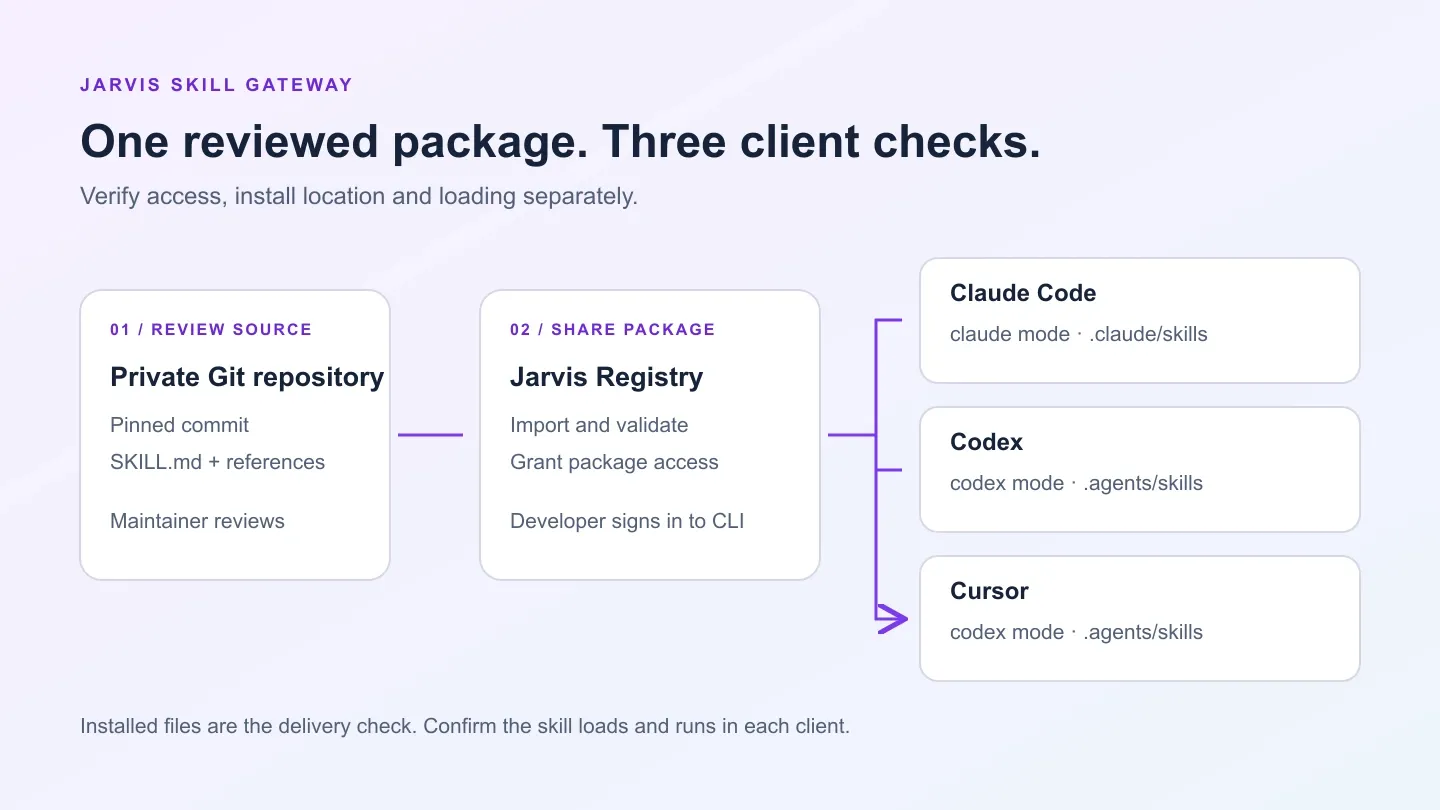
Choose Jarvis Skill Gateway when a platform team needs to share selected private skills with selected developers across Claude Code, Codex and Cursor. Git can remain the reviewed source: maintainers import an approved revision into Jarvis and grant access to the resulting package. Developers retrieve the skills they can access through the authenticated CLI. Developers do not need the source’s GitHub connection to download a permitted Registry package.
Keep three responsibilities clear: the repository holds reviewed source files, the Registry controls access to imported packages, and each coding client loads a local copy. A skill’s download permission governs its distribution; access to business systems or MCP tools is configured separately.
1. Import a reviewed package into Jarvis
Use the official private-skill sample archive. Start with revision 1 of release-notes-check, which reviews supplied release-note text for an owner and rollback instruction. Keep both files together in a private test repository:
skills/
  release-notes-check/
    SKILL.md
    references/
      checklist.md
Copy the complete revision-1 folder from the archive, including its YAML metadata. The folder name and the name in SKILL.md should both be release-notes-check. The supporting checklist travels with the instructions, so this example tests a package rather than a single copied prompt.
For this worked example, Jarvis Skill Gateway’s GitHub import brings a reviewed repository revision into the private catalog. As the Registry administrator, authorize the GitHub connection and configure the skill source for that repository and an approved commit SHA. Set the import path to skills, the directory containing the skill folders. Run the source sync, inspect its job and item results, then open the imported skill and supporting file.
Record the resolved commit, imported skill ID and actual Registry version, and check that the skill is enabled. A successful repository connection alone does not confirm that the package was imported. The private-skill walkthrough provides the detailed administrator steps.
2. Give a developer access and sign in
Jarvis Skill Gateway controls distribution at the individual skill level: a developer with Viewer access can list, inspect and download that package, while editing and sharing require separate permissions. For this check, keep the source private to its owner, give Developer A a direct Viewer grant on the imported skill, and make the skills-read scope available to that developer.
On Developer A’s machine, install the CLI using the current setup guide, then run:
jarvis-registry --version
jarvis-registry configure
jarvis-registry auth login
jarvis-registry auth status
jarvis-registry skills show
Configure the Registry deployment origin supplied by your administrator. Use auth status to check the cached login status and granted token scopes. Use skills show to inspect local mode, skip and override settings. The skills show command doesn’t list remote packages. In the Registry, confirm that Developer A is signed in and can list the actual imported skill ID. Record CLI and coding-client versions so another developer can reproduce the check.
3. Deliver the package to three separate projects
Use three new, empty projects for this first check. Project sync manages its destination: in codex mode it owns the whole .agents/skills directory and may delete untracked entries before contacting the Registry. Decline any takeover prompt and choose a fresh project instead.
The following macOS/Linux shell example creates disposable project directories and syncs Developer A’s accessible skills:
p14_lab_root="$(mktemp -d)"
mkdir "$p14_lab_root/claude" "$p14_lab_root/codex" "$p14_lab_root/cursor"

jarvis-registry skills sync --mode claude "$p14_lab_root/claude"
jarvis-registry skills sync --mode codex "$p14_lab_root/codex"
jarvis-registry skills sync --mode codex "$p14_lab_root/cursor"
The Jarvis Registry CLI delivers accessible packages from the same private catalog into the layout used by each client. The explicit --mode flags override the configured default. This gives developers one authenticated delivery workflow across the three clients, with client-specific skill loading checked next.
Passing a project path selects project scope; leaving it out selects personal scope. Each command syncs the accessible, enabled set, subject to configured skips, so other permitted skills may also appear.
Use this map to check the project destination. Each path is relative to the project passed to skills sync.
| Coding client | CLI mode | Managed project root |
|---|---|---|
| Claude Code | --mode claude | .claude/skills/jarvis-registry/ |
| Codex | --mode codex | .agents/skills/ |
| Local Cursor Agent | --mode codex | .agents/skills/ |
Cursor uses the layout written by codex mode; there is no separate cursor mode.
For Claude Code, inspect the package and lock manifest beneath the generated plugin root:
.claude/skills/jarvis-registry/
  skill-lock.json
  skills/release-notes-check/
    SKILL.md
    references/checklist.md
For both Codex and Cursor, inspect:
.agents/skills/
  skill-lock.json
  release-notes-check/
    SKILL.md
    references/checklist.md
In each project, check that the manifest records the imported skill ID and Registry version, and that both package files are present with the expected instructions. The CLI reconstructs skill frontmatter, so compare its meaningful metadata and content rather than expecting a byte-for-byte copy of the original SKILL.md. See the CLI getting-started guide for the directory modes.
4. Confirm that each client can use the skill
Files on disk establish delivery. Next, open each project in its intended client and explicitly select the skill. This separates a working package from an answer the model could produce without loading it.
Claude Code
Start Claude Code from the Claude test project. Automatic discovery of plugins in skills directories requires Claude Code 2.1.157 or later, workspace trust and an organization policy that permits them. Select the generated Jarvis plugin’s skill with:
/jarvis-registry:release-notes-checkAfter an update, use /reload-plugins or start a new session. If plugin loading is restricted, resolve the client policy before treating the package as available. The Claude Code changelog and plugin guide describe discovery and loading.
Codex
Open the Codex test project, use /skills to find release-notes-check, or explicitly mention $release-notes-check with the release-note text. Codex discovers project skills in .agents/skills; restart if a changed skill is not showing. See the Codex skills guide.
Cursor
Open the Cursor test project in the local Cursor Agent. Type / in Agent chat, find release-notes-check and select it. Cursor discovers .agents/skills as a project skill location. This checks local project loading; see the Cursor skills documentation for current client behavior.
Supply the same harmless note to each client:
Owner: Test Release Team
Rollback: Restore the previous test configuration.
Record whether the skill was discoverable, which skill you invoked and whether its response followed the packaged owner-and-rollback checklist. Keep discovery evidence separate from the response text. A plausible answer alone does not establish which instructions were loaded.
5. Check who receives the package
For an access-control check, use a second developer identity that has skills-read but no effective grant on the sample skill. Check direct, group and public access. Use a separate OS account or isolated test environment for Developer B; a second project folder still shares the first environment’s cached login.
Sign in successfully as B and list the available skills. The relevant read paths are relative to your Registry origin:
GET /gateway/api/v1/skills?enabled=true
GET /gateway/api/v1/skills/<skill-id>/content
Use the imported skill’s actual ID. The sample should be absent from B’s successful list response, and the direct content request should be denied. A failed login tests authentication, rather than the package’s access rule. Developer A should still be able to retrieve the enabled sample. The Skill Gateway permission reference explains the resource-level controls.
6. Verify one update and one access removal
Replace the repository’s sample with revision 2 from the archive, approve the new commit and import that revision into the same Registry source. Revision 2 adds a verification check. Record the new commit and actual Registry version; these are different identifiers, and the Registry number is not necessarily “2.”
Repeat the three sync commands using the same project paths, inspect each manifest and both files, then refresh each client and invoke the skill again. The earlier note has no verification step, so the updated checklist should identify that omission. Record the actual result instead of assuming all clients behave identically.
For an unchanged package, a repeat sync should report Unchanged. That status checks the recorded package name, version and directory; it is not an integrity check for every local file.
To test withdrawal, remove A’s effective access and confirm the skill disappears from A’s successful remote listing. Then complete another successful sync in each managed project and check that the package and lock entry are removed. Refresh the clients as well. Independent copies and already-loaded sessions remain outside that local cleanup. The organization-level skill guide covers the wider lifecycle.
What should a successful rollout demonstrate?
| Check | Evidence to retain |
|---|---|
| Reviewed package | Approved source commit, imported skill ID and Registry version. |
| Complete delivery | SKILL.md, the supporting checklist and matching lock entry in each project. |
| Actual use | Skill discovery and explicit invocation in Claude Code, Codex and Cursor. |
| Controlled audience | Successful allowed-user delivery and an authenticated excluded-user check. |
| Repeatable change | Updated package in each client; managed-copy removal after access withdrawal and successful sync. |
Choose Jarvis Skill Gateway when a shared private catalog, per-skill audiences and authenticated delivery matter to your Claude Code, Codex and Cursor rollout. Git remains the source-review workflow; Jarvis manages the imported packages and who can retrieve them, while the CLI places accessible skills in the selected client layout. Start with one harmless package, retain the results above, then expand to the team’s real skills. For deployment planning, use the self-hosted skill-registry guide.
References
- Jarvis Skill Gateway permissions and distribution
- Jarvis Registry CLI delivery modes
- Private-skill import and lifecycle walkthrough
- CLI setup and getting started
- Claude Code plugin discovery changelog and plugin guide
- Codex skills guide
- Cursor skills documentation
Private Skill Distribution Questions
How does Cursor receive skills from Jarvis Registry?
Use the CLI's codex mode with an explicit project path. It writes the package to .agents/skills, which Cursor can discover. Check discovery and invocation in the local Cursor Agent separately from file delivery.
Does every developer need access to the source repository?
No. Maintainers import a reviewed repository revision into Jarvis. Developers with the required Registry scope and package access can retrieve the imported skill without the source owner's GitHub connection.
Does jarvis-registry skills show list accessible packages?
No. It displays local skill settings, including mode, skips and overrides. Confirm the imported skill ID through a successful Registry listing for the same developer identity.
Does removing skill access erase every local copy?
No. After access removal, a successful sync can remove the package from the CLI-managed project destination. Independent copies and already-loaded client sessions remain outside that cleanup.