


An AI audit trail should let a city or county follow one case from start to finish. Staff should be able to see the sources, AI draft, human decision and final action. Start with one task. Agree which records to keep, where they belong and who can find them before using resident data.
Imagine a permit applicant asking why a document was marked incomplete. A chart of model usage won’t answer them. Staff need the submitted version, the requirement applied, the draft finding and the review that followed.
Key Takeaways
- Connect the AI draft to its source documents and the final agency record.
- Record what a reviewer approved, including later changes and rejected proposals.
- Choose retention and access rules with the records officer; don’t accept the vendor’s defaults without review.
Sources reviewed November 11, 2026. The worksheet and permit example below are suggested designs, not records from a live agency system.
What is an AI audit trail?
An AI audit trail links the records that show how an AI-assisted task reached its result. It covers the staff and system steps around the model, too.
For a document assistant, the result might be a draft that staff approve. An agent that uses tools might also try to update another system. Those tasks need different proof.
Our enterprise AI governance framework covers the wider controls. This guide focuses on what a department manager, investigator or records officer needs to review one case.
Use the NIST AI Risk Management Framework to assign duties and plan risk reviews. NIST describes it as voluntary guidance. Using its terms doesn’t prove that a system meets the laws or policies your agency must follow.
Record the case, the evidence and the action
Choose fields by asking what the reviewer needs to know. Then find the system that can prove each fact.
This sample worksheet helps an agency review an AI process. Its field names aren’t a legal standard or a promised product export.
| Record component | What to capture | Example for a permit completeness review |
|---|---|---|
| Case and request | Stable case ID, request ID and time | A review request linked to a permit application |
| Responsible user | Authenticated staff or service identity and department | The employee who started the check |
| Source evidence | Document IDs, versions and relevant locations | Submitted drawing version and checklist section |
| AI configuration | Provider, model identifier and workflow version | The model and checklist release used that day |
| Proposed result | Finding, supporting references and unresolved questions | A draft missing-document notice |
| Human review | Reviewer, authority, decision, edits and time | Staff correct the draft and approve the revised notice |
| Final action | Destination record, attempted operation and confirmed result | The notice saved to the permit system |
| Exceptions | Failure, retry, escalation and unresolved status | A timeout awaiting confirmation from the permit system |
Keep these records linked. A source ID helps only if the right reviewer can use it to find the version they need later.
A model name alone isn’t enough. The same model can produce different work after a prompt, source set or process changes. Keep a record of which settings were used.
Put human review before the action that needs approval
A review record should show the draft the person saw and the action they approved.
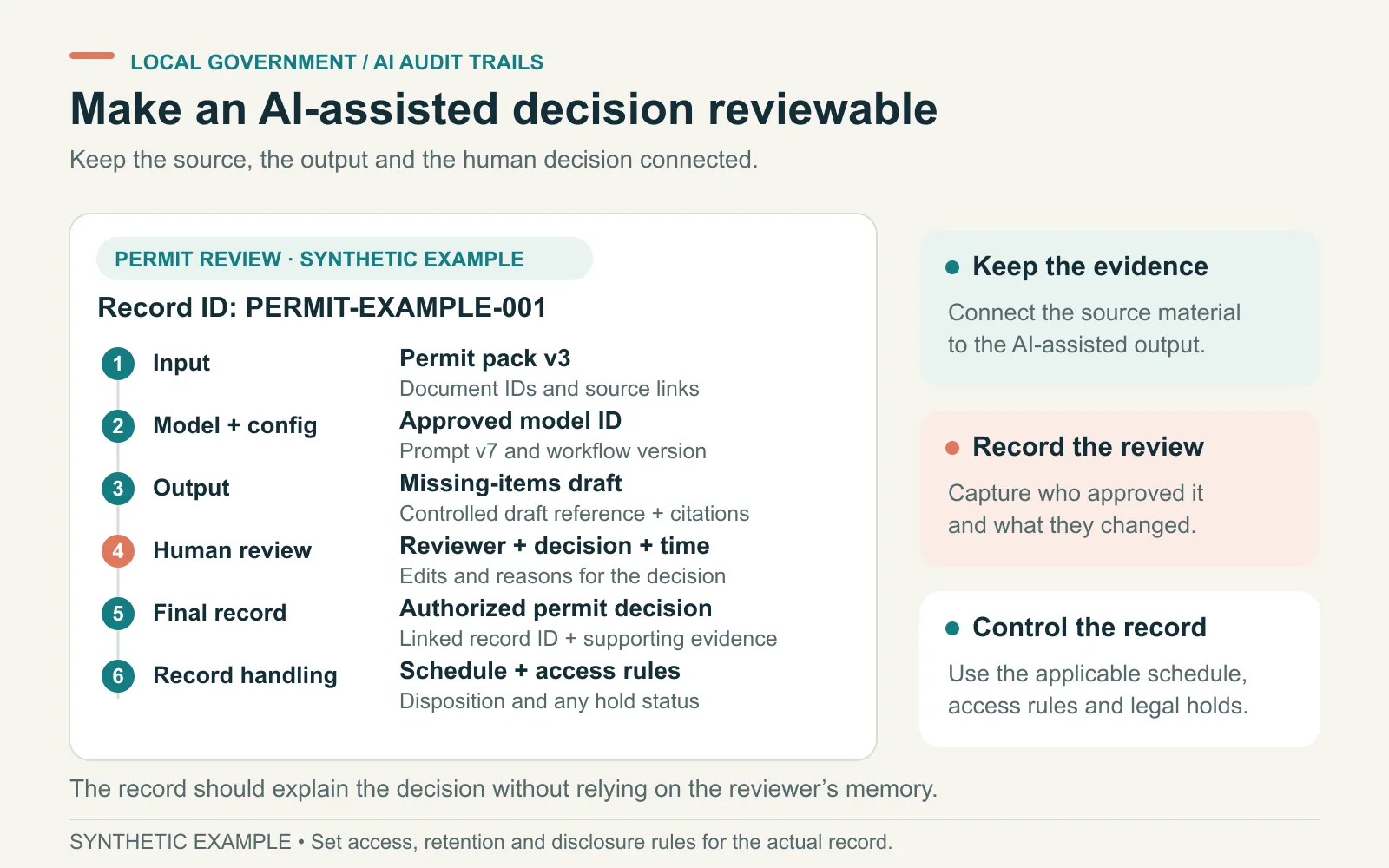
For a permit notice, show the finding, related application pages and the right checklist. Give the reviewer a way to correct or reject it.
Record why staff made an important correction. Don’t ask them to approve an unexplained model score. A model’s explanation isn’t proof that its source evidence is correct.
NIST’s Generative AI Profile discusses human review, tracking and records as ways to manage generative AI risks. The agency still chooses who may review and approve the work.
Our human-approval checklist adds tests for rejection, changed inputs and retries. Those tests matter when an approval triggers a notice, payment or record update.
If a source document changes after approval, review the new draft. Yesterday’s approval shouldn’t silently authorize today’s different notice.
Separate service logs from agency decision records
Technical logs help find system faults. Agency decision records explain the work done. Link the two so staff can follow the case and the technical team can trace a fault.
| Question | Technical evidence | Agency evidence |
|---|---|---|
| Did the model run? | Invocation record and result status | Request linked to the case |
| Which material supported the draft? | Retrieval and document-version references | Preserved source evidence and finding |
| Who approved it? | Authenticated workflow event | Reviewer authority, displayed proposal and recorded decision |
| Did the intended action occur? | Integration request and response | Confirmed notice, payment or other destination record |
Use a request ID across the systems and record how their IDs connect. Don’t assume a chat ID will appear in the case system’s export.
Where agents call external tools, our MCP audit logging guide explains which system can supply each record. Permission to make a tool call and proof of its result are different records.
Decide what happens when records are missing. Does the task stop, wait or alert its owner? Test that choice before staff rely on it.
Set retention by the record’s purpose
Don’t set one storage period for everything that involves AI. Start with the work each record documents and the rules your agency must follow.
Washington State Archives says AI inputs and outputs concerning agency business are public records for retention purposes. That guidance applies to Washington agencies.
Its retention advice ties the period to content and function. It does not recommend retaining everything. A brainstorming interaction and material used to develop an ordinance can have different records value.
Federal guidance has a different scope. NARA’s August 2026 memorandum addresses AI materials under the Federal Records Act. It isn’t a retention schedule for every city or county.
Ask the records officer which schedule applies to each kind of record. Set out where records belong, who may delete them and which holds prevent deletion. Plan what happens when the vendor contract ends.
Keeping a record and releasing it to the public are separate decisions. Keep required records, then follow the agency’s rules for reviewing requests and withholding exempt material. A stored record isn’t automatically open to everyone.
Keep the evidence you need without copying everything
A full prompt can contain resident details, passwords or restricted files. Storing more content means more material to protect and review.
Decide which exact inputs and outputs staff need for the approved task. Store them in a protected case record where appropriate. General service logs can point to those records without copying their content.
For example, a service log might hold a document-version ID rather than a resident’s address. A reviewer with the right access can follow that ID to the protected evidence.
If a review needs the exact input sent to the model, agree how to keep it safe. An ID won’t recreate that input if the source version is gone.
Give users, investigators and system managers the access each role needs. Test whether the person running a task can change older records. Check whether the system records who exports the evidence.
Also check what the provider deletes. Export and keep required records before staff close a workspace or vendor account.
Walk one sample case through the whole record
Consider a hypothetical permit application, PERMIT-EXAMPLE-001. The applicant submits a revised site plan. An assistant checks it against the approved list of required documents.
The draft notice says a drainage drawing is missing. A staff reviewer finds it in the revised upload, rejects that finding and approves a corrected notice about another missing attachment.
A useful demo would let staff find:
- The revised upload and checklist versions used in the check.
- The AI draft and its cited document locations.
- The staff correction and approved notice version.
- The request that saved that notice to the permit system.
- The destination record confirming what was saved.
Then repeat the test with an interrupted connection. If the save request times out, staff must check the destination before sending another notice.
Our municipal permit AI article explains the wider task. The P-Card auditability article asks a related question: which facts support a transaction flag? In either case, an AI finding doesn’t become the final agency decision on its own.
Ask the vendor five questions before the pilot
Ask the vendor to use made-up cases and test accounts:
- Can we export one complete case? Include source references, configuration, review and destination outcome in a format our staff can inspect.
- Can we see rejected and corrected work? An export containing only successful outputs hides the review process.
- Can we apply our retention rules? Show deletion, preservation holds and the handling of copies across connected systems.
- Who can read or change the evidence? Demonstrate restricted access, administrative actions and the export history.
- What happens when collection fails? Interrupt it and show how staff learn which records are missing.
At ASCENDING Inc, we build and maintain Jarvis, an open source AI project. You can include our governed AI offering in this review. Product traces alone don’t prove that a complete agency record exists.
To scope an audit-ready AI pilot with ASCENDING, bring one task, its records rules and the sample case above. Agree which records each system will supply before expanding the pilot.
References
- NIST: AI Risk Management Framework
- NIST: Generative AI Profile, AI 600-1
- Washington State Archives: Managing Generative AI Records
- Washington State Archives: How Long Do Generative AI Records Need to Be Kept?
- NARA: Guidance on Applying the Federal Records Act to AI Materials
Questions about government AI audit trails
What should an AI audit trail contain?
Record the case and request identifiers, authorized user, source references, model and workflow versions, proposed result, staff review and final action. Include failures and retries. Decide which content must be preserved with your records, privacy and security owners.
Are AI prompts and responses public records?
The answer depends on the jurisdiction and use. Washington State Archives says agency-business AI inputs and outputs are public records for retention purposes. That does not mean every record is publicly releasable. Your records officer and counsel should determine the applicable duties and exemptions.
How long should a local government keep AI records?
Use the applicable records schedule and any preservation hold. Washington State Archives bases retention on a record's content and function, rather than one period for everything produced by AI. A vendor's default chat-history period does not decide the agency's obligations.
Do model logs prove that a person approved an AI decision?
Only if they contain the required approval evidence and connect it to the resulting action. A model response or successful tool call alone does not establish which proposal an authorized reviewer approved. Test that connection before relying on it.