



An Amazon Bedrock inference profile gives a model call a routing or tracking target. AWS-managed profiles route requests across Regions. Application profiles let you attach an ownership label to supported usage and costs.
The distinction matters when an application works, but nobody can tell which team generated its bill. It also matters when Bedrock rejects a model ID and asks for an inference profile instead.
Use this guide to choose a profile, make a small test call and check the resulting access and cost records. For the wider application review, start with our Bedrock migration assessment checklist.
Key Takeaways
- Choose a system-defined profile for supported cross-Region routing.
- Choose an application profile when supported calls need their own cost and usage grouping.
- Check the API before creating profiles. Responses and Chat Completions don’t support application profiles.
- Test permissions and destination Regions with the role your application will actually use.
Which Bedrock inference profile do you need?
Choose based on the problem you’re solving. A routing problem and an accounting problem can involve the same model, but they need different checks.
| Your requirement | Starting point | What to verify |
|---|---|---|
| Call a model that requires cross-Region inference | A supported system-defined profile | Source Region, possible destination Regions and permissions |
| Separate one team’s supported model usage from another’s | An application inference profile with ownership tags | API compatibility, tag activation and whether calls actually use the profile |
| Track a team’s cross-Region calls | An application profile sourced from a system-defined profile | Both routing requirements and cost attribution |
| Attribute Responses or Chat Completions usage | An attribution method supported by that API | IAM principal attribution, or Projects where the endpoint supports them |
| Stop unapproved models or direct calls | IAM permissions and an applicable organization policy | Allowed model resources, allowed routes and failed-call evidence |
AWS’s inference profile overview describes the two profile types and their purposes. An application profile can reference a regional model or a system-defined profile. It doesn’t create a new model.
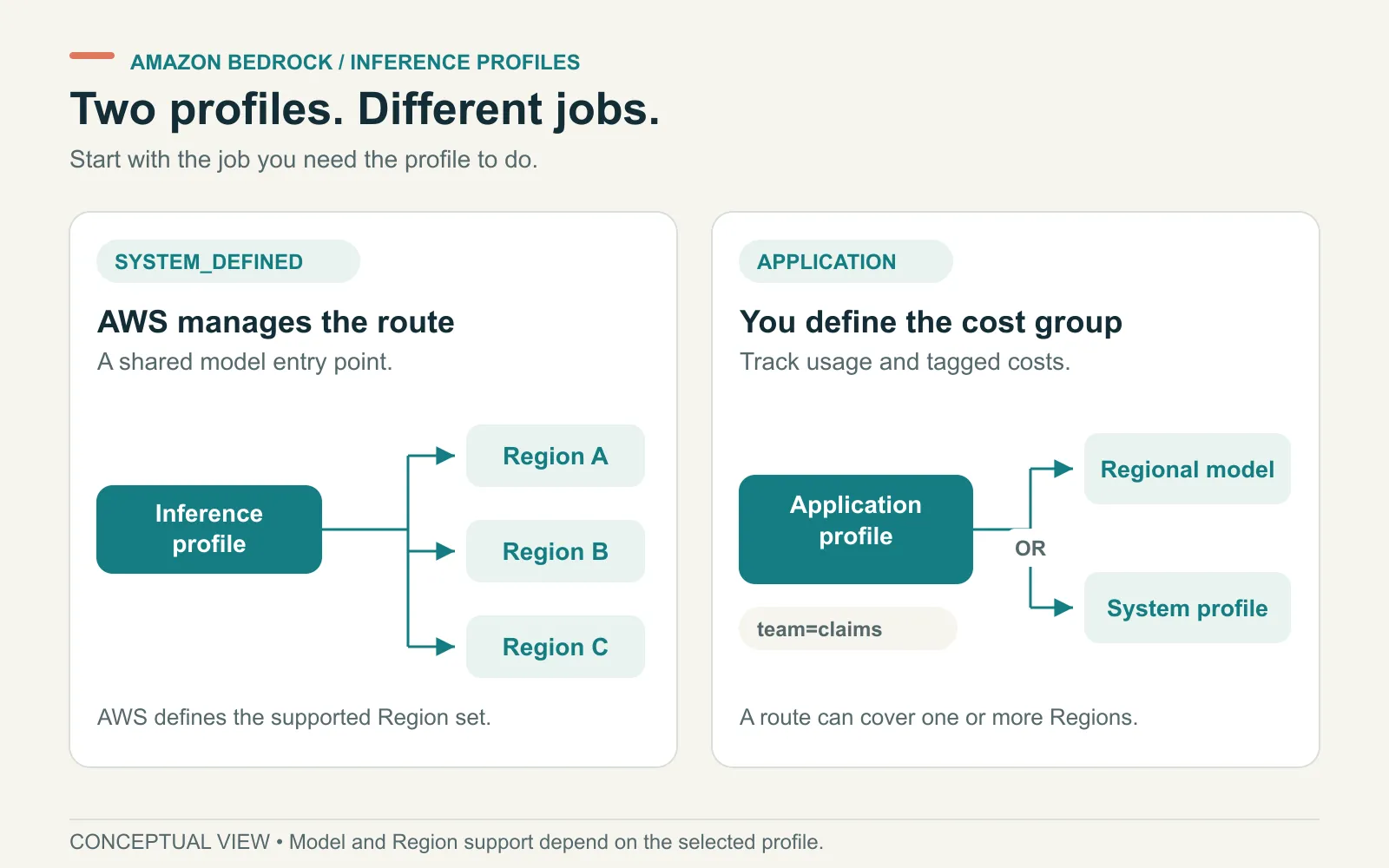
Application profiles can sit over a regional model or a cross-Region route. The API still determines whether that profile is supported.
Keep model access separate from profile selection. Our Bedrock model access guide explains where to enforce that decision.
System-defined and application profiles, in plain English
A system-defined profile is a route AWS maintains. Its supported model and destination Regions determine where an inference request can be processed.
A geographic profile and a global profile have different routing scopes. Read the destination list for the exact profile you’re considering. Your client’s Region alone doesn’t describe the full processing boundary.
An application profile is a tracking resource you create. For example, a platform team could assign separate profiles to a support assistant and a finance assistant. Both might use the same underlying model.
That separation makes the usage easier to attribute. It doesn’t prove that every support request contains support-team identity, or that callers can’t bypass the profile.
Before selecting a route, compare your residency requirements with AWS’s supported Regions and models. Global routing deserves an explicit review when the application handles restricted data.
Check API support before you build the tagging scheme
Application inference profiles support the InvokeModel and Converse API families. AWS’s current application profile documentation explicitly excludes Responses and Chat Completions on either endpoint.
Those APIs reject an application profile as the inference target. System, geographic and global profiles are a different case; don’t transfer their support to application profiles.
This catches an expensive design mistake: creating a profile for every developer before checking how the coding tool sends its requests.
Write down the actual endpoint, API, model and credential used by the client. Then choose the supported attribution method. Our Bedrock cost allocation guide covers the alternatives and how to reconcile billed totals.
Create and call an application inference profile
Start with one test workload. Confirm the selected model supports the API and source Region before creating its tracking resource.
1. Find the source model or routing profile
This read-only AWS CLI command lists system-defined profiles available from the selected Region:
aws bedrock list-inference-profiles \
  --region us-east-1 \
  --type-equals SYSTEM_DEFINED \
  --query 'inferenceProfileSummaries[].{Name:inferenceProfileName,Id:inferenceProfileId,Arn:inferenceProfileArn}'
Choose a supported source from the output. If you need a regional application profile, use the supported regional foundation-model ARN instead.
Record the source ARN and the destination Regions. Don’t build an ARN from a model’s display name or assume another Region has the same options.
2. Create one named tracking resource
The following Python example creates an application profile. Replace the source placeholder before running it. Creating infrastructure and making later model calls can incur AWS charges.
import boto3

bedrock = boto3.client("bedrock", region_name="us-east-1")

profile = bedrock.create_inference_profile(
    inferenceProfileName="support-assistant-prod",
    description="Support assistant production usage",
    modelSource={
        "copyFrom": "REPLACE_WITH_SUPPORTED_SOURCE_ARN"
    },
    tags=[
        {"key": "Team", "value": "Support"},
        {"key": "Application", "value": "SupportAssistant"},
        {"key": "Environment", "value": "Production"}
    ]
)

print(profile["inferenceProfileArn"])
AWS’s profile creation guide defines the required source and naming fields. Save the returned ARN. Application profile identifiers are generated resources, not names you can substitute into an ARN.
3. Send a small request through that profile
For a source model that supports Converse, pass the returned application profile ARN as modelId:
runtime = boto3.client("bedrock-runtime", region_name="us-east-1")

result = runtime.converse(
    modelId=profile["inferenceProfileArn"],
    messages=[{
        "role": "user",
        "content": [{"text": "Reply with: profile check complete"}]
    }],
    inferenceConfig={"maxTokens": 32}
)

print(result["output"]["message"]["content"])
This is an example to adapt, not a report of a test in your account. Run it with the application role before treating an administrator’s successful call as rollout evidence.
Why does a Bedrock inference profile call fail?
Use the error to identify which part of the request needs checking. Changing several policies at once makes that harder.
| Symptom | Check first | Useful next step |
|---|---|---|
| The error says on-demand throughput isn’t supported | Whether that model requires a system-defined inference profile | Inspect supported profiles for your source Region |
| Access is denied | Caller permissions, profile resources, underlying model resources and applicable SCPs | Reproduce with the application role and inspect the relevant denial |
| The profile can’t be found | ARN, account, Region and profile type | Retrieve the resource instead of rebuilding its ARN manually |
| Responses or Chat Completions rejects an application profile | API compatibility | Select a supported attribution method rather than relaxing IAM |
| Calls succeed but the cost report is empty | Actual request target, activated billing tags and reporting delay | Confirm new calls use the application profile ARN |
Cross-Region permissions need particular care. A permitted source Region doesn’t automatically mean every required destination is permitted by the organization’s policies.
AWS’s global cross-Region inference guidance explains the associated Region-control checks. Confirm the profile type before changing a Region restriction.
Prove the profile is doing the job you chose it for
A successful response establishes that one request worked. A useful handoff also records what the request demonstrated.
For a routing check, save the caller role, source Region, profile ARN and permitted destination set. Note any data-location constraint that rules out a global route.
For an attribution check, confirm the application used its assigned profile and that the intended billing tags were activated. Then inspect costs after the reporting delay.
Keep the evidence small and specific. A few controlled requests are easier to reconcile than a busy shared account with unknown callers.
If you also need request-level investigation, connect this record to the application’s trace. The OpenTelemetry guide for AI agents explains that separate observability layer.
Bring one workload to the platform review
ASCENDING’s Claude-on-Bedrock governance offering covers model access, attribution and operating controls. This article describes AWS mechanisms; it doesn’t require adding a gateway to use profiles.
For a scoped review, bring the application’s API, model, calling role, permitted Regions and required cost dimensions. Those details determine whether a profile fits and what else the workload needs.
References
- AWS: Inference profile types and uses
- AWS: Supported Regions and models
- AWS: Application inference profiles and API limits
- AWS: Create an application inference profile
- AWS: Global cross-Region inference
Documentation checked November 11, 2026.
Bedrock inference profile questions
What is an Amazon Bedrock inference profile?
An inference profile identifies a model and its inference routing. AWS manages system-defined profiles for cross-Region routing. You create application profiles to group supported usage and costs, using a regional model or a system-defined profile as the source.
What is the difference between a model ID and an inference profile ARN?
A model ID names a model. A profile ARN identifies a routing or tracking resource associated with that model. Supported Bedrock APIs accept a profile in their model field, but support depends on the API and profile type.
Can application inference profiles track Responses or Chat Completions costs?
No. AWS currently says those APIs reject application inference profiles on either endpoint. Use a supported cost-attribution option for that API, such as IAM principal attribution. Application profiles support the InvokeModel and Converse API families.
Does an inference profile restrict which models a team can use?
A profile alone doesn't require callers to use it or stop them from choosing another permitted model. Enforce model and route restrictions through IAM and, where appropriate, an AWS Organizations service control policy.