



Amazon Bedrock model access is controlled by AWS permissions. Removing a model from a coding tool’s menu doesn’t stop someone using the same credentials to call that model another way.
Start with the approved models and the roles that may use them. Add organization controls where the restriction must survive changes inside a member account.
This guide separates the menu, the caller’s IAM permissions and the organization’s service control policy, or SCP. It also gives you a small test matrix to prove the rule works.
Key Takeaways
- Use a client menu to guide model choice; enforce access where AWS authorizes the request.
- A workload role needs specific permissions. An SCP can restrict covered member accounts but can’t grant access.
- Review model access and routing separately when inference profiles cross Regions.
- Test approved and denied calls with the same role, including any direct route you’re trying to block.
Start with the model call, not the model menu
Write down the client, endpoint, API, model identifier and AWS role for one real workload. Without those details, “we blocked the model” is hard to verify.
A coding tool can offer only approved choices while the role behind it still has broad Bedrock permissions. Another script using that role can make a different request.
For example, an availableModels setting in a managed client may keep the menu tidy. Treat that as a user-interface control until a failed API call proves the AWS restriction.
AWS’s model access documentation describes IAM and organization-level denies for blocking model use. Removing an agreement or a visible selection isn’t an equivalent enforcement mechanism.
In commercial Regions, access to many supported models is enabled by default when the required Marketplace permissions are present. Some models still need provider or account-level approval.
This is one part of the enterprise AI governance framework. Model permissions, business-record permissions and approval workflows need their own owners.
Which control belongs where?
Use the narrowest control that can enforce the requirement across the intended callers.
| Control | What it can do | What you still need to check |
|---|---|---|
| Client configuration | Set a default model and present a shorter menu | Whether another client can use the same credentials |
| IAM policy on the workload role | Grant or deny specified actions on model and profile resources | Other attached permissions, resource scope and the actual calling role |
| AWS Organizations SCP | Limit covered member-account identities even when account permissions are broader | OU/account attachment, exceptions and management-account boundaries |
| Region controls | Restrict permitted processing routes where supported | Cross-Region profile requirements and destination scope |
| Audit records | Show which request was attempted and whether it failed | Caller identity, event type, route and the denial reason |
An SCP sets a permissions ceiling. It doesn’t give an application permission to invoke a model. AWS also documents which identities SCPs affect.
That scope includes important exceptions: management-account identities and service-linked roles aren’t restricted by SCPs. Don’t run the acceptance test with a management-account administrator.
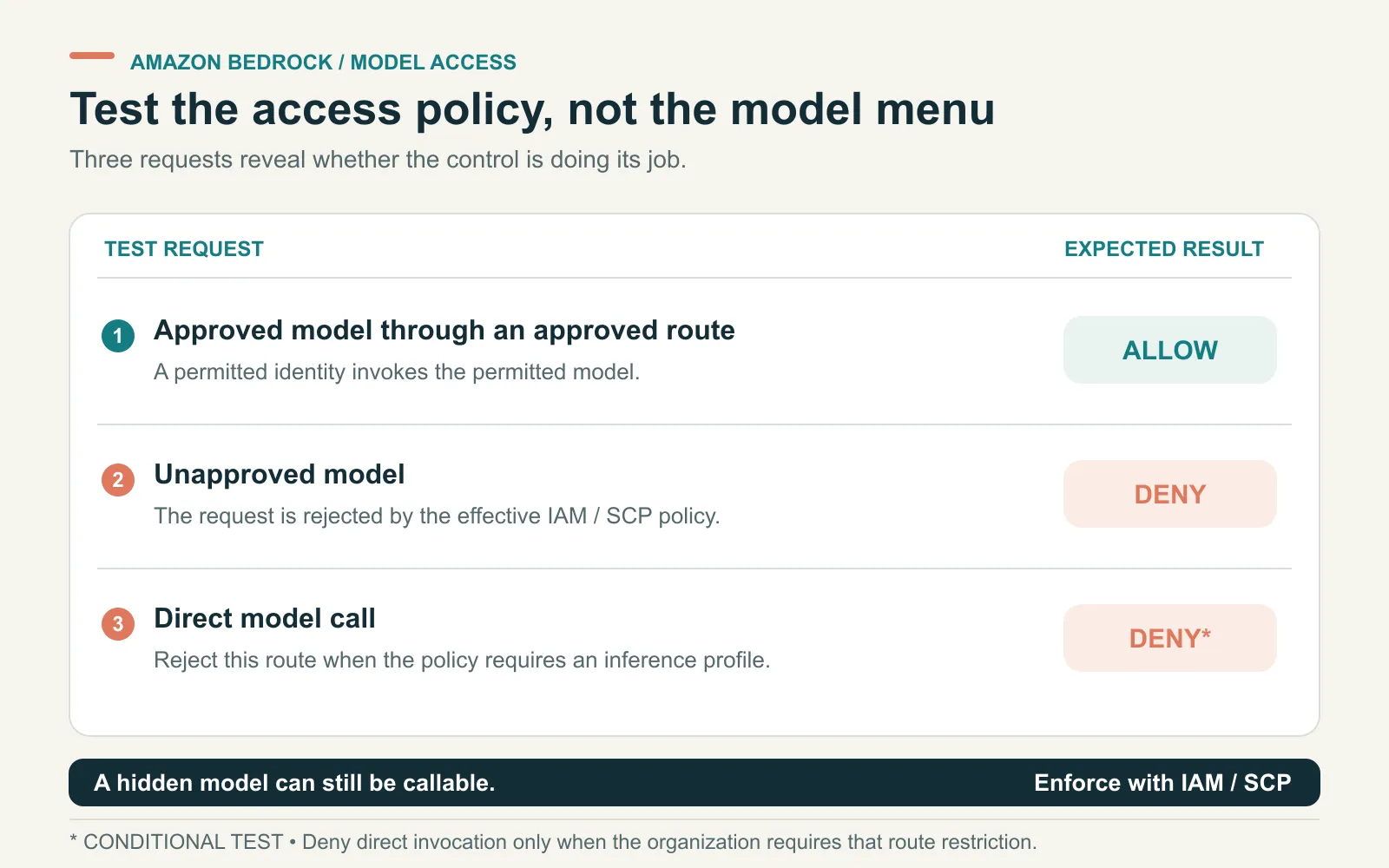
The last test applies only when your policy requires a profile. A direct call can be valid in another approved design.
Grant one workload the models it actually needs
Prefer a role whose allowed model set matches the application. A narrow grant is easier to review than a broad grant followed by several unrelated exceptions.
List every required request path before changing the policy. Include streaming, scheduled jobs and secondary models used for background work.
AWS provides Bedrock IAM policy examples for model invocation restrictions. Check the permissions behind your API; a Converse request also depends on the relevant InvokeModel permission.
For profile-based calls, review the profile resource and underlying model resources. Allowing the profile name in a client configuration isn’t an IAM grant.
Keep a short approval record:
| Field | Example to record |
|---|---|
| Workload | Internal support assistant |
| Calling identity | The member-account role used by that assistant |
| Approved models | Exact model identifiers or deliberately approved model families |
| Allowed routes | Regional calls, named geographic profiles or approved global profiles |
| Required API behavior | Non-streaming, streaming and any batch operations |
| Change owner | The team that reviews new versions and updates the tests |
This is a planning example, not a claim about a deployed customer. Use your own identifiers before turning it into a policy.
Use a Bedrock SCP when the rule spans accounts
An SCP is useful when account administrators must stay within an organization-wide model policy. It still needs a deliberately chosen attachment scope.
The following example denies two Runtime inference actions for the illustrative model family unapproved-provider.*. Replace that pattern with the actual model family you intend to block.
{
  "Version": "2012-10-17",
  "Statement": [
    {
      "Sid": "DenyUnapprovedRuntimeModelFamily",
      "Effect": "Deny",
      "Action": [
        "bedrock:InvokeModel",
        "bedrock:InvokeModelWithResponseStream"
      ],
      "Resource": "arn:aws:bedrock:*::foundation-model/unapproved-provider.*"
    }
  ]
}
This is an illustrative deny-list statement, not a complete model allowlist. A newly released model outside the blocked family isn’t covered by that pattern.
If the requirement is “only approved models,” design an allowlist instead. Include every resource evaluation required by the approved model and route.
AWS’s least-privilege Bedrock guidance discusses organization restrictions and allowlisting. A deny using NotResource needs particular care: an omitted profile resource can break a call you meant to permit.
Keep the API scope explicit. The sample above addresses those Runtime inference actions. Don’t present it as complete coverage for every Bedrock endpoint, asynchronous operation or future API.
AWS also shows a broader, model-scoped bedrock:* deny. That blocks covered control-plane operations as well as inference; our sample deliberately limits its action list. Use broader scope when required, and test the maintenance tasks it could affect.
Require an inference profile only when the design needs it
Some organizations want all supported calls to use assigned application profiles. That can support attribution, but callers must also be prevented from taking an untracked route.
The bedrock:InferenceProfileArn condition key lets a policy distinguish supported profile-based requests during model authorization. Scope the condition to the relevant foundation-model resources.
Here’s a policy template that denies direct Runtime model calls when the condition key is absent:
{
  "Version": "2012-10-17",
  "Statement": [
    {
      "Sid": "RequireProfileForRuntimeModelCalls",
      "Effect": "Deny",
      "Action": [
        "bedrock:InvokeModel",
        "bedrock:InvokeModelWithResponseStream"
      ],
      "Resource": "arn:aws:bedrock:*::foundation-model/*",
      "Condition": {
        "Null": {
          "bedrock:InferenceProfileArn": "true"
        }
      }
    }
  ]
}
Requiring a profile doesn’t require an approved profile. Combine route restrictions with the intended model and profile permissions, then test an alternate profile too.
It also doesn’t make an unsupported API compatible. Application inference profiles don’t support Responses or Chat Completions. Our inference profile guide explains that distinction.
Cross-Region routing adds another check. AWS’s global inference documentation explains where the condition key is populated and how global Region evaluation differs.
Don’t remove Region restrictions wholesale to fix an access-denied error. Identify the requested route and the policy evaluation that actually failed.
Test the same role against five requests
A useful access review records both success and failure. All requests below should use the same workload role and harmless prompt.
| Test | Expected result | What it establishes |
|---|---|---|
| Approved model through the approved route | Success | The restriction hasn’t broken the intended workload |
| Unapproved model through a client menu override or API request | Access denied | The restriction survives a different model selection |
| Approved model through an unapproved profile | Denied, if profile choice is restricted | The caller can’t substitute another tracking route |
| Approved model called directly | Denied, if profiles are mandatory | The direct route doesn’t bypass that requirement |
| Approved model with streaming enabled | Matches the streaming policy | The second invocation path was included in the review |
Save the timestamp, role ARN, API, target model/profile and request ID. Inspect the denial before assigning it to the SCP; another missing permission may be responsible.
A rejected request is only evidence of the intended control when the recorded reason matches that control. A missing Marketplace entitlement, for example, doesn’t prove your model policy works.
For tools invoked after a model response, use a separate permission test. Our two-identity MCP access walkthrough shows why server access and downstream record rights can’t be inferred from model access.
Roll out the restriction without losing the recovery path
Start in a test member account or a small organizational unit. AWS recommends testing SCP effects before a broad attachment.
Keep a known-good application role and a documented recovery procedure. Re-run the acceptance tests when you approve a model version or change the client endpoint.
Pair the access record with your team’s Bedrock cost attribution. A model approval should identify the budget owner as well as the technical caller.
ASCENDING’s Claude-on-Bedrock governance offering covers this model-access and operating-control work. Bring one calling role, the approved model list and a failed request to a scoped review.
References
- AWS: Model access
- AWS: Bedrock IAM policy examples
- AWS: Service control policies and their scope
- AWS: Implementing least privilege access for Bedrock
- AWS: Global cross-Region inference
Documentation checked November 11, 2026. Policy snippets are examples for review, not a record of deployment or account-level acceptance testing.
Questions about restricting Bedrock models
How do I restrict model access in Amazon Bedrock?
Grant the application role only the model resources and inference actions it needs. For member accounts in AWS Organizations, an applicable SCP can impose a wider restriction. Test direct calls and any profile-based routes with the same role.
Does hiding a model in Claude Code block Bedrock access?
No. A client setting can simplify the model menu, but AWS still evaluates the credentials and permissions on each request. A caller with valid permissions can use another client or send a direct API request.
Does a service control policy grant access to a model?
No. An SCP limits permissions available to identities in covered member accounts. The caller still needs an applicable IAM permission. SCPs don't restrict management-account identities or service-linked roles.
Can I require requests to use an inference profile?
For supported Bedrock Runtime calls, policies can distinguish model requests made through a profile using the bedrock:InferenceProfileArn condition key. Scope the condition to the relevant model resources and test both the permitted profile and direct-call paths.