Jarvis Registry supports Microsoft Entra ID sign-in alongside role-based access control and resource permissions. Its MCP Gateway adds permission-scoped discovery and per-tool access policy. Together, these let platform teams connect existing AI clients to company tools without treating every signed-in employee as an administrator.
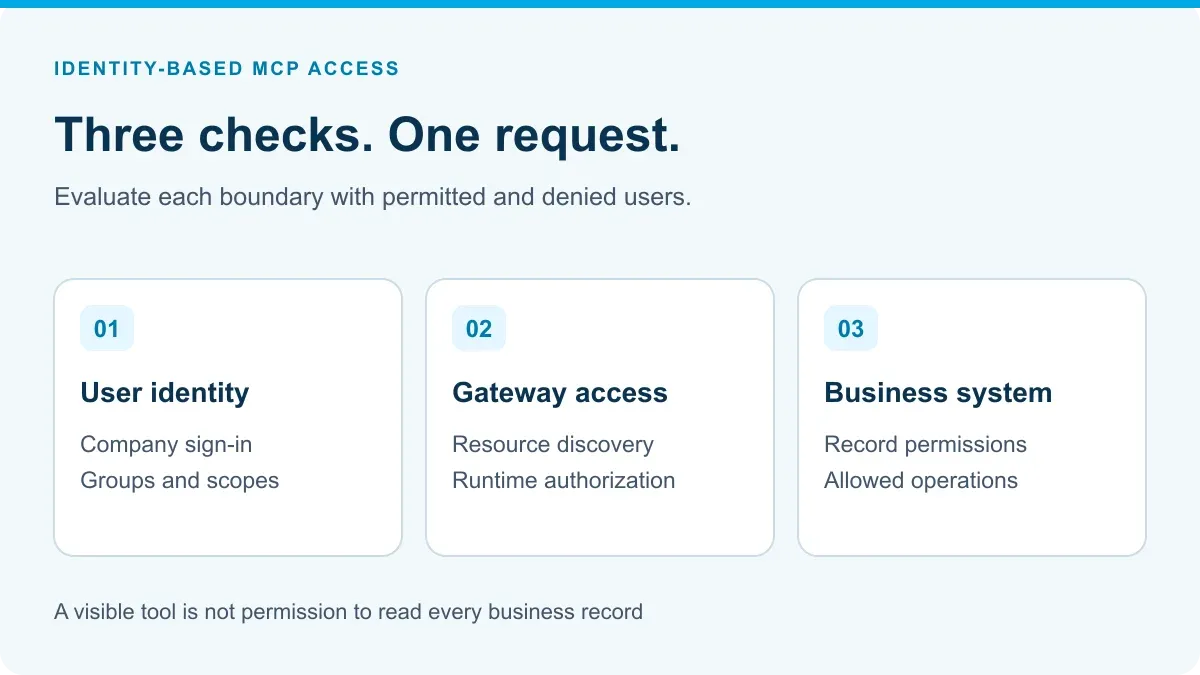
The buying decision is whether that chain works for your two users, your tool and your business data. A successful sign-in is only the first check. The same request must also pass the appropriate Registry, tool and downstream-system controls.
What does Jarvis provide, and what must you configure?
Jarvis’s identity-provider documentation names Microsoft Entra ID as a supported provider. The auth layer uses OpenID Connect, or OIDC, and OAuth 2.0, and maps identity groups to Registry roles. This is the product connection to an existing Microsoft identity environment—not a proposal to replace it.
| Buyer requirement | Documented Jarvis capability | Implementation check |
|---|---|---|
| Company sign-in | Entra ID integration through the auth layer | Correct tenant, application configuration and supported client login flow |
| Separate operator responsibilities | Roles and endpoint-level scopes | Which people may register, change or share resources |
| Restricted resource access | Resource-level access-control lists, or ACLs | Which server or agent each identity can see or modify |
| Restricted tool use | MCP Gateway per-tool access policy | Which concrete read or write operation is permitted |
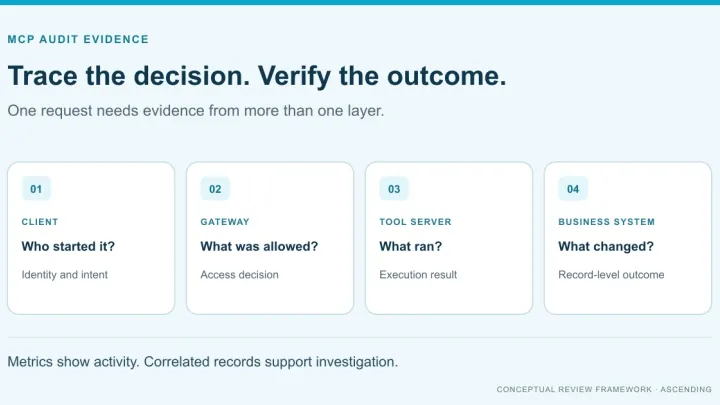
| Investigate a call | Gateway observability and audit records | Recorded identity, tool, decision and operational outcome |
These controls are related but not interchangeable. The Registry scope design separates endpoint permission from permission on a particular resource. Both checks must pass where required. A role named “Read-Only” describes Registry operations; it does not establish read-only rights inside a connected database.
Keep discovery, execution and record access separate
The Registry Endpoint gives compatible clients a common entry point and filters discovery using the caller’s permissions. That reduces the tools presented to a user, but a hidden catalog entry is not the entire security test.
Discovery: Can the user find this approved resource?
Execution: Can this identity invoke this specific operation now?
Business data: Which records can the downstream system return or change under the configured credentials?
For example, permission to invoke a ticket-search tool should not be taken as permission to read every ticket in the service desk. The connector’s identity and the application’s own access rules still matter. Document whether it acts for the individual user or through a service identity, then test the resulting record access.
For the wider architecture, see the enterprise MCP registry guide. This rollout focuses on one access decision rather than rebuilding that architecture discussion.
Test one service-desk tool with two roles
Consider an illustrative pilot, not a customer deployment: support staff can search permitted tickets; support leads can also update their status. These are business roles to configure and verify, not names of built-in Jarvis roles.
Use one registered service-desk MCP server that exposes separate search and update operations. Have its owner prepare ordinary and restricted test records. Agree the expected result before running each test.
| Test | Expected result to demonstrate |
|---|---|
| Support user discovers tools | Only the resources permitted by the configured policy appear |
| Support user searches an allowed ticket | The request succeeds within the user’s intended data access |
| Support user invokes the update operation directly | The gateway denies the prohibited operation, even if the user knows its name |
| Support lead updates an allowed ticket | The authorized operation completes and leaves inspectable evidence |
| Either user requests a restricted record | Downstream permissions prevent unauthorized disclosure or change |
| An administrator removes access | New calls reflect the revised policy within the deployment’s documented behavior |
Repeat the denied-operation test through the actual desktop or IDE client employees will use. Also check whether an unmanaged direct connection can bypass the gateway. Network, device and application configuration may be needed to keep access on the intended path.
Check access changes and evidence before expanding
Test both a fresh sign-in and an existing session after changing access. Group membership, token lifetime, application sessions and configuration reloads can affect the result. Record observed behavior instead of promising immediate revocation everywhere. Jarvis’s scope documentation, for example, says changes to its scope configuration require a service restart.
For allowed and denied requests, ask the team to locate the relevant identity, requested operation and decision. Set retention and access to those records deliberately; diagnostic payloads can themselves contain sensitive information. The MCP governance checklist covers who owns that evidence and how long it is kept.
Logs help explain what happened. They do not, on their own, prove the model’s answer was accurate or the business action was appropriate. Test those outcomes separately. Likewise, instructions that tell a copilot to avoid restricted tools are not a substitute for enforced permissions; the distinction also matters when combining AI skills with MCP tools.
Bring the access decision to a Jarvis demo
Jarvis is worth evaluating when your team already uses Entra ID and wants a shared way to expose approved MCP resources across AI clients. Bring one MCP server, two test identities, the allowed and denied operations, and one restricted record.
Request a Jarvis demo around that scenario. Ask ASCENDING to demonstrate the supplied controls and identify the tenant, connector and business-system configuration still required before rollout.
References
- Jarvis MCP Gateway
- Jarvis identity-provider integration
- Jarvis roles, scopes and resource permissions
- Jarvis Registry Endpoint
MCP Access Control Questions
Does Jarvis Registry support Microsoft Entra ID?
Yes. Jarvis documents Entra ID integration through its OIDC/OAuth auth layer, with identity groups mapped to Registry roles and scopes. Tenant and client configuration still need testing.
Does signing in allow someone to use every MCP tool?
No. Authentication identifies the caller. Registry scopes, resource permissions, tool-call policy and downstream business-system permissions determine what the caller can do.
Is a Registry read-only role the same as read-only database access?
No. Registry roles govern Registry operations. Database or application permissions must be checked separately, including the identity used by the connector.
What should an MCP access-control demo prove?
Use two identities to show permitted discovery, an allowed call, a blocked call, a restricted business record and behavior after access changes. Inspect the corresponding logs.