



Amazon Bedrock cost allocation starts with a simple question: which team should own each part of the bill? The answer has to survive the request path. A department name in a spreadsheet won’t help if every application calls Bedrock through one unlabelled role.
You can do much of this with AWS’s native features. Start by checking the API your application uses, choose an attribution method, and reconcile the resulting team totals. Add a separate monitoring platform when you have a specific gap to close.
This guide covers that setup. For the wider distinction between billing, traces and spending controls, see our AI token cost tracking guide.
Key Takeaways
- Match the method to the API. Application inference profiles aren’t supported by every Bedrock API.
- Activate cost allocation tags before relying on them in a report.
- Keep unattributed spend visible. A report that accounts for only part of the bill isn’t ready for chargeback.
AWS documentation checked November 11, 2026. The example amounts below are illustrative, not customer results.
Choose the method that matches your Bedrock calls
Bedrock has several ways to assign costs. The right choice depends on whether you need ownership by caller, by application, or by individual request.
| Your application uses | Practical starting point | What to watch |
|---|---|---|
InvokeModel or Converse on bedrock-runtime | Tagged application inference profiles for application or team costs | Each profile is tied to a model |
Responses or Chat Completions on bedrock-mantle | Projects for application costs | Check the endpoint before choosing this route |
Responses or Chat Completions on bedrock-runtime | Start with IAM principal attribution | Application profiles aren’t supported; Projects apply to Mantle |
| IAM roles or federated sessions representing teams | IAM principal attribution, with team tags where needed | A shared caller needs extra work to preserve ownership |
| Supported Runtime calls where you need prompt-level detail | Request metadata and model invocation logs | Token-based cost calculations remain estimates |
The AWS application inference profile documentation explicitly excludes Responses and Chat Completions on both endpoints. Passing an application profile as their inference target returns a 400 error.
Projects apply only to Mantle. The table covers common starting points, rather than every Bedrock cost-management feature.
This matters for coding agents and OpenAI-compatible clients. Using Bedrock doesn’t establish that a client can use an application inference profile. Inspect its actual calls before changing the configuration.
IAM principal attribution works across Runtime and Mantle APIs. It can run alongside application profiles or Projects. You don’t have to choose one mechanism for every application.
1. Agree on the ownership fields
Pick a few fields that finance and engineering can maintain together. More tags don’t automatically produce a better report.
| Field | Example value | Decision it supports |
|---|---|---|
team | customer-support | Which manager owns the spend? |
application | ticket-assistant | Which workflow produced it? |
environment | production | Is this customer use or testing? |
cost-center | cc-104 | Where should finance assign it? |
Keep values stable. If engineering uses support and finance uses customer-service, agree on one mapping before the first monthly report.
Give each application an owner who can explain an increase. Keep an explicit unallocated category for incomplete records. Don’t spread those costs across teams just to make the report look finished.
Use internal identifiers rather than personal or customer details. Tags are operational data that may appear in billing exports and logs.
2. Use application profiles at a manageable level
For InvokeModel and Converse workloads, create application inference profiles for the ownership groups you need to distinguish. Then configure calls to use the profile ARN in place of the model ID.
A system-defined profile handles AWS-defined routing. An application profile adds a resource you can tag for your own workload. Our Bedrock inference profiles guide explains that difference and the setup steps.
Start with team, application and environment. Creating one profile per employee quickly becomes expensive to maintain in administrative terms.
For example, two teams using two models in two environments could require eight profiles, if every combination needs separate tags. Another model version adds more resources. That is a planning example, not an AWS quota.
Keep an inventory with the profile ARN, underlying model, tags, application configuration and owner. A model upgrade should update that inventory as well as the code.
The trade-off is clear: profiles make ownership explicit, but somebody must maintain them. Where roles already represent teams, principal attribution may be the simpler starting point.
3. Activate the tags and prove they reach billing
Tagging a profile isn’t the last step. Activate the relevant keys under Cost allocation tags in AWS Billing and Cost Management.
AWS’s tag activation guide describes two separate delays. New keys can take up to 24 hours to appear for activation. Activation can then take up to another 24 hours.
Make this a small acceptance test:
- Create or select one tagged application profile.
- Record its ARN, model, tags and activation status.
- Send a short, non-sensitive test request through that profile.
- Note the account, Region and time of the call.
- After billing updates, check the expected tag value and spend group.
In an AWS Organization, coordinate activation with the management or payer account. Don’t assume an application developer can complete the billing step from a member account.
Plan activation before the reporting period you intend to use. Attaching a tag today doesn’t automatically repair earlier untagged costs.
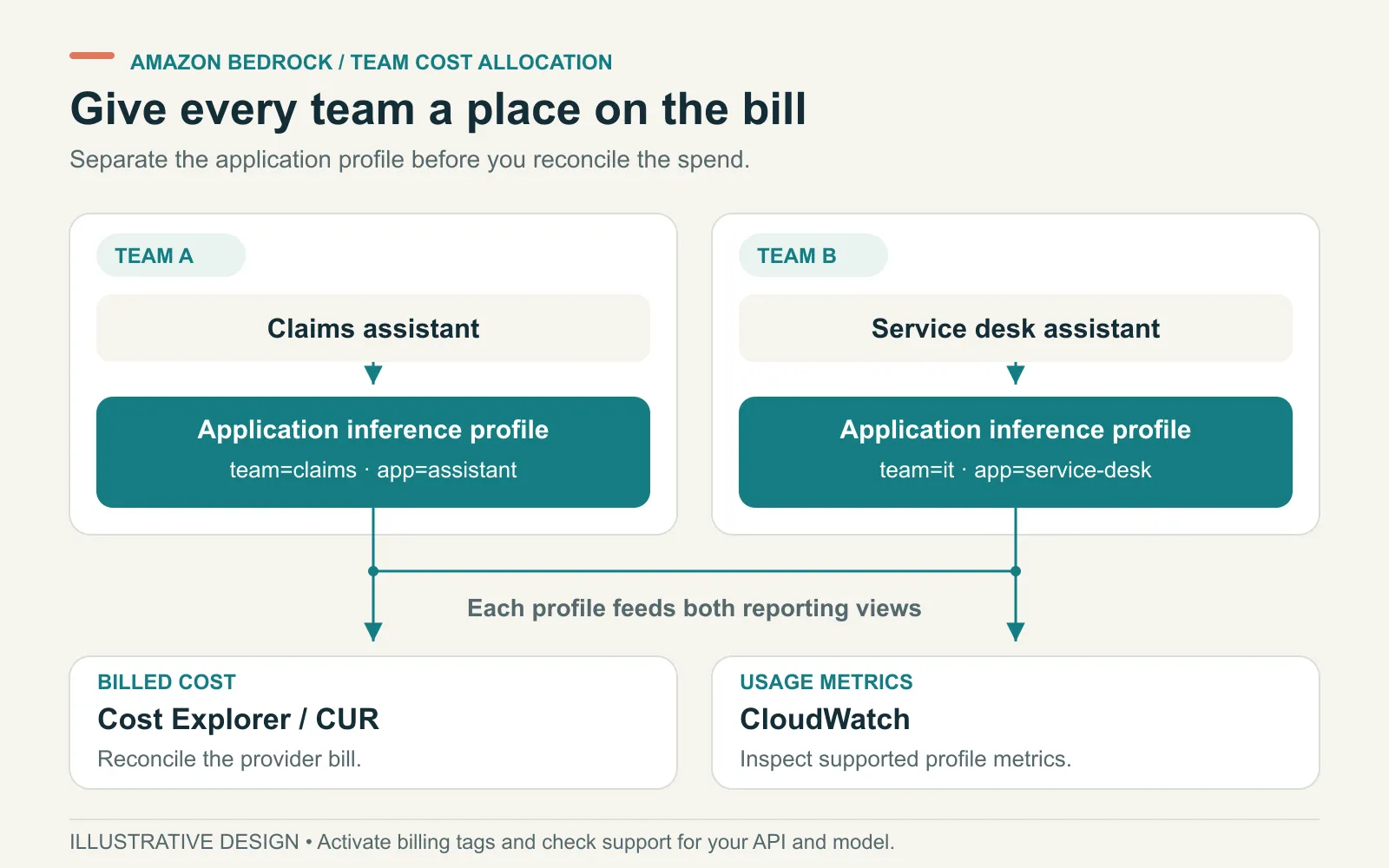
Cost Explorer and CUR supply billed totals. CloudWatch supplies supported usage metrics; separate invocation logs help explain individual calls.
4. Build a report you can reconcile
In Cost Explorer, filter to the accounts and Bedrock usage you want to review. Group by the activated team tag. Add application or environment views when someone needs to investigate a change.
Before sharing the report, write down its date range, currency, accounts, service filters and cost measure. Use the same settings for the overall total and every team subtotal.
If you use AWS Cost and Usage Reports, confirm which export you have. AWS’s cost attribution FAQ distinguishes tag columns from caller identity data. The automatic caller identity column requires CUR 2.0 with the caller-identity option selected.
Billing rows aren’t individual prompt receipts. Compare logs and billing at a compatible level, such as model, usage type and day. Don’t join a daily cost row to every request and count the same dollars repeatedly.
Also record what’s outside the report. A view of model inference doesn’t establish the full cost of an assistant. Supporting compute, storage and operating work may sit elsewhere.
5. Handle shared roles without guessing the end user
One application role can serve several departments. AWS can identify that role, but the role name alone doesn’t say which employee initiated a request.
Where billing needs to distinguish sessions, the gateway or application can assume a role with appropriate session tags. This needs a reviewed trust policy and a reliable mapping from signed-in user to team.
Avoid trusting a team name supplied freely in a request body. The layer assigning ownership should obtain it from an approved identity or application record.
For supported Runtime APIs, request metadata can add identifiers to model invocation logs. It doesn’t turn each call into an itemized billing row, and it isn’t supported on Mantle.
Keep the purposes separate. Session or resource tags help assign billed costs. Request records explain retries, token use and failed runs. Our OpenTelemetry article covers the trace context needed to investigate those runs.
A worked example: account for the missing $60
Suppose a monthly report covers $1,000 of Bedrock inference charges. All amounts in this example are invented to show the reconciliation method.
| Group | Allocated cost | Follow-up |
|---|---|---|
| Customer support | $420 | Owner confirms the ticket-assistant workload |
| Finance | $280 | Owner confirms the document-review workload |
| Engineering | $240 | Split testing from production before chargeback |
| Unallocated | $60 | Investigate calls without the expected ownership tags |
| Total | $1,000 | Matches the report’s defined cost scope |
The allocated teams account for $940. That leaves $60 to investigate, rather than silently assigning it to engineering.
Check direct model calls, older client settings, missing tag activation and shared-role traffic. Then rerun the same report for the same period. Record any remaining gap and who owns it.
If tracing estimates a different amount, don’t force it to match. Check model rates, caching, discounts, usage categories and data timing. State which figure is billed cost and which is a calculated estimate.
Check the setup before charging teams
Run the reporting process with the people who will use it. A finance analyst should be able to reproduce a team total without asking an engineer to explain every row.
Test a second team, a model change and a call that bypasses the expected profile. Keep the bypass visible in the report. If every cost still lands in one group, the setup hasn’t proved team allocation.
Finally, separate cost ownership from spending control. A tagged profile or cost report doesn’t stop another request. Assign an owner for alerts and test any proposed enforcement separately.
If this work accompanies a provider change, add the reporting checks to your Bedrock migration acceptance plan. Agree on the cost boundary before comparing the old and new application.
ASCENDING Inc maintains the open source Jarvis project. Our Claude-on-Bedrock governance offering includes cost attribution as part of deployment planning. Bring the APIs, identity path and billing view you need to reconcile.
References
- AWS: Application inference profiles
- AWS: IAM principal attribution
- AWS: Projects for Mantle cost attribution
- AWS: Activating user-defined cost allocation tags
- AWS: Cost attribution questions
- AWS: Per-request metadata tagging
Bedrock cost allocation questions
How do I track Amazon Bedrock costs by team?
Choose an attribution method that matches your API. Tag IAM roles or sessions for team ownership, use application inference profiles with InvokeModel or Converse, or use Projects for supported bedrock-mantle workloads. Activate the relevant cost allocation tags, then verify the team totals in AWS Cost Explorer or CUR.
Can one application inference profile track several models?
An application inference profile is model-specific. A cross-Region profile can route requests for that model across Regions, but it isn't a bucket for unrelated models. Keep a profile inventory as teams add models and versions.
Why aren't my Bedrock tags showing in Cost Explorer?
Check that calls used the tagged resource, the tag keys were activated for cost allocation, and enough time has passed for billing data to update. In an AWS Organization, activation is managed from the payer account. A resource tag alone doesn't establish that the spend is correctly attributed.
Does Cost Explorer show the cost of each AI prompt?
No. Billing-based methods produce aggregated costs. For supported APIs, model invocation logs and request metadata can show individual calls and token counts. A cost calculated from those tokens is an estimate that should be reconciled with billing totals.