Yes. Jarvis Skill Gateway can provide a self-hosted agent skill registry inside the broader Jarvis Registry deployment. Its production reference covers Helm on an existing Amazon EKS or Azure AKS cluster. It combines a private catalog, individual skill permissions and delivery to Claude Code, Codex, Cursor and GitHub Copilot.
Evaluate it when your platform team wants to run the catalog and control who retrieves each package. Self-hosting means your team, or a named partner, operates the service. The scope includes identity, storage and the local copies your coding tools use. It is not a separate skills-only appliance.
ASCENDING maintains the open source Jarvis Registry. This guide follows its documented deployment and delivery model; it is not a report of tests in a customer’s environment. For a broader product shortlist, start with the private skill marketplace comparison.
Choose the hosting route your team will operate
Jarvis has separate starting points for evaluation and production planning. The local quick start uses Docker Compose. The production reference describes a Helm release and supporting components for EKS and AKS.
| Stage | Documented route | What to establish |
|---|---|---|
| Local evaluation | Docker Compose | Sign-in, a non-sensitive sample package and one supported client |
| AWS production planning | Existing EKS cluster and Registry Helm release | Workload identity, secrets, persistent storage, load balancing, TLS and domain configuration |
| Azure production planning | Existing AKS cluster and Registry Helm release | Workload identity, secrets access, persistent storage, ingress, TLS and domain configuration |
The wider reference includes frontend, backend and authentication services. MongoDB holds Registry data and permissions; Weaviate supports semantic search. Review cloud storage, secrets and ingress with the team that runs your cluster. A working local example doesn’t establish production availability or recovery.
For a team that only needs file distribution, compare this service footprint against native coding-tool distribution or an existing private repository. Customer hosting is useful when the control you need justifies the infrastructure you will operate.
Separate the source, Registry and local copy
A skill package contains SKILL.md and may include scripts, references and assets. Review and distribute the complete package so developers receive the files its instructions depend on.
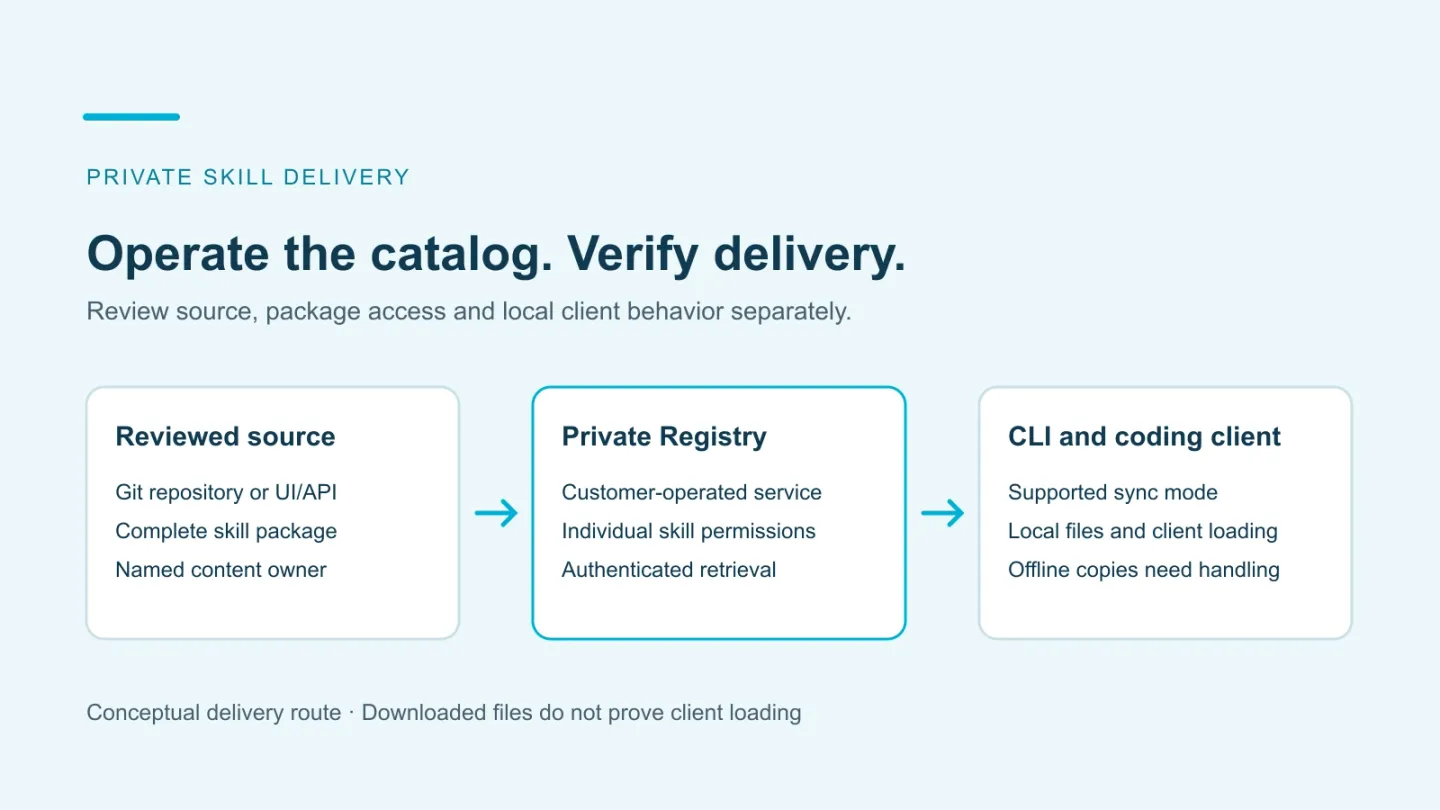
Skill Gateway supports repository sources across Git providers, including GitHub and GitLab. The conceptual authoring route is:
Reviewed Git source → private Registry skill → authenticated CLI sync → local coding-client files
Import uses the owner’s repository connection. A developer’s permission to download the Registry package is separate. Sign-in establishes who the developer is; application capabilities and the skill’s ACL decide which Registry actions they can take. The coding client then discovers the downloaded package in its own skill folders.
Repository import is read-only and runs one way into Registry; it does not push Registry edits back to the source. The Skill Gateway guide’s GitHub setup illustrates that route by resolving a selected ref to a commit and importing the discovered skill folders. GitHub App or OAuth instructions apply to that example; use the connection setup for your chosen Git provider. Direct authoring through the UI or API is another route.
Choose the maintained source for each package. Record the approved source revision and resulting Registry version separately, then review, re-import and synchronize changes. Avoid editing two independent copies without deciding which one will win at the next import.
Use permissions at the package boundary
Skills are private resources by default. An access control list, or ACL, assigns permissions to a user or group on a resource. Jarvis applies these permissions to individual skills. Its resource permission table separates viewing/downloading, editing, deleting and sharing. The creator receives full permissions; another user receives the access granted to that skill.
For example, a platform team could operate one catalog while engineering maintains a code-review skill and operations maintains a release checklist. The service owner keeps Registry running. Content owners review packages and manage their audiences. A healthy cluster doesn’t establish that each developer receives the correct skill.
Use the organization-level skill-management guide to assign a package owner and record the approval, update and access decisions alongside this service plan.
When changing access, examine all effective grants, including group and source-related grants where applicable. Removing one visible share may leave another route. Use the published private-skill lifecycle walkthrough for these checks rather than inventing a second import and removal process.
Give developers a supported delivery path
Jarvis supports skill delivery to Claude Code, Codex, Cursor and GitHub Copilot. The AI Skills CLI provides personal and project scope, with named claude, codex and copilot modes. Cursor reads compatible skill directories, including .claude/skills/. For example, the existing project command jarvis-registry skills sync --mode claude . places packages under .claude/skills/jarvis-registry/, which Cursor can discover. Use that compatible layout; the CLI has no separate cursor mode.
A developer configures Registry, authenticates and synchronizes accessible packages. Personal scope supports use across projects; project scope targets the selected working directory. Check the exact tool, version and scope your team uses. After sync, confirm that the real client discovers the skill and can use a harmless instruction from it. Local skill discovery does not by itself deliver a package to a remote or cloud worker.
Start in an empty disposable project. The CLI getting-started guide describes mode-specific directory ownership and collision behavior. In project-scope Codex and Copilot directories managed by the CLI, entries outside its tracked set are removed. Keep independently maintained content outside those directories.
Access-aware sync reconciles the managed set after a successful operation. It is not instant recall from every device: an offline machine or failed sync has not completed that check. Independently copied files and material already loaded into a client need separate handling.
Assign the operating responsibilities
Self-hosting changes who runs the service; it does not eliminate the work. Agree ownership before introducing production packages.
| Responsibility | Record to maintain |
|---|---|
| Registry service | Application/chart versions, configuration, upgrade and rollback owner |
| Identity | Provider configuration, employee lifecycle, groups and access reviews |
| Source import | Git-provider connection and authorization, selected source/ref, approved revision and import outcome |
| Package review | Content owner, scripts/references reviewed and accepted revision |
| Client delivery | CLI/client versions, mode, local-directory ownership and support route |
| Recovery | Persisted data, configuration, required secrets and identity dependencies |
Use the production reference to decide what must be backed up and restored together. A database backup alone may omit configuration or identity settings the service needs. Rehearse the chosen recovery procedure and record the actual outcome.
Confirm which operational events your deployment retains for package changes and access changes. Do not infer a complete skill-specific audit trail from a generic observability dashboard.
Check deployment and delivery before expanding
Use one non-sensitive package and two accounts with different intended access. The existing lifecycle walkthrough supplies detailed import, update and access checks. Add the hosting checks relevant to your environment:
- Reachability: the developer can reach and authenticate to the endpoint from the network where the client runs.
- Permissions: the intended user retrieves the package and the excluded user cannot; maintainers have only their intended editing/sharing capabilities.
- Version path: the approved source commit maps to the expected Registry revision and installed content.
- Client loading: the selected coding tool recognizes and uses the package after sync.
- Access changes: subsequent retrieval and successful managed-directory reconciliation behave as expected, with offline/copied-file limits recorded.
- Recovery: the restored deployment can authenticate a user and deliver the intended package again.
These are proposed acceptance checks, not reported customer results. Retain versions, settings, failures and unresolved requirements. An unavailable endpoint or failed sync is an incomplete delivery check, not proof of removal.
Keep package access separate from live tool access
A skill can describe an incident workflow while an MCP server exposes the live operations used in it. Permission to download the skill does not authorize those operations. MCP resource access and the business system’s permissions remain separate, as the skills-versus-MCP guide explains.
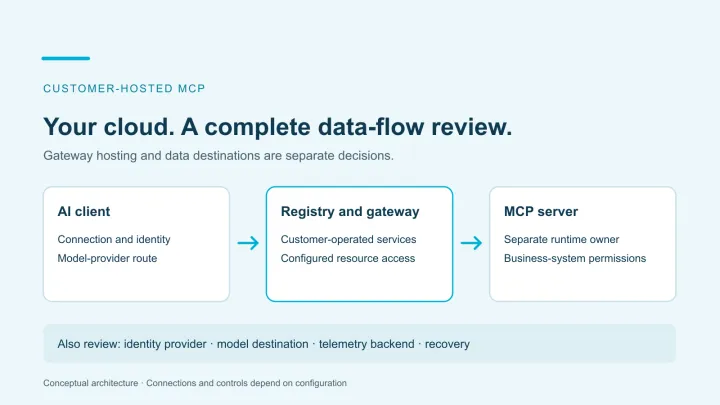
Likewise, hosting the catalog in your cloud does not decide where an assistant processes its context. Include the coding client’s model provider and tool destinations in the data-flow review.
Start with one maintained package, one environment and the coding tools your team actually runs. Bring the identity requirements and operating owner to an ASCENDING Skill Gateway discussion. Use the pilot record to decide whether and how to expand.
References
- Jarvis production deployment and local quick start
- Skill Gateway features and permissions
- AI Skills CLI and CLI getting started
- Cursor skill directories and compatibility
- Private-skill lifecycle walkthrough
- Organization-level skill management
Documentation reviewed October 28, 2026. Hosting, recovery and client checks must be performed in the chosen environment before rollout.
Self-hosted skill registry decisions
Can we host Jarvis Skill Gateway in our own cloud?
Yes. Skill Gateway is part of the broader customer-operated Jarvis Registry. The production reference covers an existing EKS or AKS cluster and a Helm release. This does not establish a separate lightweight skills-only installation. Review the full service and its identity, storage and networking dependencies.
Can Jarvis import skills from any Git provider?
Yes. Skill Gateway supports GitHub, GitLab and other Git providers. Repository import is read-only and runs one way into Registry; Registry edits are not pushed back. The published GitHub setup is one provider-specific example, so use the connection and authorization setup for your chosen provider. Direct UI/API authoring is another option.
Which coding clients does the delivery CLI support?
Jarvis skills can be used with Claude Code, Codex, Cursor and GitHub Copilot. The CLI's named modes are claude, codex and copilot; Cursor reads compatible skill directories, including .claude/skills/. Use the appropriate local layout and verify client loading after sync. A downloaded package alone does not prove that the client discovered or used it.
Does access removal recall copies from developers' devices?
No. Registry access and a subsequent successful sync govern retrieval and the CLI-managed set. Offline devices, failed syncs, independently copied files and content already loaded into a client require separate handling. Use a disposable project to test the actual client's behavior.