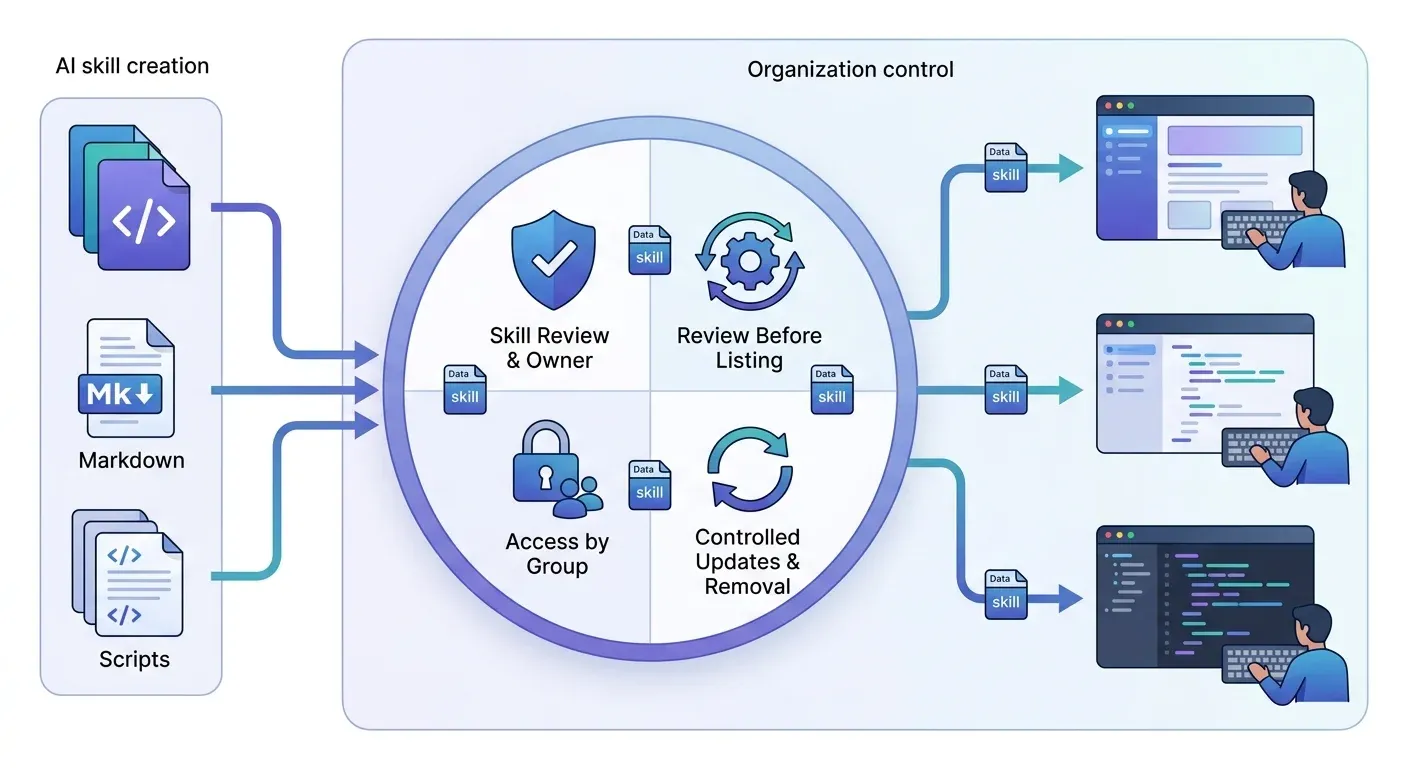
A private skill marketplace is an organization-controlled catalog of AI agent skills. Teams publish reviewed skills in one place, set who can find, edit and install them, and deliver them to supported coding tools. Unlike a public marketplace, the organization decides what is listed, who can access it, and what gets distributed.
Most teams reach this question the same way. A useful skill gets copied between repositories, a second version appears, and nobody can say which one is maintained or who approved it.
For a coding-team shortlist, evaluate Jarvis Skill Gateway, MasterSkills, SkillReg, JFrog Agent Skills Registry and iFLYTEK SkillHub. The useful distinction is how a reviewed package reaches the right developer, not whether a product calls itself a skills marketplace or a skill registry.
ASCENDING maintains Jarvis Skill Gateway, part of the open source Jarvis Registry. The comparison below uses vendor documentation, not a hands-on benchmark or a claim that every option provides the same controls.
Key Takeaways
- A skill is a
SKILL.mdfile plus optional scripts and references. A marketplace is the catalog, access control and install path around those skills.- “Private” means your organization controls listing, access and updates.
- Private hosting does not perform content review or decide where a model processes a downloaded package.
- A private repository or native coding-tool distribution may meet the need when its permissions, updates and installation process satisfy your requirements.
- Compare named options by hosting, package access and a verified delivery path for each client.
- Skills carry instructions, not authorization. Live tool access still needs gateway and downstream permissions.
What is a private skill marketplace?
It’s a managed catalog with three parts: the skills themselves, rules about who can see and change them, and a way to get them onto developers’ machines.
A skill, in the Agent Skills format, is a SKILL.md file with optional scripts, references and assets. That last part matters. A skill can contain executable material, so “reviewed” has to mean the whole package, not just the prose.
The marketplace adds a maintained catalog and distribution process around those files. Decide who owns each skill, who reviews it, who receives it and how updates arrive. Some products implement approval workflows; others require your team to operate the review process. “Private” means access is restricted, not that these responsibilities disappear.
How is it different from a public skill marketplace?
A public marketplace optimizes for discovery by anyone. A private one optimizes for control. That changes who can publish, who can install and who answers for what’s in the catalog.
A private marketplace moves package selection and access decisions inside your organization. Someone still has to review the skill, including scripts and references, before it is distributed. A private catalog can contain an unsafe package too. Our post on whether public agent skills are safe has a review checklist.
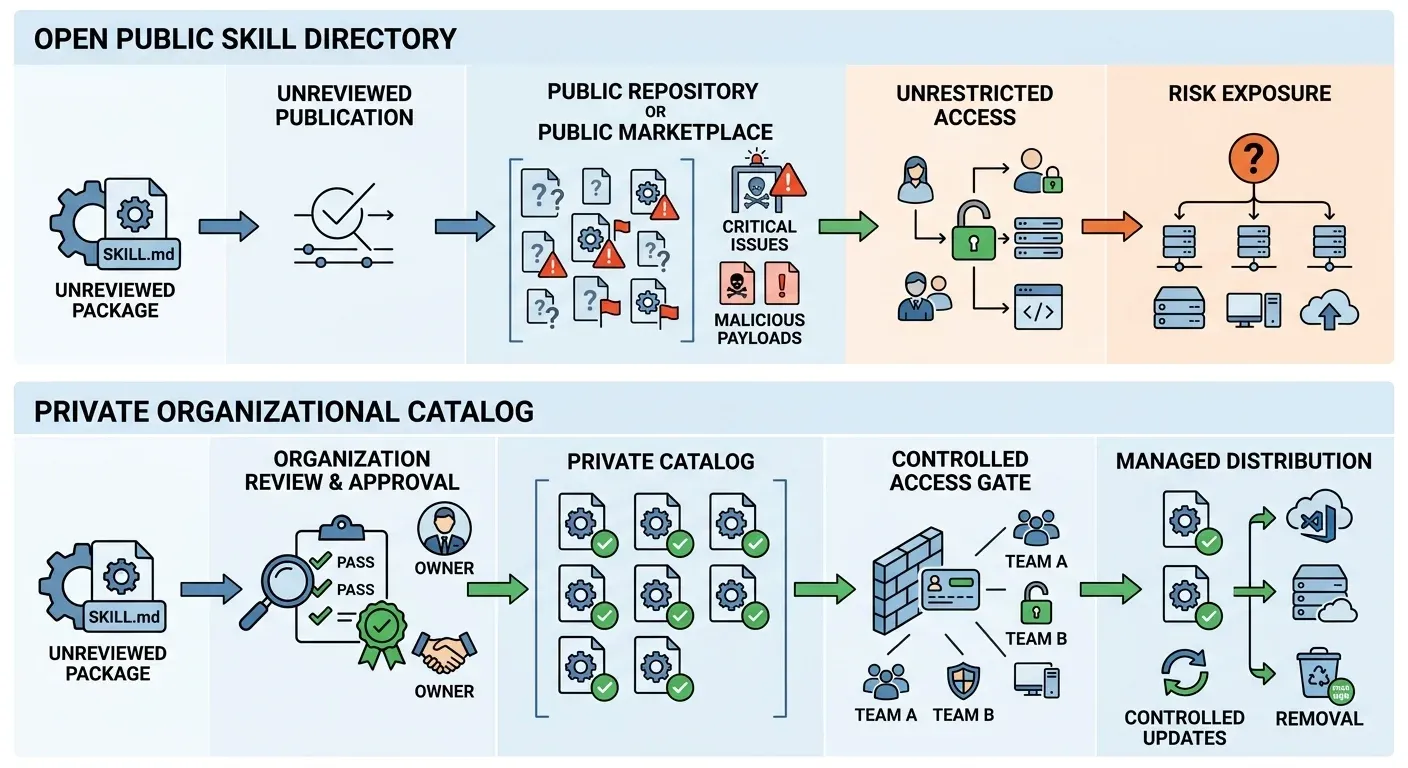
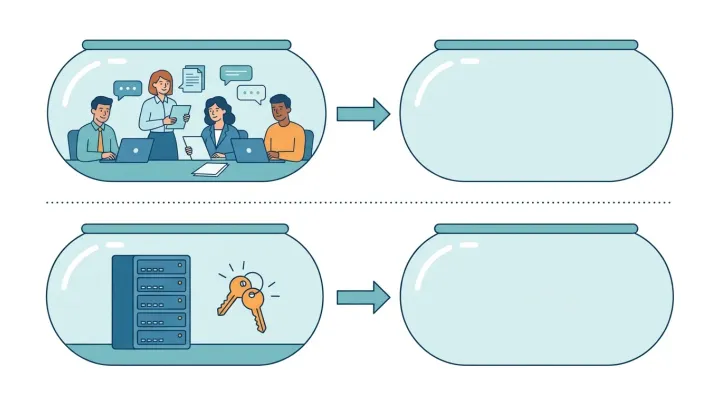
Example processes: an unreviewed public route versus an organization-reviewed private route. Public catalogs can also review packages, and a private catalog still needs its own review.
| Public directory | Private repo or native distribution | Skill Gateway | |
|---|---|---|---|
| Deployment model | Third-party site | Repository on your git host | Jarvis Registry, which can run in your own account |
| Supported AI tools | Whatever the listing targets | Depends on your chosen distribution tool | Claude Code, Codex, Cursor and GitHub Copilot; Cursor uses compatible skill directories |
| Auth and access control | Open to anyone who can reach it | Repository permissions; an admin can require the marketplace | Resource permissions for viewing, editing, deleting and sharing |
| Audit | Varies by directory | Git history records catalog changes | Not covered in this post; confirm what is recorded for skill changes in your demo |
| MCP support | Separate concern | Separate concern | Pairs with MCP Gateway, which governs live tool calls separately |
| Hosting | Operated by the directory | Your git host | You choose where Registry runs |
Why do enterprises want one?
Because skills behave like software packages. Teams need to know where a skill came from, who approved it and which version a developer is using. Four things follow from that.
- One maintained source. A single copy replaces folders passed between repositories.
- Access by group. Access follows your people and groups, not whoever has the link.
- Review before listing. An accountable owner reviews the complete package through the process your organization chooses.
- Managed updates and access changes. Teams record which revision should reach developers and test what happens when access ends.
Private hosting has limits, and we’d rather state them. It doesn’t decide where a connected model sends the content it reads. Removing access doesn’t recall a file someone already copied. And secrets don’t belong in skills at all. Our post on private AI skill management walks through how to test each of these.
A regulated company faces the same questions with more evidence to produce. Before choosing a private marketplace for coding agent skills, agree with your security and compliance owners which review records, access records and hosting boundary they need, then test that the option you pick produces them. This post makes no compliance claim about any option listed below.
How do you share skills across Claude Code, Codex, Cursor and other tools?
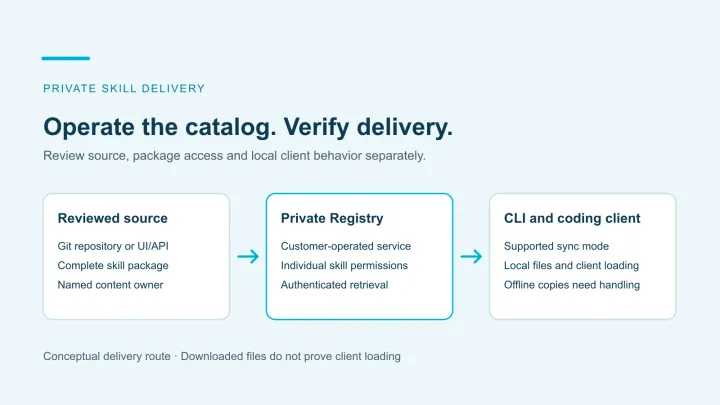
A skill package includes SKILL.md and the reference files, scripts and assets it relies on. The package has to arrive intact. Each tool also looks for skills in its own location. A marketplace therefore needs a delivery step, not just storage. Our SKILL.md guide lists the folders Claude Code, Codex, Cursor and GitHub Copilot each scan.
Jarvis supports delivery to Claude Code, Codex, Cursor and GitHub Copilot. Developers authenticate with the AI Skills CLI, then sync accessible skills into personal or project environments. Its named modes are claude, codex and copilot. Cursor’s skill-directory compatibility lets it use packages delivered into .claude/skills/; it does not require a separate cursor CLI mode. Verify the installed package in each intended local or remote environment.
You can author skills in Registry’s UI or API, or import them from GitHub, GitLab or another Git provider. Repository import is read-only and runs one way into Registry; Registry edits are not pushed back. The published GitHub setup is a provider-specific example, not the limit of product support. Use the source provider’s connection setup and keep that authorization separate from a developer’s permission to retrieve a Registry package. Record the source revision and Registry version separately when reviewing an update.
Do you need a private AI skill registry, or is Git enough?
A private repository is a valid option when its access, review, update and delivery behavior satisfy your requirements. Team size or the number of coding clients alone does not decide this.
Claude Code’s marketplace documentation describes a directory or repository with a .claude-plugin/marketplace.json catalog. Its organization controls provide another way to manage distribution. Test repository authentication and installed-package behavior rather than assuming a private URL provides every control.
Use requirements rather than a company-size threshold:
| Your situation | A reasonable starting point |
|---|---|
| Existing repository delivery already meets access and update requirements | Keep it and improve the review process where needed |
| Developers hand-copy packages or adapters across coding tools | Compare a maintained distribution layer against repairing the existing route |
| Different groups need access to individual packages | Verify package-level permissions and all effective grants |
| Audit or removal is a requirement | Demonstrate the relevant events, retention and local-copy behavior before choosing |
Example: an on-call skill in a shared developer repository
Illustrative company decision, not a customer result. A company shares reviewed build-check skills through a private repository that all engineers can clone. Operations now wants an incident-response package available only to its on-call team.
A separate private repository may meet that requirement. The company should test its existing distribution route before adding a service. If it needs different audiences for individual packages, compare that process with a registry’s package permissions. Hiding a catalog entry isn’t enough if an excluded user can still download the files.
Use an approved user and an excluded user to check the complete package, then test an update and access removal. Future retrieval and local copies are separate outcomes. A copy made before removal may still exist. Choose the smallest setup that meets those requirements and that the team can maintain.
Is Claude’s built-in skill management enough?
It may be. Claude Code’s documentation describes creating and hosting your own marketplace from a directory or repository, so a company can run a private plugin marketplace for Claude Code without another service. Check that route against your list: which coding clients receive the package, who can see individual skills, and what shows an update or a removal. If native management meets those requirements, keep it. A separate registry needs to justify the extra service your team will run or buy.
Which private agent skill registries should coding teams evaluate?
Start with the hosting model, package permissions and install path. A native client marketplace may be sufficient; a separate registry needs to justify the additional service your team will run or buy.
The options below describe SKILL.md packages, not live MCP tool execution. Public product and documentation pages were checked October 28, 2026. Features and commercial scope still need confirmation for your selected edition.
| Option | Documented distribution and governance | What to establish in your trial |
|---|---|---|
| Jarvis Skill Gateway | Customer-operated Jarvis Registry; individual skill ACLs, one-way import from Git providers including GitHub and GitLab, and delivery to Claude Code, Codex, Cursor and GitHub Copilot. | Fits a team evaluating private packages alongside Registry’s separate MCP and agent capabilities. Test provider setup, the client delivery layout, review process and available skill-change evidence. |
| MasterSkills | Private, versioned package distribution with organization/workspace/team/project access. Its Enterprise offer includes a Docker Compose self-hosted route. | Confirm the required license, identity setup and client-specific installation behavior; hosted and self-hosted operating responsibilities differ. |
| SkillReg | Organization-private skill packages with a documented authenticated CLI and coding-client setup. | Confirm plan-specific permissions and approvals, hosting terms and the exact clients and versions you need. Do not assume it is a self-hosted product. |
| JFrog Agent Skills Registry | Versioned skills in Artifactory with project-scoped access and approval policies. Its operational guide documents evidence signing with Enterprise+ and skill scanning only on JFrog SaaS. | Establish subscription, scanning setup, deployment model and installation path. These are vendor-described capabilities, not proof that scanning catches every unsafe instruction. |
| SkillHub, from iFLYTEK | An open source, self-hosted registry with versioned packages, team namespaces and a CLI distribution route. | Verify identity integration, review/audit configuration, storage operations and compatibility with your coding clients. |
Sources: Jarvis Skill Gateway, MasterSkills, SkillReg setup, JFrog’s Skills Registry and SkillHub’s README.
For an existing JFrog customer, check the platform you already operate before introducing another service. For a customer-hosted deployment, compare the documented infrastructure and support scope, not only the download format. Our self-hosted skill registry guide follows that hosting decision for Jarvis.
Whichever option you choose, test the same package through approval, installation, an update and access removal. Record the package version and client version so the result can be reproduced.
For a release process across coding tools, use the shared Claude Code, Codex and Cursor skill library guide. It separates the reviewed source from client adapters and installed copies, with discovery and rollback tests.
What a skill marketplace doesn’t govern
A skill carries instructions, not authorization. An approved skill that mentions a ticketing system doesn’t give the agent permission to use it.
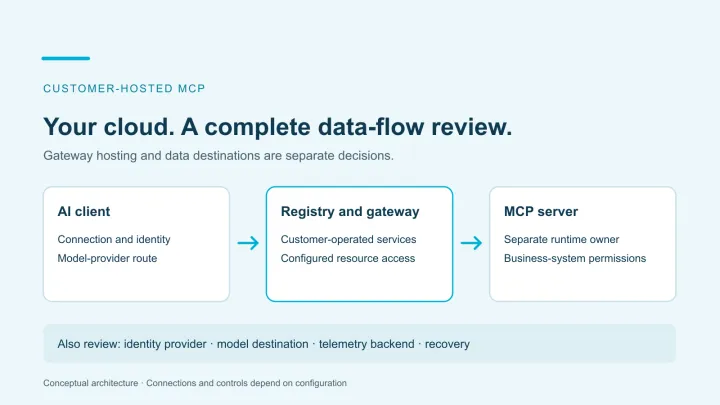
Live operations are a different layer. MCP tools run through a gateway with its own identity and policy, and the downstream system still decides what each user can touch. We cover that boundary in AI skills vs MCP tools and in the MCP gateway buyer’s guide.
The same split explains why a skill registry isn’t an MCP registry. One catalogs instructions for how to work. The other catalogs the tools an agent can call. Our enterprise MCP registry architecture post covers the second.
If you’re also registering running agents, the AI agent registry vs skill registry comparison distinguishes agent endpoints, A2A capability descriptions and downloadable instruction packages, including platforms that catalog all three.
What to check before you adopt one
Test one skill with two accounts before you roll anything out.
- Name an owner. Every shared skill needs a person accountable for it.
- Review before listing. Read the whole package, including scripts and references.
- Use two test accounts. One has access and one doesn’t. Confirm each sees what you expect, and that only maintainers can edit or share.
- Test an update and a removal. Change the source, sync again, then remove all effective grants and sync once more. Separate blocked retrieval and managed-directory reconciliation from offline, copied or already-loaded files.
- Confirm your tools. Check the exact tools and versions your developers use, in your own configuration.
A good demo shows all five with a non-sensitive skill your team can review. Use an empty disposable project: the CLI getting-started guide describes mode-specific directory ownership, including project directories that remove entries outside the CLI’s tracked set. Do not test against independently maintained files.
Use the published private-skill lifecycle walkthrough for import, update and access checks. Request a Jarvis demo with one skill, two users and the coding tools you run today.
Registry shortlist and Jarvis delivery boundaries reviewed October 28, 2026. This is a documentation comparison; no customer deployment results are asserted.
References
- Agent Skills format overview
- Claude Code documentation, Create a marketplace
- Claude Code documentation, Host and maintain a marketplace
- Claude Code documentation, Manage plugins for your organization
- iFLYTEK SkillHub repository
- MasterSkills private registry
- SkillReg getting started
- JFrog Agent Skills Registry
- JFrog Skills Registry operational guide
- Jarvis Skill Gateway
- AI Skills CLI documentation
- Cursor skill directories and compatibility
- Private-skill lifecycle walkthrough
Private skill marketplace questions
What is a private skill marketplace?
A private skill marketplace is an organization-controlled catalog of AI agent skills. Teams publish reviewed skills in one place, set who can find, edit and install them, and deliver them to supported coding tools. Unlike a public marketplace, the organization decides what is listed, who can access it, and what gets distributed.
Which private agent skill registries should coding teams evaluate?
Jarvis Skill Gateway, MasterSkills, SkillReg, JFrog Agent Skills Registry and iFLYTEK SkillHub offer different private distribution models. Compare hosting, package-level permissions, the review process and the exact client installation path. Native coding-tool distribution or a private repository may also meet your requirements.
Which coding clients can receive Jarvis skills?
Jarvis supports Claude Code, Codex, Cursor and GitHub Copilot. The AI Skills CLI has claude, codex and copilot modes with personal and project scope. Cursor reads compatible skill directories, including .claude/skills/, so it can use that delivery layout. Verify discovery and behavior in the client and environment your team uses.
Does removing Registry access erase a downloaded skill?
No. Removing access blocks subsequent authorized retrieval, and a successful CLI sync reconciles its managed set. Offline machines, independently copied files and content already loaded by a coding client require separate handling. Test the actual client and sync mode before treating access removal as complete.
What is the difference between a skill registry and a skill marketplace?
The terms overlap. A skill registry usually stores versioned skill packages and controls who can retrieve them, while a skill marketplace usually adds browsing and installation for developers. Many products do both, so compare hosting, package permissions and the install path for each client rather than the label. Neither is an MCP registry: skills are instructions, while MCP tools are live operations. See AI skills vs MCP tools, and is it safe to use public agent skills for why private hosting does not replace package review.