


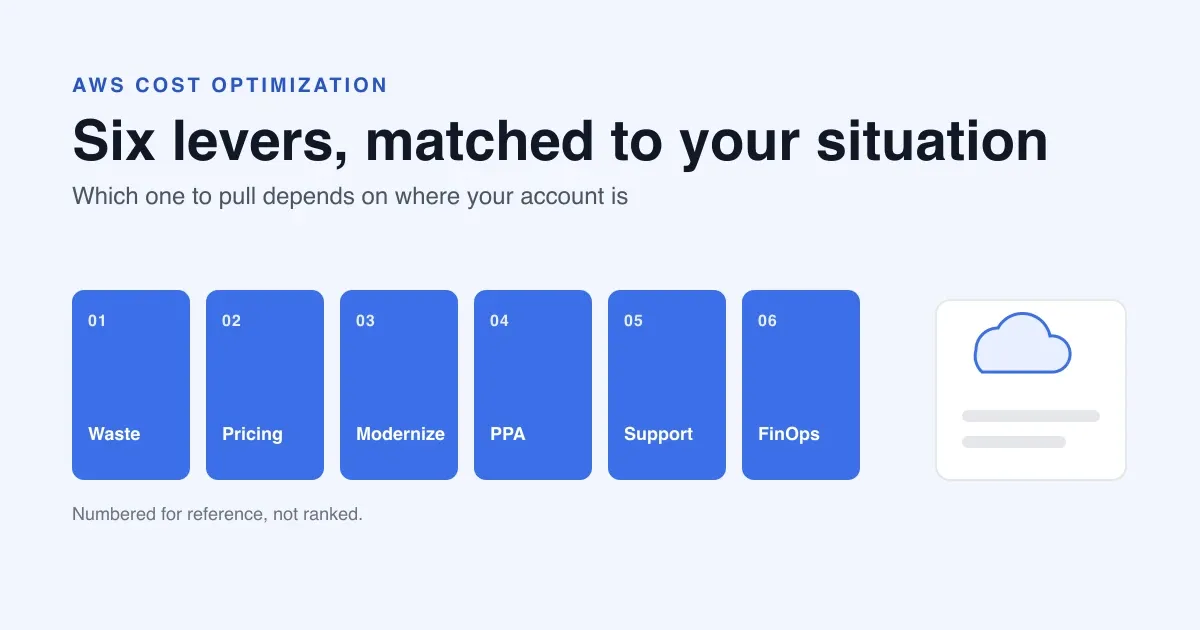
An AWS bill does not come down with one service. It comes down with six levers, pulled in the right order for your situation:
- Remove waste and right-size.
- Pick the right pricing model for each workload.
- Modernize what is costly to run.
- Negotiate a Private Pricing Agreement (PPA).
- Lower the support fee through an authorized AWS partner.
- Measure the result so the savings last.
A cost optimization service, meaning paid help with this work, is worth paying for when it does that work and proves the saving held. A service that only hands you a report is not.
This post shows which lever fits which situation and ends with five questions to ask any provider. It draws on the AWS Well-Architected Framework’s Cost Optimization pillar and AWS’s cost management pages. It marks the points that are ASCENDING’s judgment and not AWS’s.
Last verified against AWS pages on 2026-11-18. AWS publishes no typical saving for an account of any size, so this post gives none. Check the sources in References before you rely on a detail. ASCENDING’s earlier posts linked below were written some years ago. Use them for the approach, and check current AWS pricing and documentation before you apply a detail.
Key takeaways
- The right first lever depends on your situation, not on a fixed order.
- AWS says to size commitments to the steady floor of your usage, not the peak. That is why waste and right-sizing usually come first for accounts that have grown without cleanup.
- A PPA lowers your rate on broad spend. Partner-led support lowers the Enterprise Support fee. If you hold a cross-service PPA, Enterprise Support is mandatory, so partner-led support cuts a cost you must carry anyway.
- Without a baseline and an audit, you cannot tell which lever worked.
The six levers at a glance
AWS’s Cost Optimization pillar has four areas: cloud financial management, expenditure and usage awareness, cost-efficient resources, and continuous optimization. Levers 1 to 3 draw on expenditure and usage awareness and cost-efficient resources, and lever 6 on cloud financial management and continuous optimization. Levers 4 and 5 are ASCENDING’s additions on the commercial side. The numbers are labels, not a ranking.
| # | Lever | What it changes | Typical owner |
|---|---|---|---|
| 1 | Cut waste and right-size | What you run and how big it is | Engineering |
| 2 | Choose pricing models | What each hour of usage costs | FinOps or finance |
| 3 | Modernize the application | How the workload is built | Engineering |
| 4 | Negotiate a PPA | Your rate on broad spend | Finance and procurement |
| 5 | Partner-led support | The Enterprise Support fee | Cloud owner and procurement |
| 6 | Measure and audit with FinOps | Whether savings are proven | FinOps |
“Typical owner” is ASCENDING’s judgment, not an AWS classification.
Which lever fits which situation
AWS describes each practice but does not say which to start with. The table below is ASCENDING’s judgment, built on what the AWS guidance says about each lever.
| Your situation | Start with | Then | Hold off on |
|---|---|---|---|
| Just migrated or lifted and shifted; spend is unclear | Waste and right-sizing (1); a measured baseline (6) | Modernization candidates (3) | Commitments (2, 4) until usage settles |
| Stable production usage, little waste left | Pricing models (2) | A PPA (4) | n/a |
| Large, predictable spend; a contract is starting or renewing | A PPA (4) | Pricing models (2) | n/a |
| You pay for Enterprise Support, or a PPA requires it | Partner-led support (5) | Include it in PPA talks (4) | n/a |
| One architecture is expensive to run | Modernization (3) | Re-measure (6), then re-size commitments (2) | A commitment on the old design |
| Savings keep coming back; nobody owns the bill | Measure and audit (6) | Rebase the other levers on the baseline | n/a |
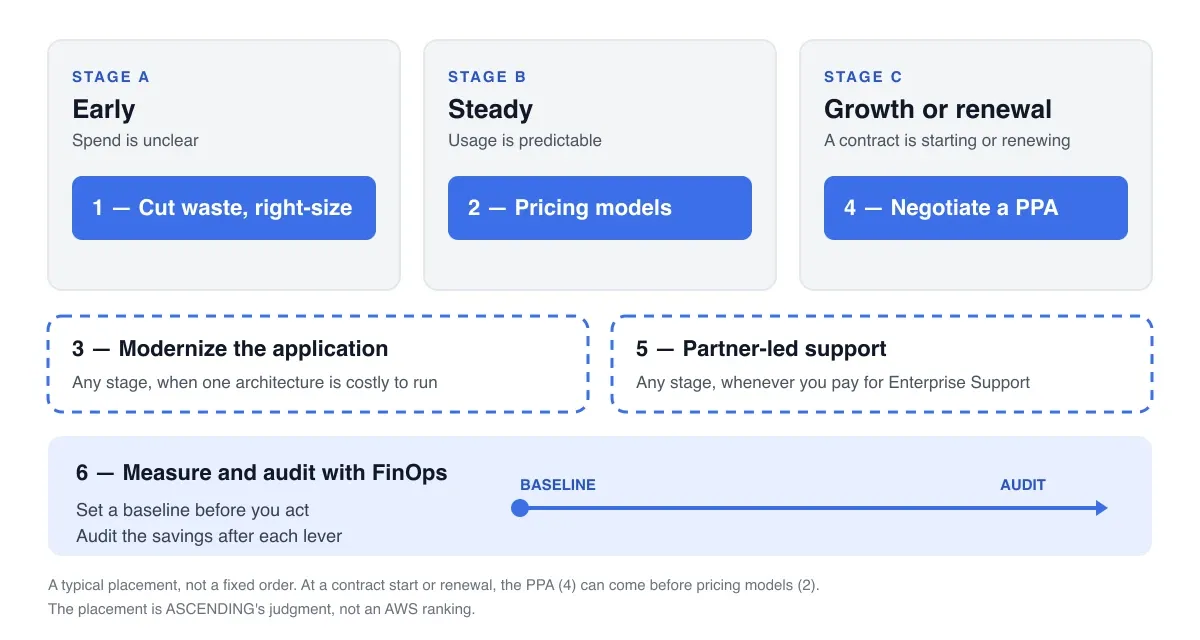
Three stages run through the rows:
- Early, spend unclear. AWS’s expenditure and usage awareness area starts from the point that you cannot optimize what you cannot see. Make spend visible, then remove what nothing uses.
- Steady, usage predictable. AWS says steady, long-running components suit commitment-based discounts. Short-lived or elastic ones are cheaper on usage-based or interruptible models. Pricing models and a PPA pay off here.
- Growth or renewal. A PPA and its support requirement hang off contract timing. Modernization is not tied to a stage. It comes up whenever one architecture is clearly expensive to run.
AWS also suggests quarterly or bi-annual deep reviews for workloads above roughly 10 percent of cost, and annual reviews for the rest.
1. Cut waste and right-size
Stop paying for what nothing uses, then size the rest to real demand. For an account that has grown without much cleanup, this comes first. In ASCENDING’s view, it also makes every later lever cheaper.
AWS names the practices, in its guidance on right-sizing and cloud financial management:
- Manage the resource lifecycle. Retire environments that no longer serve a need. That includes non-production environments that run around the clock but are used only in working hours.
- Right-size from data. Choose type, size and number from measured workload characteristics, not from a cautious over-estimate.
- Match effort to impact. Look harder at the resources that drive most of the bill.
AWS also gives you the tools to find the work, listed on its Cost Management page:
- Cost Explorer analyzes cost and usage over time.
- AWS Budgets alerts you when spend exceeds, or is forecast to exceed, a threshold.
- Cost Anomaly Detection flags unusual spend.
- Cost Optimization Hub gathers recommendations across Regions and accounts.
- AWS Compute Optimizer recommends sizes that match demand and finds idle resources.
AWS lists a common failure: right-sizing recommendations are generated and never acted on. The savings stay theoretical while the resources keep running.
For a company spending $20,000 a month, this is the place to start. Find what nothing uses and remove it.
Illustration: a $20,000-a-month account
This is a hypothetical buyer profile, not data from a customer or from AWS. Say the bill is $20,000 a month across compute, storage and databases, and development and test environments run around the clock. The steps below show an order of work. They are not savings estimates, because AWS publishes none.
| Step | Action | Lever |
|---|---|---|
| 1 | Turn on Cost Explorer and Budgets, tag spend by team, and record a baseline such as cost per unit of business outcome | 6 |
| 2 | Schedule or stop the development and test environments, and remove the idle resources Compute Optimizer finds | 1 |
| 3 | Right-size the largest compute and database resources first | 1 |
| 4 | Find the steady floor of usage and cover that floor with Savings Plans. Leave variable usage on-demand and interruptible work on Spot | 2 |
| 5 | Skip the PPA for now. In ASCENDING’s judgment, an account of this size may not be large enough to qualify. AWS publishes no minimum commitment, so ask your account team and revisit it as spend grows | 4 |
| 6 | If you buy Enterprise Support, compare the fee through a partner. The cost post works the fee at several spend levels | 5 |
| 7 | Re-measure against the baseline and record each saving against the step that produced it | 6 |
Modernization (lever 3) stays off the list unless one workload stands out as expensive to run.
ASCENDING’s earlier S3 cost optimization post shows one waste lever: move rarely read objects to a cheaper storage class with a lifecycle rule. It compares only the classes available then (Standard, Standard-IA and Glacier), so check AWS’s current S3 pricing first.
2. Choose the right pricing model
Match each workload to the pricing model that fits how it runs. Savings Plans and Reserved Instances reward steady usage. Spot Instances suit fault-tolerant work that can be interrupted. AWS ties each pricing model to a usage pattern in its pricing model guidance. AWS’s goal is one model per component, chosen by usage pattern, not one model for everything.
Order matters. AWS lists commitments sized to peak usage, instead of the steady floor, as a common mistake. You pay for unused commitment whenever demand dips. AWS also warns that commitments bought once and never revisited drift out of line. In ASCENDING’s view, this is why you remove waste first. A commitment on an oversized baseline locks the waste in for the whole term.
For Spot, ASCENDING’s earlier post on running a stack on Spot Instances shows how to make an application ready for interruptions.
For how Savings Plans compare with a PPA, see AWS Savings Plans vs EDP vs Private Pricing.
3. Modernize the application
Some of the biggest savings come from changing how a workload runs, not from tuning it. AWS says a component can be cheaper because you picked a better-suited service. It favors managed, serverless and event-driven designs where they lower cost and still deliver the business value.
AWS is clear about what to compare. Listed price alone misleads. Weigh total cost of ownership: operational overhead, licensing, data transfer, and the effort to run the component. A self-managed option can look cheaper until you count the staff time to patch, scale and operate it.
Modernization has its own cost. It takes engineering time and can lengthen the payback. AWS’s trade-offs guidance says to start from business requirements and work backward. It says the pillar’s goal is not cost reduction alone but the best ratio between cost and business value. It also notes that teams defer modernization because migration cost is visible today while the cost of staying put is spread over years. In ASCENDING’s view, start here only when one architecture is clearly expensive to run.
ASCENDING’s earlier post on migrating business applications to serverless covers when serverless fits, which domains it does not suit, and the risks to plan for.
Microservices and serverless: where the saving comes from
Two patterns come up most often. They save money in different ways. In ASCENDING’s view:
- Serverless and event-driven designs charge for work done, not for idle capacity. They fit spiky or unpredictable demand, where a fleet sized for the peak sits idle in the troughs. AWS’s right-sizing guidance names the same problem.
- Microservices split an application into parts you can scale and size independently. One busy component no longer forces you to scale everything. The trade-off is operational: more components to run, monitor and secure. Staff time counts in total cost of ownership, so a split done without need can cost more than it saves.
Neither saves money by default. Both pay off when demand is uneven or the parts carry very different load. Neither is worth it for a small, steady workload that already fits its servers.
Example: FINRA’s elastic trade validation
ASCENDING’s FINRA case study (published 2024-07-15) shows the serverless pattern. FINRA’s Order Audit Trail System had to validate trade reports against more than 200 rules, with daily volumes that could double or triple on spike days. ASCENDING replaced static infrastructure with a serverless, event-driven pipeline. Files land in Amazon S3, a controller tier coordinates work through Amazon SQS, and AWS Lambda workers run the validation.
The case study reports a 2x gain in cost efficiency, which it attributes to Lambda’s pay-as-you-go processing and to retiring on-premises servers. It also reports validation time falling from 3 to 7 minutes to under 1 minute.
Read the cost figure with care:
- It publishes no baseline, dollar amount or percentage, so “2x” shows direction, not a number for your bill.
- It combines two changes, so the saving cannot be credited to serverless alone.
- The case study mentions microservices-based controllers only as a possible next step. It is not a microservices example.
Example: TOKENEED on Amazon EKS
For containers, ASCENDING’s TOKENEED case study (published 2022) covers a blockchain tokenization platform on Amazon EKS, the managed Kubernetes service many teams use for microservices. Its releases were manual and hard to roll back. ASCENDING built a five-stage AWS CodePipeline workflow with rolling, immutable and blue/green options. The case study reports that release time dropped by more than 80 percent.
The saving here is engineering effort, not AWS spend. That still counts, since AWS includes staff time in total cost of ownership. But the case study gives no AWS cost figure, no absolute release times, and no detail on how the application is split into services. It supports the operational-effort point above, not a claim that EKS lowers your AWS bill.
If you run Kubernetes, ASCENDING’s AWS EKS and Kubernetes page lists the cost levers it applies: autoscaling, separating workloads across instance types or Spot Instances, and setting resource requests and limits. It publishes no savings figures. To see what each workload costs before you change anything, read EKS cost monitoring per workload. It names third-party tools, so re-check them before you rely on it.
4. Negotiate a PPA
A cross-service Private Pricing Agreement (PPA, formerly the Enterprise Discount Program, or EDP) trades a commitment on your overall AWS spend for a negotiated rate across eligible services. AWS does not publish rates, so the saving depends on the negotiation and on how much of the commitment you use. A shortfall against the commitment is the main risk.
AWS’s pricing page describes private pricing only in general terms and publishes no discount schedule or contract terms.
Sequence matters. Negotiate after you remove waste and settle pricing models, so you commit to your real baseline. If you commit first and cut spend later, you risk a shortfall.
For the clauses to check, read the PPA and EDP negotiation guide. The support requirement that comes with a PPA is covered in the next lever.
5. Lower the support cost through partner-led support
In ASCENDING’s position, Enterprise Support is mandatory in a cross-service PPA, and an authorized AWS partner can provide it (details). AWS does not publish PPA terms, so confirm the clause with your AWS account team. ASCENDING is an AWS Premier Tier Services Partner and Managed Service Provider, and its AWS Partner-Led Support delivers Enterprise Support at a lower fee than buying it directly from AWS. The rate and what it applies to are stated in AWS Partner-Led Support vs AWS Enterprise Support, not repeated here. ASCENDING provides this route, so weigh its interest.
If you hold a cross-service PPA, the logic is simple. You carry the Enterprise Support fee either way. Taking it through an authorized partner reduces that fee, and your PPA stays unchanged.
The numbers and trade-offs are in two more ASCENDING posts:
- How much AWS Enterprise Support costs works the fee at different spend levels.
- Is AWS Enterprise Support worth it? helps you decide whether you need the plan at all.
The partner route also includes Technical Account Manager-led Well-Architected Reviews. See the Well-Architected Reviews page.
6. Measure and audit the savings with FinOps
Cost work decays unless someone owns and measures it. FinOps is how you check that the other five levers worked and keep working. Use it at both ends. Set a baseline before you act. Audit the savings afterward, so you know which lever produced which result.
AWS describes cloud financial management as shared work across finance, engineering and business teams. They need a shared vocabulary, one source of cost metrics, and a regular review cadence. AWS also says to track efficiency as cost per unit of business outcome, not absolute spend alone. Otherwise growth looks like failure and real efficiency gains stay invisible. Use that as a test for any savings claim: ask what the unit cost did, not only what the bill did.
AWS also lists findings that are recorded but never enter a backlog as a common failure, so reviews produce reports instead of savings. Give each finding an owner and a place in the backlog, and record the saving when it lands.
ASCENDING’s earlier post Measuring cost optimization on AWS uses a composite of computing hours against cost, so a growing environment does not hide the gain.
What to ask any provider before you pay
In ASCENDING’s view, providers come in three kinds: a consultancy that advises and reports, a partner or managed service provider that makes changes in your accounts, and a tool vendor that automates detection. The last two can overlap. These five questions are ASCENDING’s checklist, not an AWS standard, and they apply to all three.
| Question | What a good answer sounds like |
|---|---|
| Who makes the change in your accounts, and with what access? | A named team, scoped permissions you control and can revoke, and a record of each change |
| How is a saving tracked so you know it stayed? | A baseline before the work, unit-cost reporting after it, and a review cadence |
| What does the fee depend on? | A fee you can predict and tie to scope, not only to a share of what is saved |
| Does it require migration or re-platforming? | It says which levers work in place and which need engineering changes |
| What happens to the work if you stop? | The recommendations, reports and changes are yours to keep |
Most levers work in place: cleanup, right-sizing, pricing models, a PPA, partner-led support and measurement. Modernization is the exception, because it changes the application.
The questions follow from AWS’s warning about recommendations that are never acted on. The useful part of a service is the work that follows the report.
References
- AWS Cost Management: Cost Explorer, Budgets, Cost Anomaly Detection, Cost Optimization Hub, Compute Optimizer and Savings Plans, opened 2026-11-18.
- AWS Well-Architected Framework, Cost optimization pillar, opened 2026-11-18.
- Practice cloud financial management, opened 2026-11-18.
- Evaluate cost when selecting services, opened 2026-11-18.
- Select the correct resource type, size, and number, opened 2026-11-18.
- Select the best pricing model, opened 2026-11-18.
- Optimize over time, opened 2026-11-18.
- Understanding trade-offs, opened 2026-11-18.
- AWS pricing, AWS, for the general description of private pricing (also cited in ASCENDING’s Savings Plans post, opened 2026-11-04).
- AWS Partner-Led Support, ASCENDING.
- Well-Architected Reviews, ASCENDING.
- TOKENEED EKS Continuous Deployment with AWS CodePipeline, ASCENDING case study, opened 2026-11-18.
- AWS EKS and Kubernetes, ASCENDING, opened 2026-11-18.
- FINRA Elastic Trade Validation on AWS, ASCENDING case study, opened 2026-11-18.
FAQ — AWS Cost Optimization Services Questions Buyers Ask
Which AWS cost optimization services are worth paying for?
In ASCENDING's view, the ones that make changes and then prove the saving held, not the ones that only produce a report. AWS's own tools already list what to resize, and the AWS Well-Architected guidance warns about recommendations that are generated and never acted on. Ask any provider who makes the change in your accounts, how a saving is tracked, and what the fee depends on. The questions are in the section "What to ask any provider before you pay" near the end of this post.
How can a company spending $20,000 a month on AWS cut its bill?
Start by finding out where the money goes and removing what nothing uses, then right-size what remains. After that, match each workload to a pricing model, and only then commit. AWS publishes no typical saving for an account of this size, so any percentage you are quoted is an estimate. The situation table in this post shows which lever to start with for your stage.
Can I reduce my AWS bill without migrating?
Yes, for most levers. Cleaning up unused resources, right-sizing, changing pricing models, negotiating a Private Pricing Agreement (PPA), and moving to partner-led support all happen in your existing accounts. Application modernization is the exception, because it changes how a workload is built and takes engineering time.
Can partner-led support lower my AWS cost if I have a PPA?
Yes. In ASCENDING's position, Enterprise Support is mandatory in a cross-service PPA and an authorized AWS partner can provide it, with your PPA unchanged. AWS does not publish PPA terms, so confirm the clause with your AWS account team. That makes partner-led support a way to reduce a cost you must carry anyway. The PPA and Enterprise Support requirement post covers who can provide it, and AWS Partner-Led Support vs AWS Enterprise Support covers what changes.