Protect company MCP tools from tool poisoning by reviewing what the model will see, recording the approved definition, and checking changes before clients use them. Keep runtime permissions narrow as a separate control. Approving a server once doesn’t establish that every later tool definition or response is trustworthy.
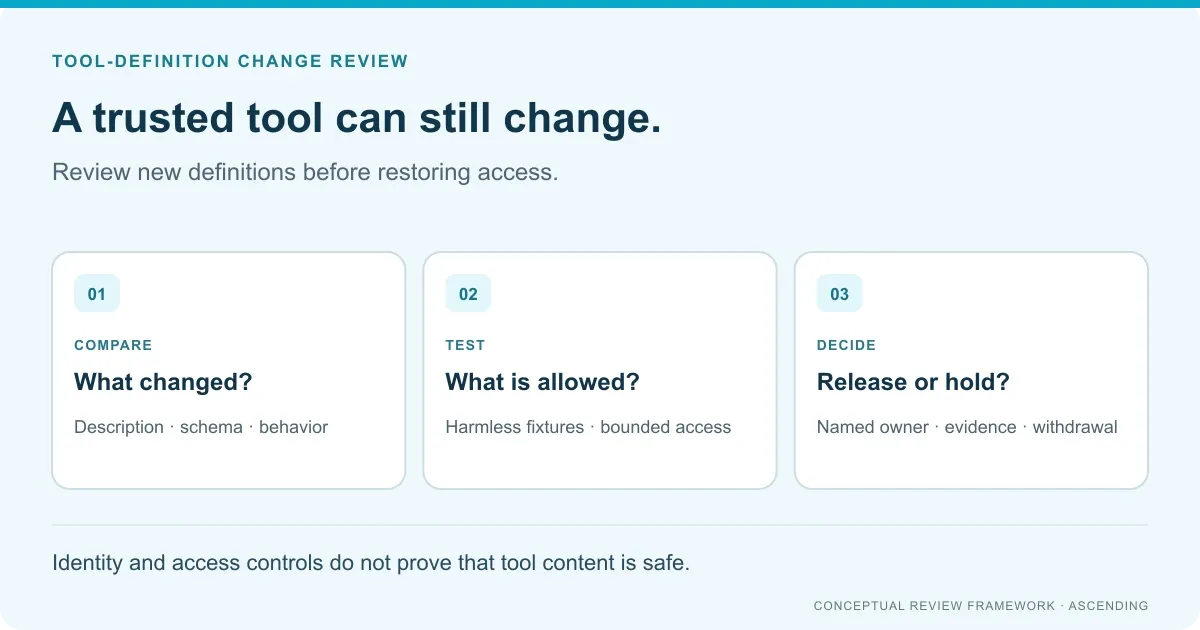
This guide focuses on one decision: should a changed tool be released to company users? It proposes a review record and safe acceptance tests, not a tested Jarvis detection feature.
Key Takeaways
- Review descriptions, schemas and annotations together, not only the visible tool name.
- A matching definition doesn’t prove unchanged server behavior.
- Test approval, withdrawal and cached clients with harmless fixtures.
- Keep permissions and downstream access independent of the model’s interpretation.
Disclosure: Jarvis is an open source project built and maintained by ASCENDING Inc. We distinguish its documented controls from the review process proposed here.
What changes can make an approved tool risky?
Tool poisoning introduces instructions through material an AI client encounters while discovering or using tools. The model may interpret that material as directions instead of an untrusted description or result.
Invariant Labs’ research demonstrated malicious tool descriptions and changes after initial approval, often called rug pulls. It also showed how one server’s descriptions could influence interactions with another server.
Descope’s explanation distinguishes this problem from a malicious user typing instructions directly into a chat. The suspicious content can arrive through a connected tool the user believes is legitimate.
Use three separate review questions:
| Change surface | Review question | What metadata review cannot establish |
|---|---|---|
| Tool description or schema | Does it introduce unrelated instructions, parameters or new data requests? | Whether the deployed server implements the reviewed behavior |
| Server implementation or dependencies | Have capabilities, credentials or destinations changed? | Whether every future response will be trustworthy |
| Returned content | Could retrieved text attempt to redirect the agent’s next action? | Whether all possible future content has been tested |
The OWASP MCP Security Cheat Sheet covers these related risks and recommends reviewing the complete definition. Its guidance explicitly distinguishes metadata-change detection from detecting changes behind an unchanged definition.
Create a review record before approving changes
We recommend a small record attached to the server’s existing owner and release process. Avoid a separate checklist nobody maintains.
| Record item | What to write down |
|---|---|
| Purpose | The business operation this tool may perform, and explicit exclusions |
| Ownership | Server owner, reviewer and team responsible for withdrawal |
| Reviewed artifact | Server origin, tool name and captured definition, with a consistent version or digest |
| Access boundary | Permitted clients, identities, destinations and data classes |
| Change | The previous and proposed definitions, plus a readable difference |
| Decision | Approve, reject or hold; rationale; required follow-up tests |
| Release evidence | Which clients received the approved version and how withdrawal was verified |
For a synthetic ticket lookup, the purpose could be “return a test ticket’s status.” A later request for an unrelated destination or extra data should trigger review.
Preserve the entire tool definition returned to the client, including its name, title, description, schemas, annotations, icons and any additional fields. Compute the digest over that complete artifact using consistent serialization. Otherwise, formatting changes can create noise and omitted fields can hide relevant changes.
Don’t treat a hash as a safety label. It identifies content, not whether that content deserves approval. Use it to connect the review decision to the artifact actually released.
Review the difference, then the whole definition
A short difference helps a reviewer find changes. Reading the complete proposed definition helps reveal instructions whose meaning depends on surrounding text.
Our suggested reviewer questions are:
- Does every instruction relate to the tool’s stated purpose?
- Do new parameters request more data than the operation needs?
- Has the tool gained a write, sharing or network capability?
- Does any text direct behavior involving another tool or server?
- Are new dependencies or remote destinations owned and approved?
- Can the existing permissions still contain the changed behavior?
Flag instructions that request secrecy, unrelated actions or a wider access boundary. A flag requires investigation; it isn’t proof of a successful exploit.
Treat annotations such as readOnlyHint as claims to verify. The MCP tools specification cautions that annotations are untrusted unless supplied by a trusted server. A read-only label doesn’t replace destination authorization.
For the broader server hardening program, see MCP security hardening. This narrower review belongs inside that program, not in place of it.
Test the review gate with harmless changes
Use an isolated test server, synthetic records and identities without production privileges. The following are proposed acceptance tests, not reported execution results. They don’t require secrets or an attack against another system.
| Test change | Expected review behavior | Evidence to save |
|---|---|---|
| Edit a harmless description sentence | Change is detected and routed to the configured reviewer | Old/new artifact references and review decision |
| Add an unused optional parameter | Reviewer checks purpose and data scope before approval | Schema difference and approved scope |
| Change a read-only annotation | Review doesn’t rely on the annotation as authorization | Updated risk assessment and destination permission test |
| Return synthetic text unrelated to the lookup | Test checks whether the client attempts an unintended action | Sanitized client behavior and any blocked tool attempt |
| Withdraw the test tool | New and existing sessions cannot keep invoking it through approved routes | Discovery and invocation results for both session types |
| Leave metadata unchanged but alter a harmless server response | Definition comparison alone reports no metadata change | Separate behavioral test result, proving the limit of that control |
The first two tests validate the change process, not poisoning detection accuracy. The response test checks one fixture, not every possible prompt injection. Keep those conclusions separate.
Record the client’s version and connection state. A fresh session and a session with cached definitions may behave differently. If removal stops discovery but an existing session can still invoke the tool, withdrawal isn’t complete.
Decide what to do when review or enforcement fails. Options include retaining a known approved version, blocking that tool, or temporarily removing the integration. Test the chosen path.
Keep runtime permissions independent of review
An approved definition doesn’t authorize every invocation. The gateway and destination must still decide whether the current identity may perform the requested operation.
Limit reachable tools and credentials to the workflow’s needs. A ticket lookup shouldn’t inherit permission to send external messages just because the client supports both operations.
Separate high-impact actions from low-risk reads and require appropriate confirmation. The MCP specification’s user-control guidance supports explicit approval and visibility into tool use. Verify what the selected client actually displays.
A manual review process adds delay, especially when upstream tools change frequently. Use risk tiers and clear ownership to make that trade-off manageable. Don’t silently bypass review to meet an update schedule.
Where Jarvis fits, and what to confirm
Jarvis MCP Gateway documents permission-scoped discovery and per-tool access controls. Those controls help define which tools an identity can reach. They don’t, by themselves, establish that a description or result is safe.
Before treating this process as a Jarvis implementation, confirm where definitions are captured and how approved changes reach clients. Also confirm who can block an updated tool and how existing sessions respond.
Automatic scanning, signed-definition verification, version pinning, change-triggered approval and rollback aren’t established by this article. They require implementation evidence. Your team may need a release workflow or additional controls alongside the gateway.
Start with one owned tool and one harmless change. Record the review decision, test both fresh and existing sessions, and keep the evidence with the release. The MCP audit evidence guide explains how to separate permission decisions from actual execution results.
References
- Invariant Labs: Tool poisoning research.
- Descope: Understanding MCP tool poisoning.
- OWASP: MCP Security Cheat Sheet.
- Model Context Protocol: Tools specification.
Sources checked October 19, 2026. Review controls reduce risk; none of the proposed tests establishes complete protection against tool poisoning.
MCP tool change-review questions
How do we protect company MCP tools from tool poisoning?
Review tool definitions before exposing them to company clients, record the approved version and re-review changes. Combine that process with least-privilege tool access, destination controls and safe tests. No single review, scanner or gateway guarantees protection from prompt injection.
Does a tool-definition hash prove the tool is safe?
No. A digest can identify a definition or detect a change when the captured fields and comparison method are consistent. It doesn't prove the initial content was safe or detect changed server behavior behind an unchanged definition.
Is approving an MCP server enough?
No. Its tool definitions, implementation, dependencies and returned content can change. Define which changes require review, how clients receive approved updates and what happens when a tool must be withdrawn.
Does Jarvis automatically detect tool poisoning?
This guide doesn't establish automatic poisoning detection or definition-change approval in Jarvis. Its access controls are relevant to limiting reachable tools. Confirm any scanning, version-pinning or change-enforcement requirement against the proposed implementation.