

Amazon DynamoDB is a NoSQL database service provided by Amazon Web Services (AWS) that allows storing and retrieving data in a flexible, scalable, and high-performance manner. The design process is a lot different from traditional relational database design. One popular way to use Amazon DynamoDB is through a single-table design with multiple entities.
In this post, we will talk about a standard DynamoDB design process from The DynamoDB book. While Amazon DynamoDB provides us with great performance, scalability, and other benefits, the design and implementation are not straightforward. We will use three different worked use cases to illustrate our design practice at the end.
The Setup
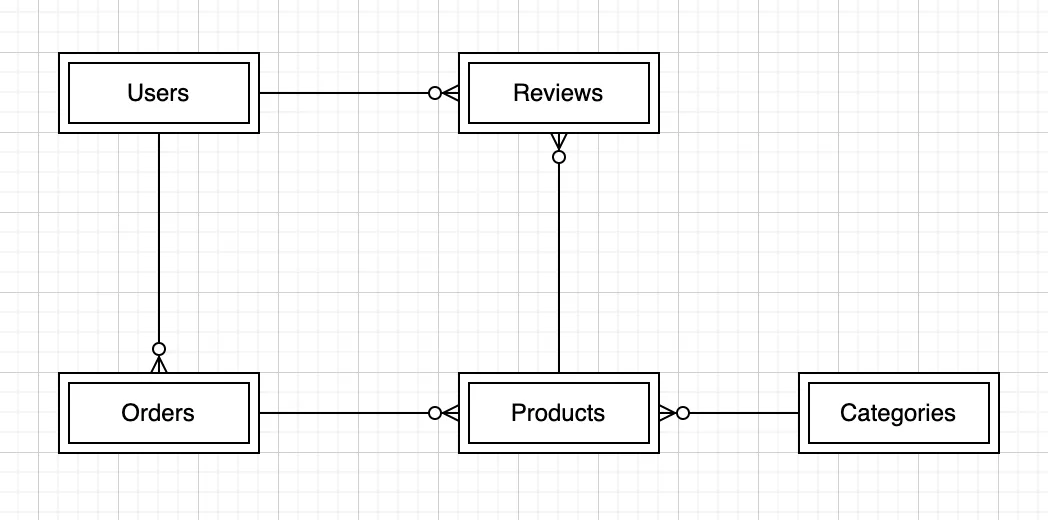
The following design process will utilize a simple e-commerce website example to illustrate the design process which contains Users, Orders, Reviews, Products, and Categories information.
Identify the Entities and Relationships
The first step in designing the Amazon DynamoDB table is identifying the entities we need to store and their relationships. Users can have multiple orders and reviews, and categories can have various products.
| Entity | PK | SK |
|---|---|---|
| Users | USER#<UserName> | USER#<UserName> |
| Orders | USER#<UserName> | ORDER#<OrderId> |
| Categories | CATEGORY#<CategoryName> | CATEGORY#<CategoryName> |
| Products | CATEGORY#<CategoryName> | PRODUCT#<ProductName> |
| Reviews | USER#<UserName> | REVIEW#<ReviewId> |
The following secondary-index attributes support additional queries. Each order stores its status and a consistently formatted creation timestamp in GSI1SK; append the order ID to distinguish orders created at the same time.
| Entity | GSI1PK | GSI1SK |
|---|---|---|
| Orders | ORDER | STATUS#<Status>#<CreatedAt>#<OrderId> |
| Reviews | PRODUCT#<ProductName> | REVIEW#<ReviewId> |
GSI2 uses the item’s Type attribute as its partition key and the base-table SK as its sort key. Example type values are USER, ORDER, PRODUCT, REVIEW and CATEGORY.
Entity Relationship Diagram
Define the Access Pattern
We should define the access patterns that we need to support. For example, we need to retrieve all orders for a specific user, retrieve all reviews for a particular product, or retrieve all products in a specific category.
Maintain a list of access patterns for each project. Use the following worksheet as a starting point, then add the queries required by your application.
| # | Access pattern | Table or index key condition |
|---|---|---|
| 1 | Get a user by username | Base table: PK = USER#<UserName>, SK = USER#<UserName> |
| 2 | Get all users | GSI2: Type = USER |
| 3 | Get all products | GSI2: Type = PRODUCT |
| 4 | Get products in a category | Base table: PK = CATEGORY#<CategoryName>, SK begins with PRODUCT# |
| 5 | Get products by product name | GSI2: Type = PRODUCT, SK = PRODUCT#<ProductName> |
| 6 | Get orders for a user | Base table: PK = USER#<UserName>, SK begins with ORDER# |
| 7 | Get all orders | GSI2: Type = ORDER |
| 8 | Get orders in an order-ID range | GSI2: Type = ORDER, SK between the two ORDER#<OrderId> bounds |
| 9 | Get orders for a status and date range | GSI1: GSI1PK = ORDER, GSI1SK between bounds within STATUS#<Status># |
| 10 | Get order information by order ID | GSI2: Type = ORDER, SK = ORDER#<OrderId> |
| 11 | Get reviews for a user | Base table: PK = USER#<UserName>, SK begins with REVIEW# |
| 12 | Get all reviews | GSI2: Type = REVIEW |
| 13 | Get a review by review ID | GSI2: Type = REVIEW, SK = REVIEW#<ReviewId> |
| 14 | Get reviews for a product | GSI1: GSI1PK = PRODUCT#<ProductName>, GSI1SK begins with REVIEW# |
| 15 | Get all categories | GSI2: Type = CATEGORY |
These are logical key values; use expression attribute names and values when implementing the requests. Paginate queries rather than assuming a request returns every matching item.
Determine the Key Schema
The base table groups a user’s profile, orders and reviews under USER#<UserName>, while each category groups its category record and products under CATEGORY#<CategoryName>. The sort-key prefixes distinguish entity types within those groups.
Define the attributes
Store the fields needed by the application as well as the index keys. For example, an order needs its owner, order ID, status, creation timestamp, Type, GSI1PK and GSI1SK. Keep timestamp format and key prefixes consistent between writes and queries.
Define the secondary indexes
Create GSI1 with GSI1PK as its partition key and GSI1SK as its sort key. Create GSI2 with Type as its partition key and SK as its sort key. These are indexes on the same table, not separate secondary tables.
The constant type keys used here make the access patterns easy to demonstrate, but can concentrate traffic as volume grows. Review AWS partition-key design guidance and load-test the table and indexes before adopting this teaching schema for production.
Use Case 1: Find a user by username
The problem
A username stored only as a non-key attribute cannot be used as the partition-key condition of a Query. In this design, however, the username is part of both base-table key values, so a scan is unnecessary.
The solution
Use GetItem with PK = USER#<UserName> and SK = USER#<UserName> to retrieve the user profile directly. If an existing schema does not encode the username in its primary key, evaluate a secondary index for that access pattern.
The result
The application can retrieve the profile from a known username without scanning unrelated items. Define username normalization and uniqueness rules before constructing these keys.
Use Case 2: Query an order-ID range
The problem
The base table groups orders by user. A query across users therefore needs a different key path.
The solution
Query GSI2 with Type = ORDER and a sort-key range over ORDER#<OrderId>. To retrieve only one user’s orders, query the base table with PK = USER#<UserName> and the ORDER# prefix instead.
The result
The index supports a defined order-ID range without a full-table scan. String keys sort by UTF-8 bytes, so encode IDs consistently, for example with fixed-width numeric components. An ID range is not automatically a date range or a geographic grouping.
Use Case 3: Query orders by status and date
The problem
A sort key beginning with status groups each status separately. It cannot support one date-range query across every status unless another access pattern is designed for that purpose.
The solution
Query GSI1 with GSI1PK = ORDER and bounds within STATUS#<Status>#<CreatedAt>#<OrderId>. Both bounds must use the same status prefix. Choose the time interval and boundary values explicitly; use one consistent timezone and timestamp format in stored keys.
The result
The query returns orders for one status in the selected time range. To include multiple statuses, issue the required status-specific queries or design a separate index. A constant ORDER partition key does not by itself distribute a high-volume workload; evaluate sharding or another partitioning strategy when needed.
Verify the access patterns before migration
For each row in the worksheet, write an example item and the corresponding lookup or query. Check that the index attributes are present, the prefixes match and the returned items meet the use case. Test representative data volumes and pagination before migrating the application.