The pros and cons of automated insurance verification depend on what happens after the first answer arrives. Automating a routine eligibility inquiry can reduce repetitive work. An incomplete response that gets filed as “verified” can create more work later, when staff must reconstruct the record or explain a disputed estimate to a patient.
For a clinic, the buying question is practical: does automation produce a usable, traceable verification record with less total staff effort? That means counting exception handling, integration support and quality review alongside time saved on data entry. This guide provides a tradeoff table and a worked pilot calculation you can adapt to your own patient-intake workflow.
What automated insurance verification actually covers
Automated insurance verification can include submitting eligibility requests, collecting payer responses, extracting benefit fields, routing missing information and updating a practice-management system. An artificial intelligence (AI) agent may coordinate those steps, but a model does not create coverage information that a payer has not supplied.
Start by separating three outputs:
- Eligibility: coverage information for the patient and requested date of service.
- Benefits: the service-specific details returned by the payer, such as cost-sharing information or limits.
- A completed operational record: evidence sufficient for the clinic’s defined workflow, including any unresolved questions and the person responsible for them.
The Centers for Medicare & Medicaid Services (CMS) eligibility inquiry guidance describes Medicare’s X12 270 inquiry and 271 response process. It supports a specific administrative exchange; it is not a universal source for every commercial plan or every question about coverage. An eligibility response also is not a prior authorization approval or a payment guarantee.
The pros and cons of automated insurance verification workflows also depend on which systems perform each step. The workflow guide maps those responsibilities; here, the focus is whether those steps are worth automating for your clinic.
Pros and cons of automated insurance verification
| Potential advantage | Corresponding limitation | What to measure in your pilot |
|---|---|---|
| Scheduled checks make intake more consistent | Repeated checks can add cost without resolving missing fields | Share of appointments checked within the clinic’s chosen window |
| Structured responses reduce retyping | A wrong patient match can propagate across systems | Patient and policy match errors, plus corrections after write-back |
| Staff spend less time navigating portals or waiting on calls | Exceptions still require staff, and retries consume time and fees | Total staff minutes per case, including failed attempts |
| Benefits are captured in a common format | Different payer answers may not be directly comparable | Accuracy and completeness of each required benefit field |
| Evidence is easier to retrieve | Transcripts, logs and attachments create additional sensitive records | Evidence availability, access controls and retention behavior |
| Teams can review a prioritized queue | An unowned queue merely moves the backlog | Unresolved cases, oldest case age and time to assigned reviewer |
| More consistent preparation may reduce avoidable rework | Payment and denial outcomes have many other causes | Verification-related corrections, separately from overall denials |
These are opportunities to test, not promised results. A small practice with a few straightforward payer relationships may gain more from configuring existing electronic checks than from buying a new agent platform. A larger organization with multiple systems and frequent exceptions may have a stronger case for orchestration.
Where the benefits are most likely to hold up
Insurance verification benefits most from repeatable work with clear inputs and an accepted completion rule. Examples include checking a scheduled patient list, comparing returned policy identifiers with the registration record, and placing missing benefit fields into a named work queue.
Define completion at the field level. “Call ended” and “response received” are technical events. “Required fields supported by a source, no unresolved contradiction, permitted update confirmed” is an operational result. A routine case should only move forward when it satisfies the latter rule.
If intake starts with scanned cards, referrals or supporting paperwork, first improve document classification and indexing. Classifying a document and extracting an identifier can prepare the inquiry; neither proves that the insurance is active. Keep that boundary visible in the workflow and in staff training.
Where automation can add cost or risk
Missing insurance information can look deceptively complete
A missing visit limit is not an unlimited benefit. An absent authorization indicator is not permission to proceed. A blank deductible field is not a zero balance. Store “not returned,” “conflicting” and “not applicable” as different states, and retain the source and retrieval time for each value.
Use the payer’s current response and applicable plan information to resolve questions. Model confidence is useful for prioritizing review only after evaluation; it does not establish coverage. The CMS HIPAA Eligibility Transaction System (HETS) program provides current Medicare eligibility resources, including companion-guide material that distinguishes an eligibility response from a guarantee of payment.
Verification integration and exception handling continue after launch
Budget for payer enrollment, authorized access, field mapping, credentials, monitoring, support and practice-management updates. Where portal access is involved, verify that the access method is permitted and that failures have an owner. A system that retries indefinitely can spend money while hiding an unresolved case.
For phone-based exceptions, evaluate voice AI for payer calls separately. Ask who handles an unrecognized plan, a contradictory answer, a dropped call or a representative who requires human verification. Include that labor in the cost model.
Insurance data can spread beyond the original record
A workflow can create new copies in prompts, call transcripts, support tickets and diagnostic logs. The Department of Health and Human Services (HHS) cloud-computing guidance explains the business-associate obligations that can apply to cloud providers handling electronic protected health information. Customer hosting alone does not settle the obligations for every connected service.
Map the actual data path before procurement. Review access, retention, incident handling and the applicable agreements for each participant. The Health Insurance Portability and Accountability Act (HIPAA) Security Rule summary describes safeguards including access and audit controls; a vendor’s security label is not evidence that your deployed workflow meets its requirements.
Calculate insurance verification ROI using total staff effort
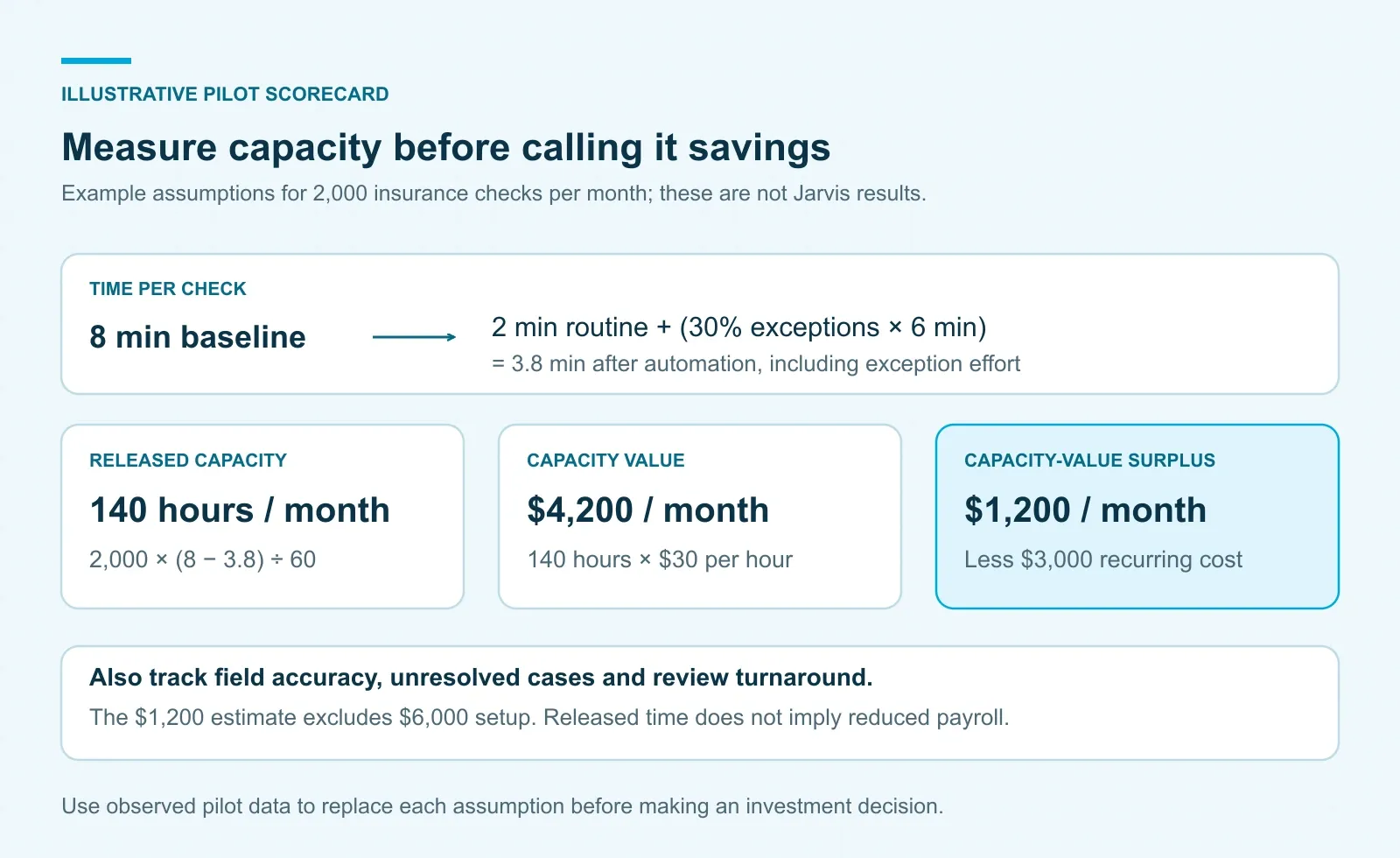
The following insurance verification return on investment (ROI) calculation is an illustrative planning example, not a customer result or industry benchmark. All figures are assumptions chosen to show the calculation. Replace them with your own measured workload and vendor quotes.
| Planning input | Example assumption |
|---|---|
| Monthly verification cases | 2,000 |
| Baseline staff time per case | 8 minutes |
| Routine staff review with automation, for every case | 2 minutes |
| Cases needing additional exception work | 30% |
| Additional staff time per exception | 6 minutes |
| Loaded staff cost | $30 per hour |
| Recurring technology cost, including usage and support | $3,000 per month |
| One-time setup cost | $6,000 |
Average staff time after automation is 2 + (30% × 6) = 3.8 minutes per case. The monthly capacity released is 2,000 × (8 − 3.8) ÷ 60 = 140 hours. Valued at $30 per hour, that is $4,200 of staff capacity, leaving $1,200 per month after the assumed recurring technology cost.
That is a capacity-value calculation. It becomes cash savings only if spending actually falls, for example through less overtime or avoided contract labor. If payroll remains the same, assess whether the released time improves service or absorbs growth. Under the additional assumption that all $1,200 is realized as monthly economic benefit, the $6,000 setup cost takes five months to recover. Do not label that a cash payback forecast without the supporting budget change.
Exception rates are decisive. With these assumptions, recurring costs break even at 50% exceptions: three minutes of average staff effort per case must be saved to cover $3,000. That leaves nothing for recovering setup costs. At 60% exceptions, average effort becomes 5.6 minutes and the capacity value falls to $2,400, below the assumed recurring cost.
Run an insurance verification pilot that can disprove the business case
For an insurance verification pilot, choose one clinic, a defined payer mix and one intake workflow. Set acceptance thresholds with the operations owner before seeing the results. The following sequence is a suggested evaluation method, not a regulatory timetable.
- Measure the baseline. Record staff work, elapsed turnaround, missing fields, corrections and unresolved cases using the same definitions planned for the pilot.
- Run in shadow mode. Compare automation outputs with reviewed source evidence before allowing updates to production records. Include messy and incomplete cases, not just successful calls.
- Allow bounded updates. Start with approved fields and validated cases. Require an assigned reviewer for conflicts and an acknowledgment from the destination system for each write.
- Review the full denominator. Include timeouts, failed calls, duplicate attempts, manual rescues and cases still open when the pilot ends.
- Decide by payer and workflow. Expand where quality and economics meet the thresholds. Retain the existing process where they do not.
Report field accuracy, missing required fields and serious incorrect confirmations separately. A single blended “automation rate” can hide the problem you most need to understand. Track verification-related rework before claiming a change in denial rates, and use comparable cohorts before attributing financial outcomes to the tool.
Where Jarvis AI fits in a healthcare automation pilot
ASCENDING’s Jarvis AI platform documents customer-hosted deployment, governed tool access, workflow automation and observability. Those capabilities provide a basis for discussing orchestration around separately selected eligibility services and operational systems. The payer connections, voice service, exception rules and practice-management write-back in this article are an implementation scope to validate; they are not a claim that Jarvis ships a turnkey insurance-verification product.
Bring one workflow, a representative set of reviewed exceptions and the pilot scorecard to an ASCENDING assessment. Where the problem is interpreting documents consistently, the healthcare archive fine-tuning playbook provides the next step. Where the problem is coordinating tools and approvals, evaluate the governed workflow around them. Let the evidence determine which part of the process to automate first.
References
- CMS: Eligibility Inquiry
- CMS: HIPAA Eligibility Transaction System
- HHS: Guidance on HIPAA and Cloud Computing
- HHS: Summary of the HIPAA Security Rule
- ASCENDING: Jarvis AI Platform
FAQ — Insurance Verification Automation Tradeoffs
What are the main pros and cons of automated insurance verification?
Automation can make checks more consistent, reduce transcription and redirect staff time. Its limits include incomplete payer data, integration costs, exception handling and the risk of treating an unresolved benefit as confirmed.
Does an active eligibility response guarantee payment?
No. An insurance eligibility response reports coverage information; it does not guarantee payment or replace a separate prior authorization decision. Keep missing service-specific benefits unresolved until verified.
How should a clinic calculate insurance verification automation ROI?
Compare baseline staff time with routine review plus exception work, then subtract recurring technology costs. Account for setup separately and distinguish released staff capacity from actual cash savings.
When should an automated insurance verification workflow stop for a human?
Stop for conflicting sources, identity mismatches, missing required benefit fields, an exhausted retry budget or a write-back that cannot be confirmed. Assign an owner and preserve the evidence for review.
Can Jarvis AI replace an eligibility clearinghouse or a payer-calling service?
Jarvis can be evaluated as the governance and orchestration layer around separately selected services. Payer access, voice calling, practice-management integration and workflow-specific controls need their own implementation scope.