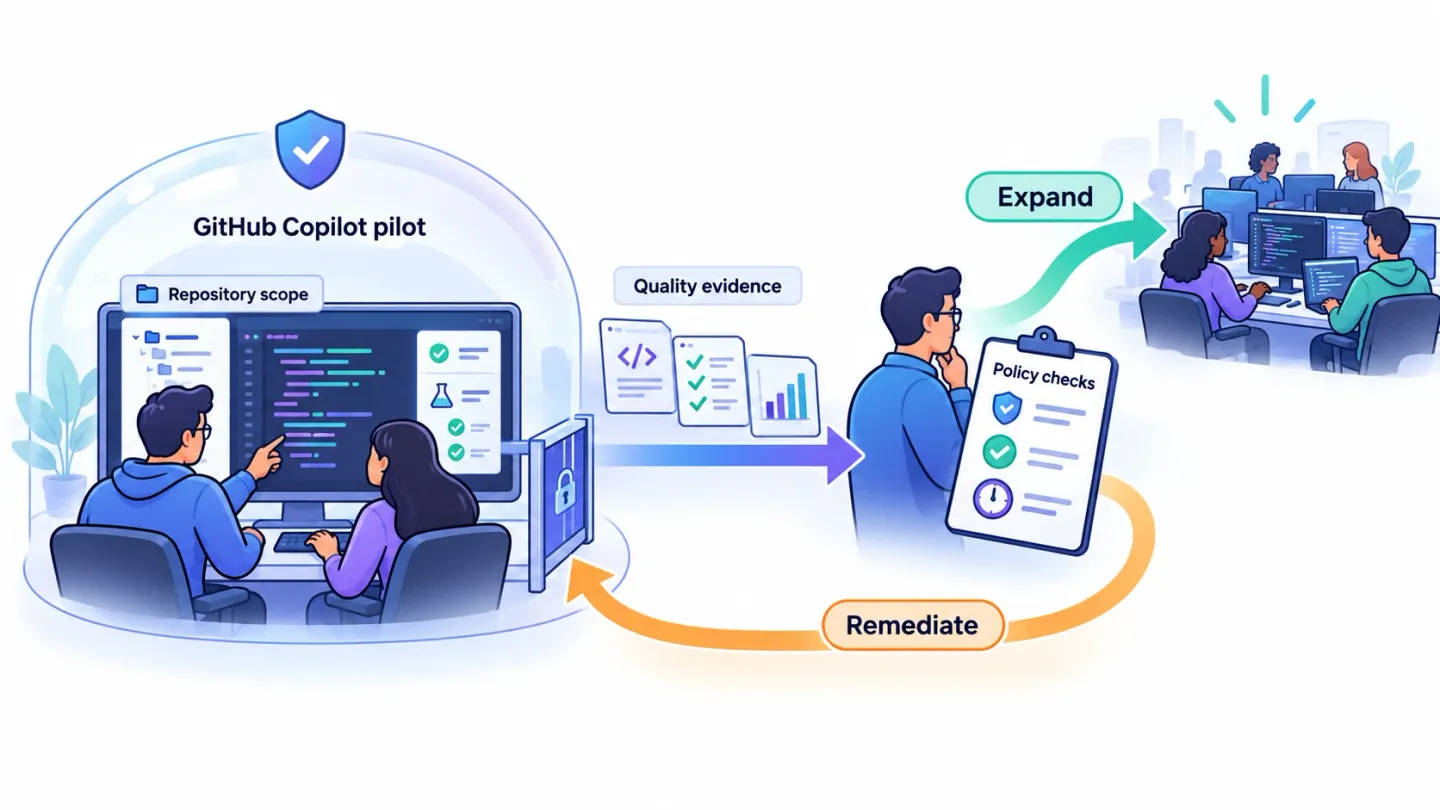
A Copilot readiness assessment for GitHub should decide whether a defined engineering workflow can enter a controlled pilot. Name the repositories, users and enabled surfaces. Test policy boundaries, define code-quality evidence and assign an owner to every gap before expanding access.
This guide covers GitHub Copilot, rather than Microsoft 365 Copilot. Use the general AI readiness checklist for broader enterprise pilot gates and the coding-agent migration assessment when replacing an existing tool.
Last verified: October 27, 2026, against the linked GitHub documentation. Pilot criteria and examples below are proposed planning aids, not measured customer results.
Disclosure: ASCENDING Inc develops Jarvis Crosswalk for AI tool migration assessments. Confirm its current scope before relying on a particular collection or analysis capability.
Scope the Copilot readiness assessment to GitHub
The word Copilot covers different products and workflows. Even within GitHub Copilot, inline completion, chat, agent behavior and code review need separate acceptance evidence.
Write the proposed pilot in one sentence: “Twenty backend engineers will use approved Copilot features in two internal repositories for test creation and routine refactoring.”
Then list exclusions: production incident response, restricted customer data, autonomous deployment or any repository whose controls haven’t been tested. These are scope decisions for this example, not universal prohibitions.
GitHub’s pilot tutorial recommends a contained group, a budget, monitored results and a go/no-go decision. Decide those conditions before enabling additional features.
A Copilot readiness assessment evidence table
Use pass, gap or not applicable for each row. A pass requires evidence from the intended configuration, and every gap needs an owner.
| Gate | Evidence to collect | Decision it supports |
|---|---|---|
| Product and surface | Plan, IDE, extension version, enabled modes and models | What exactly is being approved? |
| Repository scope | Pilot repositories, classification and accountable owners | Which code can enter the workflow? |
| Identity and licensing | Seat assignment, organization membership and removal test | Who can use the approved configuration? |
| Policy | Effective enterprise and organization settings | Which features can users actually enable? |
| Content boundaries | Surface-specific exclusion test with synthetic fixtures | Does the proposed data restriction work here? |
| Code review | Required checks, reviewers and merge controls | How are incorrect or unsafe changes caught? |
| Economics | Current quote, usage budget and review labor assumptions | What does one acceptable outcome cost? |
| Exit | Seat removal, extension handling and retained workflow inventory | Can the team stop or switch without losing needed work? |
This is an assessment worksheet, not a weighted readiness score. A failed mandatory data boundary can’t be offset by enthusiastic user feedback.
Copilot readiness assessment: name the effective policy owner
GitHub documents enterprise policies and delegation to organization owners. Record the effective setting for the pilot organization, including decisions delegated locally.
Ask an ordinary pilot user to demonstrate the enabled features. An administrator’s screenshot alone doesn’t prove what the user’s client can access.
Verify each surface and policy boundary
Content exclusion has documented mode limits
GitHub’s content-exclusion documentation says Edit and Agent modes of Copilot Chat in Visual Studio Code and other editors aren’t covered. It also documents limitations involving indirectly supplied semantic information, symlinks and remote filesystems.
Treat the current support matrix as a scoping input. If the pilot depends on a restriction unavailable in its intended mode, choose a narrower scope or resolve the control gap first.
Use synthetic files with unique, harmless markers in an isolated test repository. Exercise each intended surface and record observed behavior. Don’t test with real confidential content.
An output that omits a marker doesn’t prove the content never entered a model request. Combine behavior tests with documented support, effective policy evidence and the security team’s accepted data path.
Keep review and merge controls outside generated prose
Define which changes require a human reviewer and which automated checks must pass. A repository instruction asking the assistant to test its code doesn’t replace required checks on the branch.
Include an intentionally failing test in a sandbox fixture. Confirm the workflow exposes the failure and the merge controls prevent promotion under the intended policy.
Design a comparable engineering pilot
Select recurring work with a visible definition of done: adding a unit test, correcting a small defect or refactoring a bounded module.
Record task type, repository, complexity and engineer experience. Comparing simple generated tests with a previous week of production incidents produces an unreliable result.
| Measure | What to record | Interpretation limit |
|---|---|---|
| Adoption | Eligible users and active users in the same period | Activity doesn’t establish value |
| Completion | Accepted tasks meeting the original definition of done | Keep task scope comparable |
| Quality | Review findings, failed checks and later rework | Observe beyond the first generated draft |
| Time | Task time plus review and correction effort | Include human review labor |
| Cost | Seats, measured usage and operating effort | Use current contract terms |
| User feedback | Helpful cases, friction and missing workflows | Collect examples alongside opinions |
GitHub’s usage-metrics documentation provides adoption and activity signals. Use those exports alongside your task evidence, rather than treating accepted suggestions as independently verified business outcomes.
An illustrative pilot charter might require all critical access tests to pass and every accepted task to meet existing review standards. Set improvement targets from your baseline before the pilot starts.
Avoid inventing a universal productivity threshold. A team with heavy review requirements may gain value from better drafts even when total cycle time changes little.
Make the rollout or migration decision
At the review meeting, produce one of three decisions: expand within a stated scope, remediate and repeat specified tests, or stop the proposed use case.
For expansion, name the next repositories and features. A successful inline-completion pilot doesn’t automatically approve agent-driven repository changes.
For migration, record the workflows the old tool provides. Include editor completion habits, rules, skills, MCP integrations, hooks and background work. The Cursor rules mapping guide shows how to preserve instruction scope.
Before closing the old account, use shadow AI discovery to find personal subscriptions and integrations outside the official seat list. Review vendor data handling separately through the AI vendor risk checklist.
Where Jarvis Crosswalk fits
An assessment service should deliver the scoped inventory, evidence register, candidate mappings, unresolved gaps and a decision the engineering owner can review.
We build Jarvis Crosswalk at ASCENDING Inc. Confirm its current collection coverage and delivery scope through our contact page. Don’t assume an automated scanner, guaranteed conversion or validated performance improvement.
Keep the final decision tied to the tested GitHub plan, client surfaces and repositories. Reassess when those conditions change.
References
- GitHub: pilot a new Copilot feature or model
- GitHub: manage enterprise Copilot policies
- GitHub: content exclusion and limitations
- GitHub: Copilot usage metrics
GitHub Copilot readiness questions before a pilot
What should a Copilot readiness assessment include for GitHub?
Define repositories, users and Copilot surfaces, then gather evidence for access, data boundaries, policy enforcement, code review, cost and rollback. Finish with a scoped pilot decision and owners for unresolved gaps.
Is this a Microsoft 365 Copilot readiness assessment?
No. This guide covers GitHub Copilot for software engineering. Microsoft 365 Copilot requires a separate assessment of Microsoft 365 data, permissions, licensing and employee workflows.
Do GitHub Copilot content exclusions protect every mode?
No. Current GitHub documentation says content exclusion isn't supported in Edit and Agent modes of Copilot Chat in Visual Studio Code and other editors. Review the current surface matrix and test your exact configuration before admitting restricted repositories.
Can Copilot usage metrics prove developer productivity improved?
Usage metrics show adoption and activity. Evaluate them alongside reviewed task completion, defects, rework and delivery time for a comparable task mix. An acceptance rate or generated-line count alone doesn't establish a productivity improvement.