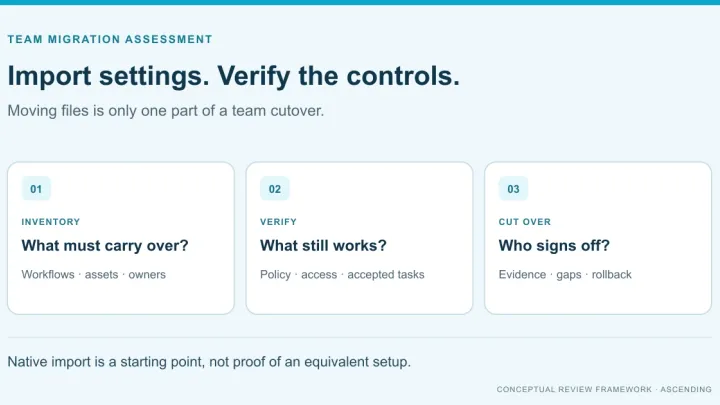
A coding agent migration readiness assessment decides whether you can scope a move between coding agents, and what to fix first. Its evidence is an inventory of every tool in use, not only the one you plan to leave. Pull seats and usage from each vendor, scan repositories for configuration files, check endpoints, CI and spend for anything unmanaged, then classify each item against the target.
Most companies have more than one tool to find. In a Harris Poll survey of 1,528 developers and technology buyers released by GitLab, 91% of organizations had two or more AI coding tools in active use. 80% agreed their organization adopted AI tools faster than it developed policies to govern them.
TL;DR: A coding agent migration readiness assessment ends in one of three decisions: ready to scope, remediate first, or not ready. Base it on an inventory of the whole fleet: vendor admin data for licensed use, a repository scan for configuration as code, and endpoint, CI and spend records for everything else. Classify every item as importable, reconstructable, archive-only or blocked. Native import copies files on one machine. It does not move organization policy, hooks or credentials.
This assessment comes before tool-specific migration work. It covers Cursor, GitHub Copilot, OpenAI Codex and Claude Code, and uses Claude Code as the worked target where import behavior matters.
What is a coding agent migration readiness assessment?
It is a bounded review that answers one question: can we scope this migration, and if not, what blocks it? It is not the migration itself, and it does not prove the target tool works. That comes later, in a tool-specific acceptance pilot.
In this guide, “coding agents”, “AI coding tools” and “AI coding IDEs” mean the same set: AI assistants in the editor, agents in the terminal and cloud agents, such as Cursor, GitHub Copilot, OpenAI Codex and Claude Code.
The assessment produces three things:
- An inventory register of every coding agent, seat, configuration file, MCP server, hook and CI integration in use, each with an owner and evidence.
- A classification of every row against the target tool: importable, reconstructable, archive-only or blocked.
- A readiness decision: ready to scope, remediate named gaps first, or not ready, with an accountable owner for each open item.
The rest of this guide follows that order: why the inventory must cover the whole fleet, what to record, four steps to collect and classify the evidence, a worked example and the decision checklist.
Vendor documentation last verified October 22, 2026. The register, scan and checks below are our recommended method, not results from a completed customer migration.
Why does migration readiness depend on a fleet-wide inventory?
A move “from Cursor” breaks when the same developers also use Copilot in the IDE and an agent CLI in the terminal. Scope the migration from observed use, not from what procurement bought. In the GitLab-released Harris Poll survey cited above, 54% of organizations had three or more AI coding tools in active use.
Developers adopt and change tools faster than central teams track them. The Stack Overflow 2026 Developer Survey found that only about a third of respondents (34%) kept their original AI tools over the past year. Only 24.0% said their organization provides approved AI tools and guidance for using them.
The same survey shows heavy overlap between coding agents. Respondents could select several, so the shares add up to well over 100%.
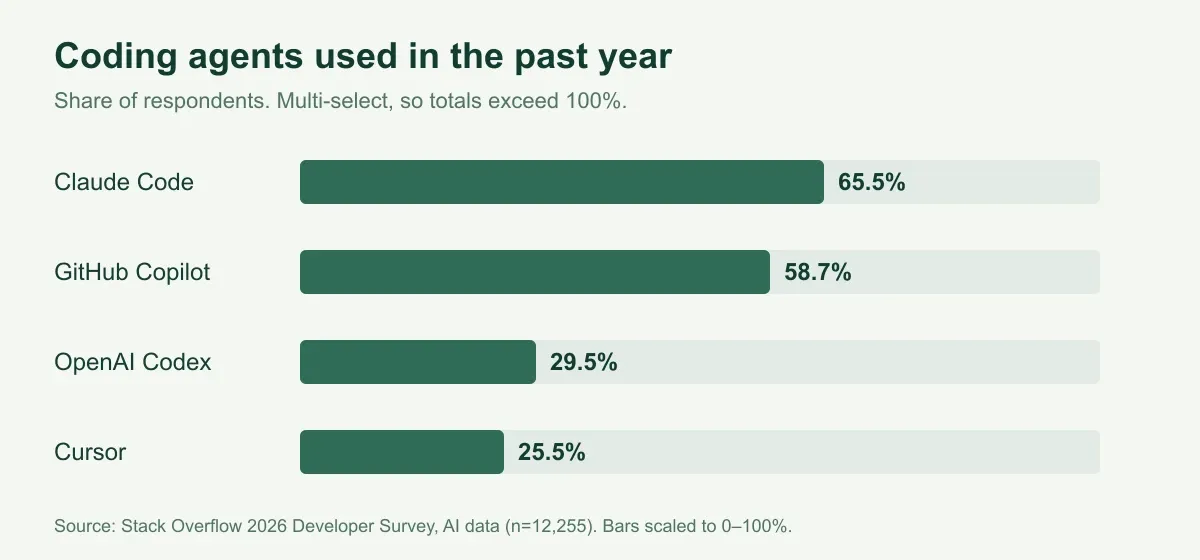
Figure 1. Answers to “Have you used any of the following coding agents or assistants in the past year?” Multi-select, n=12,255 (Stack Overflow 2026).
Sort what you find into three groups: sanctioned (bought and administered), tolerated (known but unmanaged) and unmanaged (not yet known). A migration plan that only covers the first group leaves dependencies behind.
What should the AI coding tool inventory record?
Use one row per asset, each with an owner, an evidence link and a classification. Record a reference to the secret manager entry and its owner, never a secret value.
| Asset | Where to find it | Evidence to record | Typical owner |
|---|---|---|---|
| Seats and plans | Vendor admin console, contracts | Tool, plan tier, seat count, billing owner | Procurement or IT |
| Active users and last activity | Admin and usage APIs | Active users per tool, last activity date | Engineering operations |
| Repository instructions | Repository scan | Rules files, AGENTS.md, CLAUDE.md, Copilot instructions, with repo and path | Repository owner |
| MCP servers | Project and user MCP configs, admin allowlists | Server, transport, endpoint, credential owner | Platform or security |
| Hooks and local automation | Hook configs at project, user and managed levels | Trigger, script, failure behavior | Platform team |
| Skills, commands and subagents | Tool-specific folders in repos and home directories | Name, version, required tools, owner | Repository owner |
| Organization policies | Admin dashboards, managed settings | Privacy mode, content exclusion, MCP allowlists, enforced rules | Security |
| CI and hosted agents | CI workflow files, vendor cloud agent settings | Trigger, repository access, secrets referenced | DevOps |
| API keys and direct model use | Secret manager, cloud billing | Secret reference, consuming service, owner | Security |
| Contracts and retention | Order forms, vendor terms | Renewal date, notice period, data retention terms | Procurement or legal |
| Features without a confirmed equivalent | Developer survey, usage metrics | Feature, users who depend on it, workaround | Engineering lead |
Cursor’s Tab autocomplete is an example of the last row. Our Cursor to Claude Code mapping found no verified equivalent, so measure how much the team relies on it before you commit to a date.
Four classifications for every row
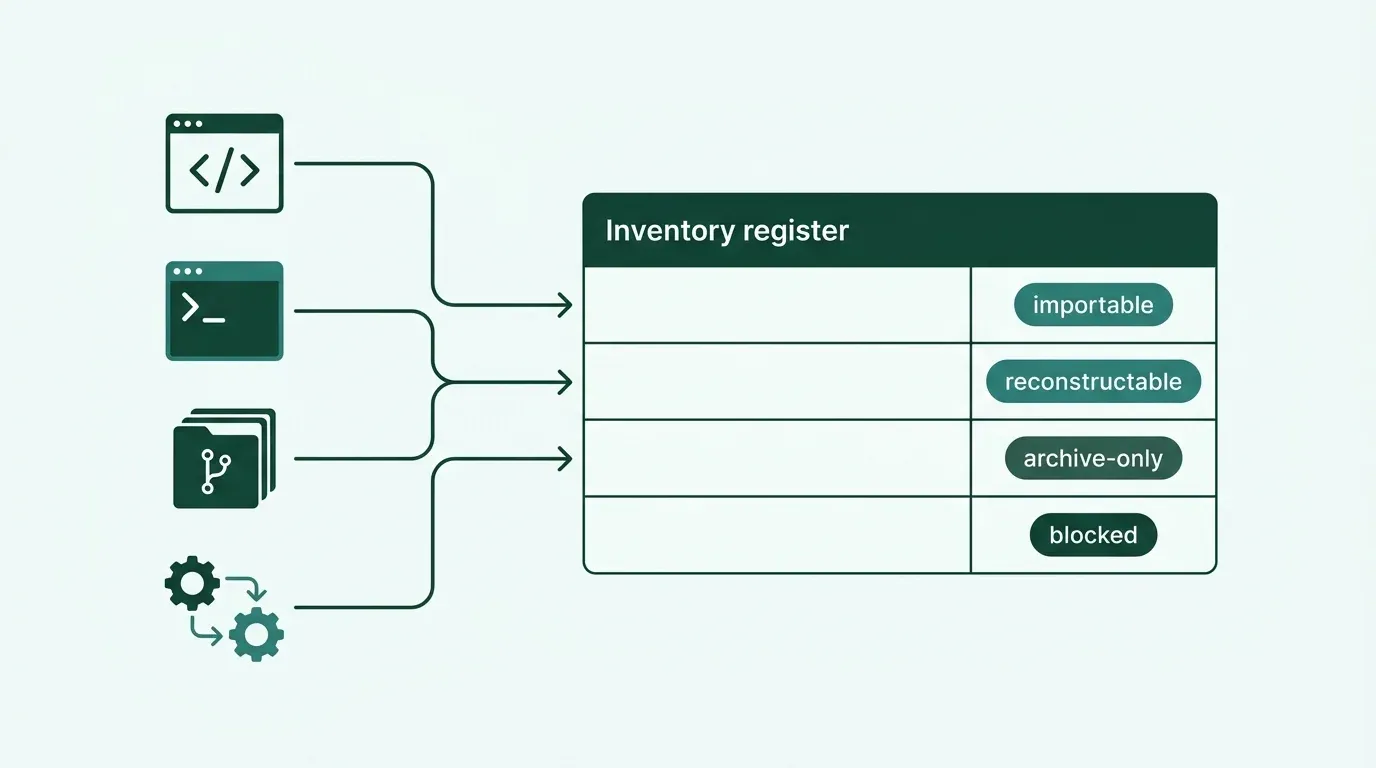
Give each row one of four labels once you know the target tool:
- Importable: the target’s supported import or loading path carries it over. Still test that it behaves as intended.
- Reconstructable: the concept exists in the target, but someone must rebuild it, for example a hook or an organization policy.
- Archive-only: keep it as a record for audit or reference. It will not become working state in the target, for example chat history.
- Blocked: no equivalent, no export route or an unresolved legal or security question. It needs a decision before cutover.
This inventory covers tooling. For the questions beyond tooling, such as baseline, evaluation and operating ownership, use our AI readiness checklist.
Step 1: Pull seats, usage and audit data from each vendor
Vendor admin data shows who is licensed and what they use on that vendor. It does not show personal accounts, trial accounts or tools nobody bought centrally.
| Vendor | Members and seats | Usage | Spend | Audit log | MCP or skills adoption | Limits to note |
|---|---|---|---|---|---|---|
| Cursor | Admin API member list | Daily usage per user | Per-member spend for the current billing cycle | Yes, up to 30 days per query | Analytics API mcp and skills metrics | Analytics API is Enterprise-only, 30 days per query |
| GitHub Copilot | Seat API with last_activity_at and editor | Usage metrics reports for org, enterprise and users | Billing usage reports for AI credit and premium request usage | Audit log records plan, policy and license changes, not client sessions | Usage metrics count MCP servers, agent mode and cloud agent use | Usage metrics policy must be enabled; IDE activity depends on telemetry |
| OpenAI Codex | Workspace roles and groups (admin setup) | Workspace analytics dashboard and a workspace-level Analytics API | Activity consumes workspace credits (governance); no per-user cost view is publicly documented | Compliance API, including codex_log records | No adoption metric documented; MCP tool events come from admin-defined MCP hooks and OpenTelemetry for local runs | Analytics API field reference requires a workspace sign-in |
| Claude Code | Admin API lists organization members | Analytics dashboard and the Claude Code usage report | Estimated cost by model in the usage report | Compliance API activity feed includes Claude Code sessions on Enterprise | Enterprise Analytics API reports skill activity; MCP appears only as connector activity | Usage report excludes subscription-plan and cloud-platform usage; Enterprise Analytics API is not on Team plans |
“Not documented” means we found no description in the vendor’s public documentation when we checked. It is not proof that the feature is missing, so confirm with your account team.
Three limits change how you read the numbers:
- Short windows. Cursor’s Analytics API and audit log queries cover at most 30 days each. Pull data on a schedule if you need a longer baseline.
- Telemetry gaps. GitHub notes that Copilot IDE activity appears only when telemetry is on. A seat with no recent activity may still be in use.
- Route gaps. A developer using Claude Code through a cloud provider will not appear in Anthropic’s Claude Code usage report. Check the cloud provider’s billing as well.
Export the results into the register and note each pull date. Unused seats are worth flagging now, because they reduce what you need to buy in the target tool.
Step 2: Scan repositories for configuration as code
Each tool leaves recognizable files in repositories and home directories. One scan across your company’s repositories finds most of the team-level setup a migration must account for.
| Tool | Project files | User files | Managed or enterprise |
|---|---|---|---|
| Cursor | .cursor/rules/ (rules), legacy .cursorrules, AGENTS.md, .cursor/mcp.json, .cursor/hooks.json | ~/.cursor/mcp.json, ~/.cursor/hooks.json | Team Rules in the dashboard; hooks at an MDM-managed system path |
| GitHub Copilot | .github/copilot-instructions.md, .github/instructions/*.instructions.md, AGENTS.md (custom instructions) | IDE settings | Organization and enterprise policies; MCP allowlists in enterprise managed settings |
| OpenAI Codex | AGENTS.md, .codex/config.toml (config reference) | ~/.codex/config.toml | Managed requirements.toml |
| Claude Code | CLAUDE.md, .claude/rules/, .claude/settings.json, .mcp.json, .claude/skills/, .claude/agents/, .claude/commands/ (directory reference) | ~/.claude.json, ~/.claude/, CLAUDE.local.md | Managed settings |
AGENTS.md appears in three of the four rows. One file can serve several tools, and that changes how it should be classified.
The example below lists matching files in every repository cloned under ./repos. It is a starting point to adapt, not a supported tool:
# Example: list AI coding tool configuration files in each cloned repository
for repo in repos/*/; do
  git -C "$repo" ls-files -- \
    ':(glob)**/AGENTS.md' ':(glob)**/CLAUDE.md' ':(glob).cursorrules' \
    ':(glob).cursor/**' ':(glob).github/copilot-instructions.md' \
    ':(glob).github/instructions/**' ':(glob).codex/**' \
    ':(glob).mcp.json' ':(glob).claude/**' \
  | sed "s|^|${repo%/}: |"
done
Add each hit to the register with its repository owner. Read MCP and hook files closely: they reveal external endpoints and scripts that run on developer machines. For locating MCP servers beyond repositories, see how to find unapproved MCP servers.
User-level files never reach a repository. Personal MCP servers in ~/.claude.json or ~/.cursor/mcp.json are invisible to this scan, which is why Step 3 exists.
Step 3: Find unmanaged use on endpoints, in CI and in spend
Unmanaged use sits outside admin consoles: personal accounts on company devices, CLIs installed by hand, AI steps in CI pipelines and subscriptions paid on expenses.
Check five places:
- Endpoint software inventory. Use your MDM or endpoint management tool to list IDE extensions and installed CLIs for each AI coding tool.
- Single sign-on logs. Sign-ins to vendor apps show who uses a tool through the company identity, including tools without a central contract.
- CI workflow files. Search pipeline definitions for AI CLIs, code review bots and API keys passed as secrets.
- Expense and procurement records. Individual subscriptions often appear here before anywhere else.
- A short developer survey. Ask which tools people use, which features they rely on and what they would miss. It is the best source for dependency, not just presence.
Some vendor controls can close gaps once you find them. Cursor’s privacy and data governance controls include an “Allowed Team IDs” policy that blocks personal accounts on company devices. Check each control’s coverage before you rely on it: GitHub states that Copilot content exclusion is not supported in Copilot CLI or in agent mode in IDE chat.
An inventory is also a governance control in its own right. The NIST AI RMF Playbook’s GOVERN 1.6 calls for mechanisms to inventory AI systems, resourced according to risk. A register built for migration can become that record afterwards.
Step 4: Classify every item against the target tool
The register becomes a migration plan once every row has a classification and a target decision. Native import helps with files on one machine. It does not move organization policy.
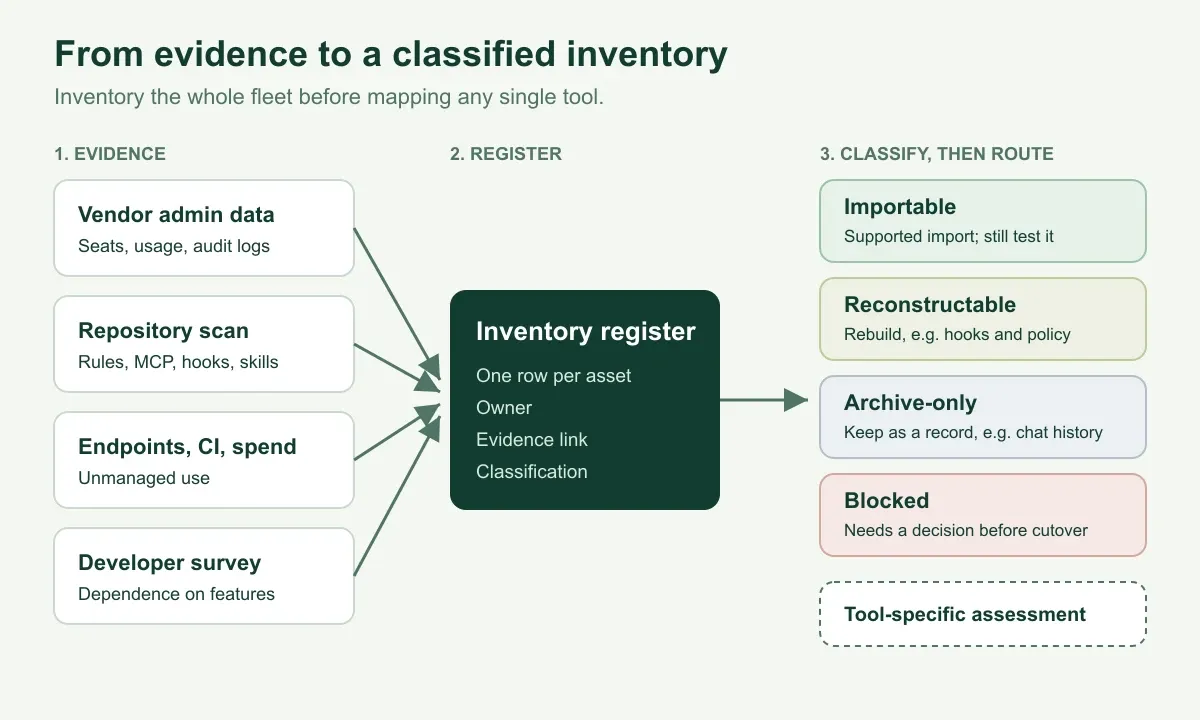
Figure 2. Evidence feeds one register. Classification decides what the tool-specific assessment must test.
What native import does and does not move
Native import runs on one developer’s machine and copies files, not organization policy. That decides how most rows are classified when Claude Code is the target:
- Importable: Claude Code’s
/importcopies instruction files, MCP servers, commands, subagents and skills from Codex, Gemini CLI or Cursor, with version and provider-route limits./initreads Cursor rules and.github/copilot-instructions.mdwhen generating aCLAUDE.md. Claude Code v2.1.277 and later also readsAGENTS.mddirectly when noCLAUDE.mdfile exists in the working directory or above. - Reconstructable: the documentation does not list hooks, permissions, privacy settings or team policy among imported items. Rebuild them centrally in Claude Code managed settings.
- Archive-only or re-created: credentials go through an approved route, never copied. Old chat sessions stay as records.
Because every developer runs import separately, it is a convenience for individuals, not an organization-wide migration. The tool-specific guides below cover version gates and exceptions.
Route each source tool to its assessment
Use the register to start the tool-specific work:
- From Cursor: see what maps from Cursor to Claude Code for rules, hooks, subagents and the Tab gap.
- From Codex: use the Codex to Claude Code team assessment worksheet and acceptance tests.
- From GitHub Copilot: we have not published a dedicated guide yet. Use the classifications above and test instruction loading, MCP access and policy parity on one repository.
- Employee ChatGPT workspaces: these are a separate scope. See the company ChatGPT-to-Claude assessment.
Worked example: one MCP server through the assessment
This example is illustrative. It shows how the method handles one asset, not a result from a customer engagement.
Suppose the repository scan finds .cursor/mcp.json in a service repository, defining an MCP server for an internal ticketing system. The developer survey shows three engineers also run the same server from their personal ~/.cursor/mcp.json. Cursor’s admin settings hold an MCP allowlist that permits it.
The register records it as three rows, because each part moves differently to Claude Code:
| Row | Evidence | Owner | Classification | Next action |
|---|---|---|---|---|
| Project MCP server config | .cursor/mcp.json in the service repository | Repository owner | Importable | Preview /import, then confirm the server connects. Cursor and Claude Code use different environment-variable syntax, as our Cursor mapping shows |
| Personal copies | Survey answers from three engineers | Each engineer | Reconstructable | Replace with the shared project config; remove personal copies after cutover |
| Enterprise MCP allowlist | Cursor team MCP settings | Security | Reconstructable | Re-create the allow rule in Claude Code managed settings and test a denied server |
The ticketing token itself never enters the register. The row references the secret manager entry and its owner, and the credential is re-issued through the approved route.
Splitting one asset into rows like this keeps “the config file moved” from being mistaken for “the control moved”.
Make the readiness decision: ready, remediate or not ready
The assessment ends with one of three decisions, each with named owners. Ready to scope means the register is complete enough to price and plan the migration, not that you can cut over.
- Ready to scope: every item below is checked. Move to the tool-specific acceptance pilot.
- Remediate first: one or more items are open but have an owner and a date. Close them, then reassess the affected rows.
- Not ready: blocked rows have no decision, or core evidence such as seat data or the repository scan is missing.
Copy this checklist into your tracker:
- Every tool in use has a named owner and a seat or usage source.
- Unused and duplicate seats are flagged.
- Every repository with AI tool configuration is in the register.
- Every MCP server has an owner, an approved endpoint and a credential owner.
- Every hook and CI agent has a documented trigger and failure behavior.
- Every row has a classification: importable, reconstructable, archive-only or blocked.
- Every blocked row has a decision and an accountable person.
- Renewal dates and notice periods for current tools are recorded.
Before cutover, the target must also reproduce the controls you rely on today, such as privacy enforcement, MCP allowlists, blocked commands and approved sign-in routes. For Claude Code, governing Claude Code for IT covers SSO, managed settings and the HIPAA-eligible route.
Then run the tool-specific acceptance pilot. Inventory completeness is a precondition for that pilot, not a substitute.
Where Jarvis Crosswalk fits
ASCENDING Inc builds Jarvis Crosswalk to support AI tool migration assessments. If you’re evaluating it, confirm its current collection coverage, outputs and delivery scope with our team. Don’t assume an available automated scanner or a tested migration path.
The checklist above works with or without it. To discuss one bounded inventory, use our contact page.
Conclusion
A coding agent switch is a fleet decision, so the readiness assessment should cover the fleet:
- A coding agent migration readiness assessment ends in a decision: ready to scope, remediate first or not ready.
- Inventory every AI coding tool in use, including tolerated and unmanaged ones.
- Combine vendor admin data, a repository scan, endpoint, CI and spend records and a developer survey.
- Classify each item before mapping it. Hooks and policies usually need rebuilding.
- Treat native import as a per-machine convenience, not proof of a migration.
Start with the register, then move to the assessment for your source tool.
References
- GitLab: AI Accountability Report press release (Harris Poll), June 23, 2026
- Stack Overflow: 2026 Developer Survey, AI and AI data
- Cursor: Admin API and Analytics API
- Cursor: Rules, Hooks and Privacy and data governance
- GitHub: Copilot user management API, Copilot usage metrics API and usage metrics reference
- GitHub: Copilot audit logs and billing usage API
- GitHub: Repository custom instructions and Content exclusion
- GitHub changelog: MCP allowlists in enterprise managed settings, August 6, 2026
- OpenAI: Codex configuration reference, Enterprise admin setup, workspace analytics, Analytics API and governance
- Anthropic: Claude Code commands, memory and AGENTS.md and .claude directory
- Anthropic: Claude Code managed settings, analytics and Claude Code Analytics API
- Anthropic: Admin API, list users, Compliance API and Enterprise Analytics API
- NIST: AI RMF Playbook, Govern
Questions about coding agent migration readiness
What is a coding agent migration readiness assessment?
It is a short, evidence-based review that decides whether a company can scope a move between coding agents, such as Cursor, GitHub Copilot, OpenAI Codex or Claude Code. It inventories every tool and configuration in use, classifies each item against the target, and ends with one of three decisions: ready to scope, remediate specific gaps first, or not ready.
How do we find every AI coding tool our developers are using?
Combine four kinds of evidence: each vendor's admin and usage data, a scan of your repositories for tool configuration files, endpoint, CI and spend records, and a short developer survey. Vendor consoles only show licensed seats on that vendor, so they miss personal accounts, tools bought on expenses and CLIs installed by hand.
What should an AI coding tool inventory include?
Record seats and plans, active users, repository instructions, MCP servers, hooks, skills and subagents, organization policies, CI and hosted agents, API key references, contracts and renewal dates, and any feature without a confirmed equivalent in the target tool. Give each row an owner, an evidence link and a classification. Never store secret values in the inventory.
Can vendor admin APIs show which AI coding tools are in use?
Only for licensed use on that vendor, and coverage depends on the plan. For example, Cursor documents its Analytics API as Enterprise-only, and Anthropic's Claude Code Analytics API excludes subscription-plan and cloud-platform usage. Use admin data to measure what you bought, and other evidence to find what you did not.
Does Claude Code import settings from Cursor, Codex or Copilot?
Claude Code's /import command copies instruction files, MCP servers, commands, subagents and skills from Codex, Gemini CLI or Cursor on one machine, subject to version and provider-route limits. /init reads Cursor rules and .github/copilot-instructions.md when generating a CLAUDE.md. Hooks, permissions and organization policy are not listed as imported, so plan to re-create them in managed settings.
Is an AI asset inventory the same as a migration readiness assessment?
No. The inventory is the evidence base: what exists, who owns it and how it can move. The readiness assessment uses that evidence to decide whether a migration can be scoped and what must be fixed first. For readiness gates outside tooling, such as baseline, evaluation and ownership, see our AI readiness checklist.