

Best Practice
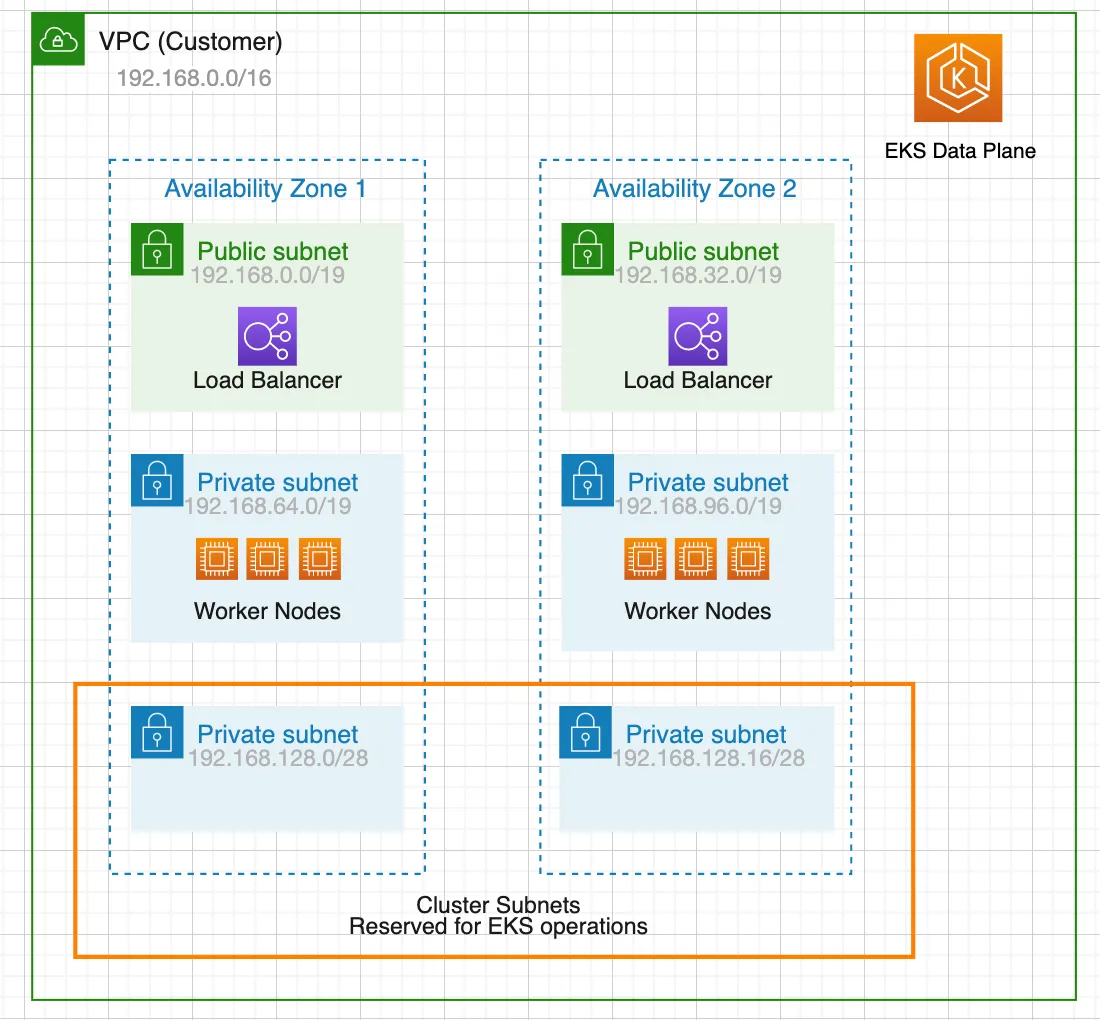
Create private VPC subnets in different Availability Zones reserved for EKS network interface and future cluster upgrades.
Why need this
Security:
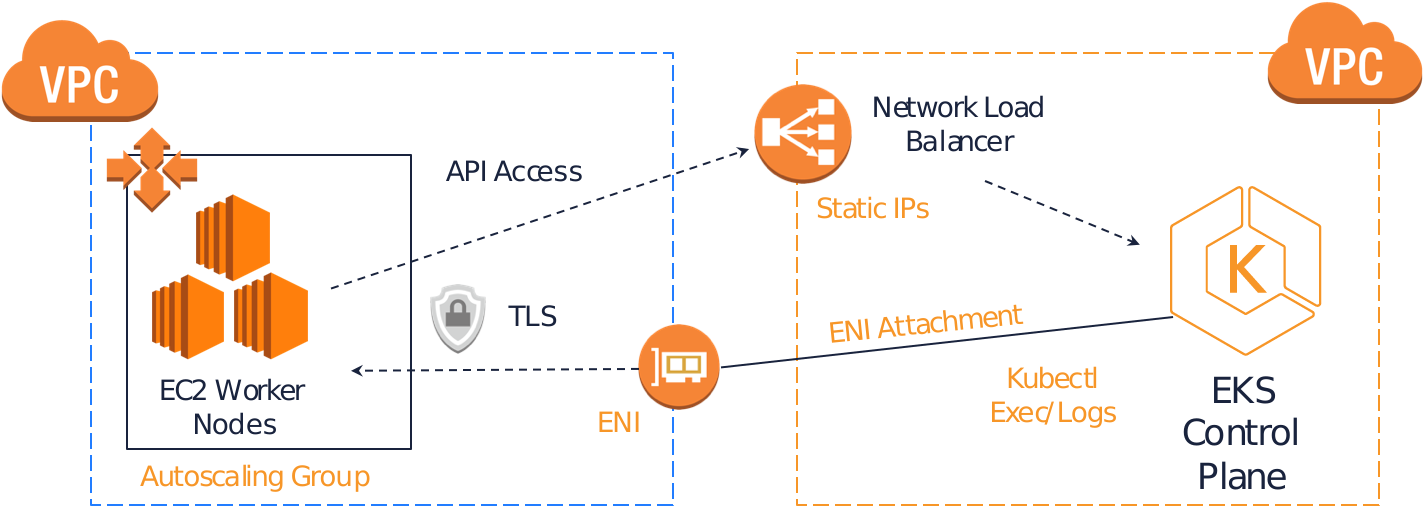
When creating EKS clusters, we will need to specify a VPC and at least two subnets in different Availability Zones. The subnets we specified when creating the cluster are called cluster subnets. Worker nodes are not recommended to be placed inside cluster subnets. The cluster subnets are “reserved” for EKS operations.
Maintainability:
When we upgrade our cluster, Amazon EKS requires up to five free IP addresses from the subnets that we specified when we created our cluster. Amazon EKS creates new cluster elastic network interfaces (network interfaces) in any of the subnets that we specified. The network interfaces may be created in different subnets other than our existing network interfaces are in.
If we don’t follow this best practice and specify large subnets or even specify all subnets during cluster creation, we are putting our cluster in a situation that cluster upgrade may fail in the future. If the cluster subnets are too large, it will take a lot of IPs and would be a waste of resources. When we run out of available IP addresses, we may need to deploy nodes in cluster subnets. If there’s not enough free IP addresses in the subnet and EKS randomly choose that subnet to deploy the new ENI during upgrading, the upgrade will fail.
ASCENDING Approach
The Ascending approach is to use 2 /28 subnets in different Availability Zones as cluster subnets and create at least 2 public and 2 private subnets for workload separately. Usually, a /19 CIDR is good for worker subnets. The worker nodes would be deployed in private subnets to have maximal control over traffic to the nodes and this would be effective for the vast majority of Kubernetes applications. Ingress resources (like load balancers) would be instantiated in public subnets and route traffic to Pods operating on private subnets.
Why Worker Subnets Need So Much Room
The sizing advice above only makes sense once you know how the Amazon VPC CNI hands out addresses. Under the default configuration every Pod receives a real IP from the worker subnet — not an overlay address. A node does not consume one IP, it consumes one IP per Pod it can host, plus the addresses the CNI keeps in a warm pool so new Pods can start without waiting on an EC2 API call.
How many that comes to depends on the instance type. Each type supports a fixed number of elastic network interfaces and a fixed number of IPv4 addresses per interface, and the two multiplied together set the node’s maximum Pod count. A small instance may top out in the low teens; a large one can host several hundred. Plan the subnet against the densest node group you expect to run, not the one you start with.
This is where clusters run out of room quietly. Nothing fails at creation time. Months later a scaling event cannot place Pods, and kubectl describe pod reports a failure to assign an IP address while the subnet shows plenty of free EC2 capacity. The constraint was never compute — it was addresses.
When the Worker Subnet Fills Up
Two options are worth knowing before you need them.
Add a secondary CIDR block. A VPC can carry additional CIDR blocks, including ranges from the 100.64.0.0/10 carrier-grade NAT space. Because that space is not routable on the public internet and rarely collides with corporate networks, it is a common way to add Pod capacity to a VPC whose primary range is already committed. Pods land in the secondary range while nodes and load balancers stay in the original subnets.
Turn on prefix delegation. Instead of assigning individual addresses to an interface, the CNI can assign /28 prefixes. Each prefix carries 16 addresses, so the same interface limit yields far more Pods and far fewer EC2 API calls during scale-up. The trade-off is allocation granularity: prefixes must be carved from contiguous space, so a heavily fragmented subnet can refuse a prefix even when individual addresses remain free. Enable it on a subnet with room to spare.
Controlling Traffic Between Pods
Subnet layout decides where traffic can go; it does not decide what is allowed to talk to what. Two mechanisms cover that gap and they operate at different layers.
Kubernetes NetworkPolicy is the portable option, expressing rules in Kubernetes terms — namespaces, Pod labels, ports. Nothing enforces those rules until a controller implements them, so confirm your cluster runs one before assuming a policy is active.
Security groups for Pods push enforcement down to the VPC layer, attaching an EC2 security group directly to a Pod. That matters when the other side of the connection is not in the cluster at all: an RDS instance, an ElastiCache node, anything that already speaks security-group-to-security-group. The feature depends on supported instance types, so check the node group before designing around it.
An insurance eligibility integration is one example where an egress inventory needs to name the transaction provider, model endpoint, evidence store, and destination application separately. If the workflow adds a payer-calling service, map that service’s data path too. Use the inventory to review required connections and failure handling before turning the workflow on.
A Short Checklist
- Cluster subnets stay small —
/28is enough — and are reserved for EKS-managed network interfaces, never for worker nodes. - Cluster subnets span at least two Availability Zones and keep five or more free addresses available for version upgrades.
- Worker subnets are sized from maximum Pod density on the largest planned instance type, not from node count.
- Worker nodes sit in private subnets; only ingress resources are instantiated in public subnets.
- There is a documented plan for address exhaustion — secondary CIDR, prefix delegation, or both — before the cluster reaches it.