
Picture the moment a migration plan meets reality. The new AI platform is signed and the rollout date is on the calendar. Someone on the steering committee asks a simple question: “Can everyone just export their ChatGPT history before we switch?”
In ChatGPT Enterprise, the answer is no. There’s no Export data button for members. Workspace data leaves through a compliance log stream that OpenAI keeps for only 30 days. And the custom GPTs your teams built over two years retire on December 11, 2026, whether you’ve moved or not.
This guide is for the IT, security and AI owners who run a ChatGPT Enterprise workspace, not for individual users.
None of this is hidden. It’s spread across a dozen OpenAI help pages, though, and each one covers a single piece. This post puts the pieces together. We’ll walk through:
- what leaves the workspace, and by which route
- how Codex fits in
- why OpenAI blocks some things
- what Claude, Gemini and Copilot can take in on the other side
Vendor documentation checked November 25, 2026. OpenAI’s help pages change often, so confirm each route against the linked page before you plan around it.
Key Takeaways
- Enterprise members can’t export their own data. Owners collect it through the Compliance Logs Platform, which keeps JSONL logs for 30 days.
- Codex leaves in five pieces. Analytics, compliance logs, OpenTelemetry, local files and Git each hold part of the record.
- Custom GPT actions, model choice and sharing settings don’t survive the December 11, 2026 retirement.
- No major assistant documents a bulk import of ChatGPT Enterprise chat history. Plan to archive history and rebuild what people actually use.
The Export button isn’t there
Most people learned about ChatGPT export from a personal account. In a personal account you open Settings, choose Export data, and a ZIP arrives with conversations.json and an HTML viewer. It’s reasonable to assume work accounts behave the same way. They don’t.
OpenAI’s export article says self-service export isn’t available in Enterprise, Business or Healthcare workspaces. It sends members to their workspace owner. The plans differ in what that owner can do next:
| Plan | Members export their own data? | What the admin can do |
|---|---|---|
| Free, Plus, Pro | Yes, as a ZIP whose download link expires 24 hours after you receive it | Not applicable |
| Business | No | Owners can export one member’s data from the Members page, “if the Export data option is available” (Business FAQ) |
| Enterprise | No | Collect through the Compliance Logs Platform; no per-member export button is documented |
| Edu | Only if an owner turns it on | Member export has been an owner setting since the June 17, 2026 release. It’s off by default and unavailable with data residency (Edu export) |
Even Edu’s export isn’t a moving box. OpenAI says uploading that JSON into a personal account doesn’t recreate the chats. The file is a record of past work, not something you can open and keep using. That distinction comes up again and again in this post.
Where the data actually leaves
ChatGPT Enterprise data leaves through four documented routes, and only the compliance logs, read directly or through a partner, carry conversation content. If members can’t export, the routes are how the data gets out, and they fall into two very different groups.
The first group carries content: what people typed and what the model returned. The second carries usage: who used what, and how often. Only the first group can help with legal holds or rebuilding a workflow. The second helps you plan seats and spot which teams depend on which tools.
| Route | What you get | Who can use it | Format |
|---|---|---|---|
| Compliance Logs Platform | Conversation, audit, auth, app and Codex events | Enterprise and Edu owners | JSONL, kept 30 days |
| eDiscovery and DLP partners | The same compliance data, in a vendor’s tool | Workspaces that connect a listed partner | The vendor’s format |
| Workspace analytics export | Usage reports by user, GPT and project | Admins and analytics viewers | CSV |
| Analytics API | Aggregated ChatGPT, Codex and Work usage | Admin key with analytics scopes | API responses for your warehouse |
The analytics routes count activity and don’t include prompt or response content. So when someone asks for “the export,” find out which group they mean. A finance team planning seat counts needs the CSV. A legal team under a preservation order needs the logs.
The compliance stream is a stream, not a backup
The Compliance Logs Platform is OpenAI’s owner-controlled export of ChatGPT Enterprise activity as JSONL logs. It’s the only route that carries conversation content, so it does most of the work. It also runs on the strictest clock. OpenAI calls the product the Compliance Logs Platform, and its programmatic interface is the Compliance API.
The platform delivers time-windowed JSONL logs, and OpenAI keeps them for 30 days. After that they’re gone unless you’ve already downloaded them. OpenAI’s compliance article is direct about it: customers who need longer retention must collect logs continuously and store them themselves.
That changes how you plan. You can’t wait until the week before cutover and pull a year of history. You have to start collecting early and keep it running.
The API changed this year
Two access patterns exist today:
- Logs Platform: append-only events.
- Stateful Compliance API: returns an object’s current state when you request it.
OpenAI released a new conversation-logs system on March 5, 2026. On June 5, 2026, it removed the old stateful conversations route. Scripts that call that old route have stopped working and need to move to the logs endpoints. The endpoints sit under https://api.chatgpt.com/v1/compliance, as OpenAI’s Compliance API guide shows. If your integration was built in 2025, check it before you rely on it.
What’s in the stream
Elastic’s ChatGPT Enterprise integration gives the most complete public list of event types. Treat it as a third-party list, not OpenAI’s own:
CONVERSATION_MESSAGEAUDIT_LOGandAUTH_LOGAPP_LOGandAPP_AUTH_LOG, for connector requests and responsesCODEX_LOGandCODEX_SECURITY_LOGCUSTOM_AGENTS_LOG, for workspace agent runs
Coverage keeps growing. OpenAI’s Enterprise release notes record what 2026 added:
- Library file endpoints for export and delete (June 11)
- ChatGPT for PowerPoint prompts and responses (July 6)
- Codex policy changes in audit logs (September 11)
- Locked chats in message logs (October 20)
Record mode transcripts and their canvases are captured. Historical meetings imported into ChatGPT Meetings are not, according to OpenAI’s record mode article.
Who holds the key
In Enterprise, only a workspace owner can create credentials with sensitive compliance permissions. Elastic’s documentation adds that the API key needs a compliance scope requested from OpenAI support. More than a dozen eDiscovery and DLP partners can consume the logs, including Microsoft Purview, Relativity and Smarsh (compliance article).
One question remains open. The compliance article names Enterprise and Edu and tells other plans to contact sales. If you run Business, get OpenAI’s answer in writing before you build a plan around this route.
Codex leaves in five pieces
You can export Codex usage, but only in pieces: analytics, compliance logs, OpenTelemetry, local files and Git each hold part of the record. Codex complicates the export story because it doesn’t live only in ChatGPT. Some of it runs in the cloud, some runs on developers’ laptops, and some ends up in your Git repositories. Each part leaves through a different door.
| Codex data | Where it goes | The catch |
|---|---|---|
| Usage totals | Codex analytics, workspace analytics, Analytics API | Aggregated counts, not content |
| Conversations | Compliance API CONVERSATION_MESSAGE and CODEX_LOG events | 30-day log window |
| Local actions | OpenTelemetry events you collect yourself | Off by default |
| Config, skills, history | Local files under CODEX_HOME | Spread across laptops |
| Code changes | Commits and pull requests in GitHub or GitLab | Only work someone pushed |
Usage numbers
OpenAI’s governance guide is candid about the dashboards. It calls Codex and workspace analytics “interactive reporting surfaces, not raw audit logs.” It also warns against building “a durable reporting contract from dashboard labels or downloaded report fields,” because those fields can change.
For anything you want to keep, OpenAI points to the Analytics API. Its unified daily usage endpoint covers ChatGPT, Codex and Work. It needs an admin key with the enterprise.analytics.usage.read scope, and the narrower Codex analytics scope doesn’t include it. If you just need a snapshot, the workspace user report exports to CSV under Usage > Overview > Export. Its seat_type column marks Codex seats in eligible workspaces.
What the logs miss
Codex conversations show up in the compliance stream. Local work is a different matter. The governance guide says local execution produces separate OpenTelemetry events, and “conversation visibility alone does not establish a complete record of local actions.”
To capture those events, a developer or admin opts in through the [otel] section of config.toml. OpenAI’s advanced config reference documents otlp-http and otlp-grpc exporters. It also documents log_user_prompt = false to redact prompts. The events include codex.user_prompt, codex.tool_decision and codex.tool_result. If you need an audit trail of what Codex did on a machine, this pipeline is the only documented way to get one.
What developers already have
Some Codex data never needed exporting, because it already lives on your hardware. Codex keeps local state under CODEX_HOME, which defaults to ~/.codex. That folder holds:
config.toml- credentials
history.jsonl, when history persistence is on
Local session transcripts are saved by default, although OpenAI’s docs don’t specify the folder layout. Skills are plain folders with a SKILL.md, stored in .agents/skills or $HOME/.agents/skills (skills guide). AGENTS.md files sit in the repository.
The catch is that these files are spread across every developer’s laptop. Collecting them takes a deliberate effort before cutover.
Codex cloud works on repositories from a connected GitHub or GitLab account, and finished tasks can become pull requests (Codex cloud docs). Anything pushed stays in your repositories after you leave ChatGPT. Cloud tasks nobody pushed or applied stay behind.
Sorting the workspace: move, archive, rebuild or leave
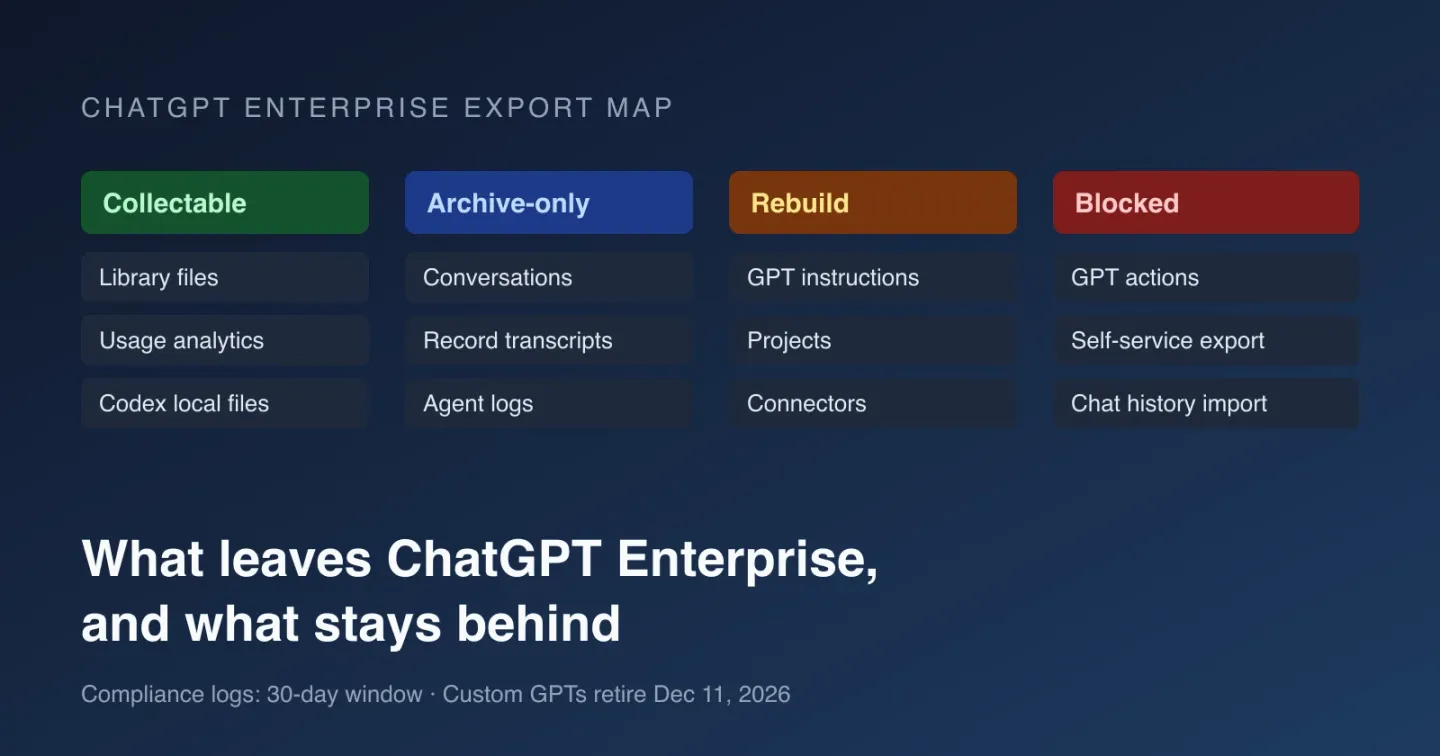
Put all the routes together and every asset falls into one of four groups. We recommend this sorting for migration assessments because it replaces a vague question with a specific one. “Can we export it?” becomes “What will we do with it on the other side?”
- Collectable: leaves through a documented route.
- Archive-only: you can keep a record, but nothing can run it.
- Rebuild: you’ll recreate it in the new tool.
- Blocked / not documented: no export route found. Treat “not documented” as a question for OpenAI, not a confirmed gap.
| Asset | Route | Status | What to do |
|---|---|---|---|
| Conversations | Compliance logs | Archive-only | Stream logs daily into your own storage |
| Library files | Compliance Library endpoints | Collectable | Export the files you still need; transient chat uploads can expire after 48 hours (retention article) |
| Memory | Listed in the 2024 launch; current endpoint not documented as of November 25, 2026 | Not documented | Ask OpenAI; don’t promise memory transfer |
| Custom GPT instructions and knowledge | Plugin migration inside ChatGPT only | Rebuild | Get instructions and source files from their owners |
| Custom GPT actions | None | Blocked | Save each action’s OpenAPI schema, auth method and owner |
| Projects | Chats likely appear in message logs (inferred); no documented export for structure or instructions | Rebuild | Record each project’s instructions and files |
| Canvas | Documented only for record mode | Not documented | Save important canvases as documents |
| Record mode transcripts | Compliance API | Archive-only | Imported historical meetings are excluded |
| Connectors and apps | Activity in APP_LOG; configuration not exported | Rebuild | Record each connector’s scopes and account owner |
| Codex | Compliance logs, OpenTelemetry, local files, Git | Collectable | Each route covers part; collect all of them and push wanted work |
| Workspace agents | CUSTOM_AGENTS_LOG | Archive-only | Document the agent’s logic separately |
| Usage analytics | CSV export and Analytics API | Collectable | Export before seats are removed |
Read the “Status” column top to bottom and a pattern appears. Most of what you can collect is evidence of past work. Very little of it is something a new tool can run. Collection isn’t import, and a plan that treats them as the same thing will slip.
Why OpenAI locks it down
It’s tempting to read these restrictions as lock-in. The documented picture is more about control, and it helps to keep OpenAI’s statements apart from our reading of them.
OpenAI’s Enterprise privacy page (updated January 8, 2026) says the customer owns and controls its data. It also says the customer controls retention in Enterprise, Healthcare and Edu, and decides which internal sources connect. In that model the organization decides what leaves, not each employee. Bulk access runs through an audited route that owners hold.
A few blocks come with documented effects, even where OpenAI gives no reason:
- GPT actions don’t move to Plugins. The retirement FAQ says so directly.
- Edu export excludes workspaces with data residency. OpenAI states the rule without explaining it.
- Removed members’ chats aren’t handed to the owner. Their projects and GPTs are reassigned, but their conversations and files aren’t (member removal article).
The rest is our interpretation, not OpenAI’s wording:
- Retention and legal holds. Personal exports would create copies the admin’s retention policy can’t govern.
- Data residency promises. A self-service download could move data outside a promised region.
- No portable format. Actions and connectors depend on credentials and OpenAI-specific tool definitions, so no other product could run an export of them.
The trade-off is real either way. Admins get control and an audit trail, and employees lose the ability to take their own work history with them. If your people expected to carry their chats out the door, say so early. It’s easier than explaining it on cutover day.
December 11 changes the math for custom GPTs
Timing note: we wrote this section in November 2026, before the December 11 retirement date. If you’re reading it after that date, your GPTs have already been converted or retired. Use it to check what didn’t carry over, and confirm the current state in OpenAI’s retirement FAQ.
For many workspaces, custom GPTs hold most of the institutional knowledge. Someone spent weeks tuning the sales-proposal GPT. Someone else wired the support GPT to the ticketing system. Those assets now have a deadline.
OpenAI is converting custom GPTs into Plugins inside ChatGPT. According to the retirement FAQ:
- Instructions become a skill.
- Knowledge files are copied.
- Connected apps carry over.
- Custom actions, model choice, sharing settings and drafts don’t transfer.
The surrounding dates matter too:
- New GPT creation in Enterprise ended October 26, 2026.
- FedRAMP and approved-deferral workspaces retire on February 28, 2027.
- Only an owner can pull the full GPT inventory.
- Old GPT conversations stay accessible.
The FAQ doesn’t mention any way to download a GPT’s configuration or knowledge files. So if you’re leaving ChatGPT, don’t go to the GPT for its contents. Get the instructions and source documents from the people who own them.
Here’s the uncomfortable part. Migrating to Plugins keeps employees working through the deadline, which is good. It also ties the rebuilt logic more closely to ChatGPT, which makes a later move harder. If an exit is likely, record each action’s endpoint and authentication now. Our guide to ChatGPT connectors vs MCP covers how to rebuild that tool access elsewhere.
The 30-day clock and other retention traps
Most export problems are really timing problems. Several of OpenAI’s deletion rules run on the same 30-day clock, and they’re easy to trip over.
Deleted chats are purged within 30 days and can’t be restored. Compliance logs expire after 30 days. OpenAI’s retention article adds that GPT knowledge files are deleted within 30 days of the GPT’s deletion. Start collecting before cutover, not after.
Offboarding is the next trap. When a member is removed, their access ends immediately. Enterprise then applies the workspace retention policy, which an admin sets as indefinite or time-bound. Projects and GPTs move to a workspace owner, but the removed member’s chats and files don’t become visible to that owner. If you need a departing person’s records, collect them through the compliance logs before you remove the seat.
Account merges are one-way. Merging a personal workspace into Business or Enterprise can’t be undone (merge article). There’s no path from a workspace back to a personal account. Users who must move to a verified-domain workspace get a fixed 7-day grace period, per the October 23, 2026 release note.
Then there’s the gap nobody documents. We found no OpenAI page explaining what happens to Enterprise data when the contract ends. Put retrieval and deletion terms in writing before you give notice. Our AI vendor risk assessment lists the exit terms worth asking for.
Where the data can land
Suppose you’ve collected everything you can. The next question is what another assistant can do with it. The short answer disappoints most steering committees: no major assistant documents a bulk import of ChatGPT Enterprise conversations.
What does move is narrower. Memory can move by prompt, instructions and knowledge files by hand, and coding-agent configuration by file.
| Destination | Memory import | Chat history import | Rebuild custom GPTs as |
|---|---|---|---|
| Claude (Team, Enterprise) | Yes, experimental and prompt-based | Not documented | Projects plus custom skills |
| Gemini | Yes, personal accounts only | ZIP upload, but work accounts aren’t supported | Gems |
| Microsoft 365 Copilot | Not documented | Not documented | Agent Builder agents |
| Claude Code (from Codex) | Not applicable | Not applicable | Reads AGENTS.md; /import copies agent config |
Claude
Anthropic’s memory import works on Team and Enterprise plans:
- You run Anthropic’s prompt in the old assistant.
- You paste the result into Claude’s settings.
- You review what Claude learned.
Anthropic labels it experimental. It focuses on work-related memories and may drop personal details. Anthropic documents no import of ChatGPT conversations.
To rebuild a GPT, upload its source files to a Claude Project, which accepts files up to 30 MB each. Turn its instructions into a custom skill. Team and Enterprise admins can provision skills across the organization.
Gemini
Google’s import page supports both memory import and uploading a ChatGPT export ZIP. It requires a personal Google account and a personal account on the source platform. Google’s March 26, 2026 announcement says Business and Enterprise accounts aren’t supported. It wouldn’t help anyway, since Enterprise members have no export ZIP to upload. Gems can still be rebuilt from instructions and knowledge files (Gems help).
Microsoft 365 Copilot
Microsoft’s Copilot memory page covers automatic saves and deletion, with no import from other assistants. To rebuild a GPT, use Agent Builder. It takes up to 20 embedded files plus SharePoint and OneDrive sources. Anyone who can use the agent can see content from its embedded files, so check the audience before you upload anything sensitive.
Claude Code, coming from Codex
Coding agents move more easily, because their configuration is just files. Claude Code reads AGENTS.md when a directory has no CLAUDE.md. Its /import command copies another agent’s instructions, MCP servers and skills one time (Claude Code memory docs). Codex history doesn’t come along. For the full mapping, see our Codex to Claude Code migration assessment.
Every destination comes with the same choice. A searchable archive of old chats costs storage and access governance. Dropping history loses context people relied on. Make that call team by team rather than once for the whole company.
A cutover plan that respects the clock
Here’s how the pieces fit together in practice. Take a hypothetical 400-seat workspace planning a February cutover. Working backward from the deadlines, the order looks like this:
- Now. Confirm compliance access and decide who holds the owner credential.
- This week. Start continuous collection of compliance logs into storage you control. Every day you wait is a day of history that expires.
- Before December 11, 2026. Pull the full GPT inventory. Save every action’s schema and auth owner, and every connector’s scopes.
- December. Export the Library files and analytics reports you still need. Collect Codex
AGENTS.mdfiles and skills, and push wanted cloud work to Git. - January. Set retention and any legal hold with counsel. Rebuild the few workflows people use most, and test them against the same tasks.
- Before notice. Get written retrieval and deletion terms from OpenAI.
- After cutover. Revoke connectors and keys once the archive is verified.
The schedule is illustrative, not a customer case. What matters is the order. The time-bound steps come first, and the rebuild work comes after the records are safe.
Export is a governance decision, not a button
The steering committee’s question, “Can everyone just export their history?”, assumes export is a feature. In ChatGPT Enterprise it’s really a set of decisions:
- What do we need to keep, and for how long?
- Who’s allowed to collect it?
- What will we rebuild rather than carry over?
That’s why we treat export as part of governance rather than an IT chore. A team that knows which GPTs matter, which connectors they call and which records the law requires can move in weeks. A team that starts by hunting for a download button will discover the 30-day clock too late.
If you’re planning the wider move, start with our company ChatGPT-to-Claude migration assessment. It covers inventory fields and a one-workflow pilot. If you’re still choosing a platform, compare ChatGPT Enterprise vs Claude Enterprise first. Treat API applications as a separate track; see ChatGPT workspace vs OpenAI API project.
Disclosure: ASCENDING Inc builds Jarvis Crosswalk, part of the open-source Jarvis project, to support AI tool migration assessments. If you’re evaluating it, confirm its current collection coverage and delivery scope with our team. Don’t assume automatic migration.
References
- OpenAI, How do I export my ChatGPT history and data?
- OpenAI, Compliance Platform for Enterprise customers
- OpenAI, Codex governance and Analytics API
- OpenAI, Custom GPT retirement and migration FAQ
- OpenAI, Enterprise privacy, updated January 8, 2026
- Elastic, OpenAI ChatGPT Enterprise integration
- Anthropic, Import memory into Claude and Claude Code memory
- Google, Import chats and memory into Gemini
- Microsoft, Add knowledge to Agent Builder agents
Questions about exporting ChatGPT Enterprise data
Can ChatGPT Enterprise users export their own chat history?
No. OpenAI's export article says self-service export isn't available in Enterprise, Business or Healthcare workspaces. Workspace owners collect conversation records through the Compliance Logs Platform instead.
How long does the ChatGPT Compliance API keep logs?
OpenAI documents a 30-day retention window for the Compliance Logs Platform. If you need records for longer, you have to download them continuously and store them in your own system.
Can you export Codex usage from ChatGPT Enterprise?
Partly. Aggregated Codex usage comes from analytics reports and the Analytics API. Codex conversations appear in Compliance API logs. Local actions need a separate OpenTelemetry export, and OpenAI says conversation logs alone aren't a complete record of local activity.
Can Claude or Gemini import ChatGPT Enterprise conversations?
Not as documented today. Claude's memory import is experimental and prompt-based, and it doesn't import chat history. Gemini's chat-history import excludes work accounts and says employer-provided access may not work.