

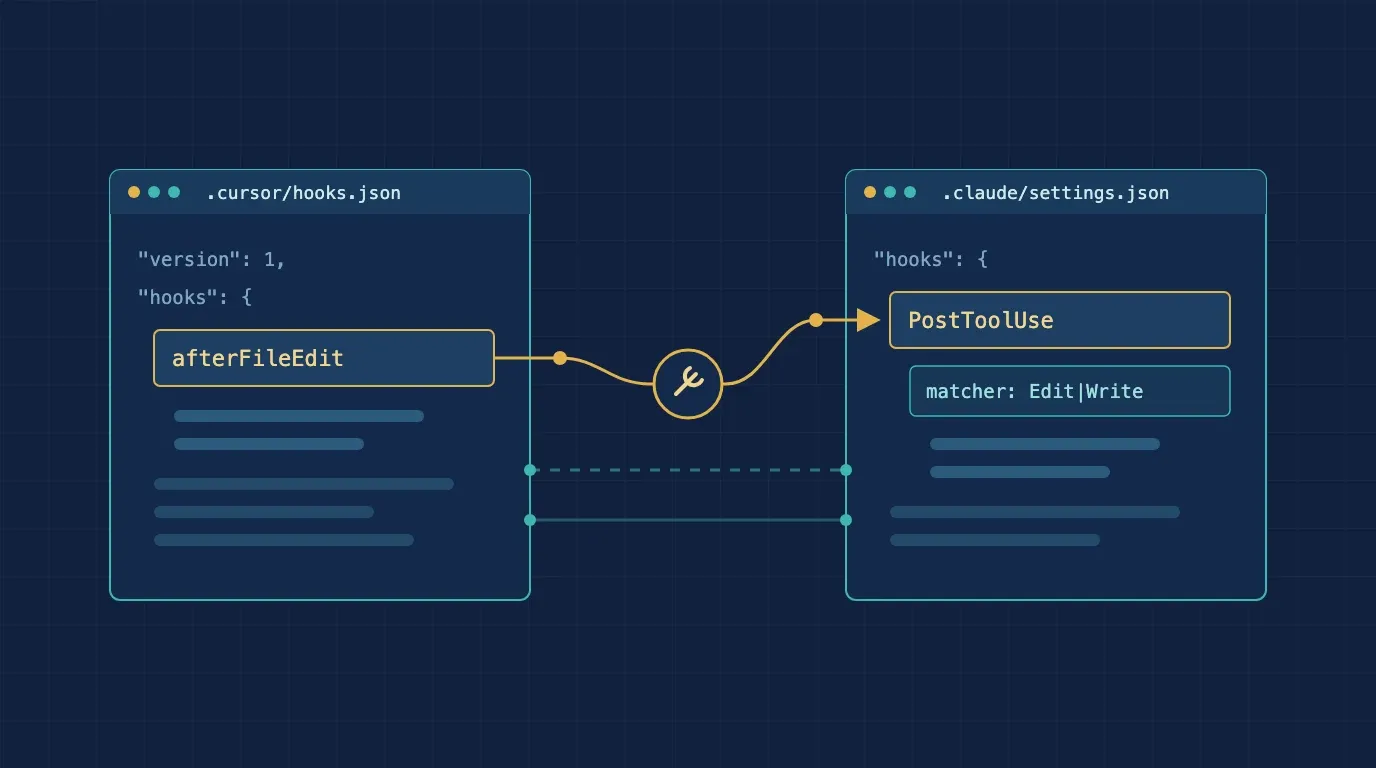
Claude Code doesn’t read Cursor’s hooks.json, so every Cursor hook needs a manual port. Most ports are small. You move the config into a Claude Code settings file, pick the matching event, and change where your script reads its input. Then you test it, because nothing warns you when a hook silently stops running.
This guide is for engineers who have Cursor hooks today and are moving to Claude Code. It explains what hooks are, compares the two config formats and event names, and ports an auto-formatting hook step by step, followed by a short blocking guard. It ends with the compatibility gaps and a checklist for proving the port works.
Everything here comes from Cursor’s hooks documentation and Anthropic’s Claude Code hooks reference, both checked on November 24, 2026. Both hook systems change often, so recheck those pages before you roll anything out. For the rest of the migration (rules, skills, subagents, MCP), see our full Cursor-to-Claude Code mapping.
Key Takeaways
- Claude Code’s
/import cursorcommand lists instruction files, MCP servers, commands, subagents and skills. Hooks aren’t on that list, so plan to port them by hand.- Cursor keeps hooks in
hooks.json. Claude Code keeps them in ahooksblock insidesettings.json, grouped by event and matcher.- Cursor’s file, shell and MCP events mostly become Claude Code’s
PreToolUseorPostToolUsewith a tool-name matcher. Cursor’safterFileEditbecomesPostToolUsewithEdit|Write.- Scripts need input changes: Cursor sends
file_pathat the top level, while Claude Code nests it undertool_input.- Tab hooks and
afterAgentThoughthave no Claude Code equivalent. Fail-closed behavior needs an explicit setting in both tools.
What Is a Hook?
A hook is a script the coding agent runs automatically at a set point in its work. It might run before a shell command, after a file edit, or when a session starts. The agent sends the hook a JSON description of what’s happening on standard input. The hook can log it, change files, or, for some events, block the action.
Teams typically use hooks for three jobs:
- Guardrails: block risky shell commands or reads of secret files before they happen.
- Automation: format or lint a file right after the agent edits it.
- Audit: record which tools and MCP servers the agent called.
Both Cursor and Claude Code support all three. What differs is the file you write, the event names, and the shape of the JSON your script receives.
Does Claude Code Read Cursor Hooks?
No. Claude Code loads hooks only from its own settings files, plugins, and skill or subagent frontmatter. Its /import cursor command can bring Cursor configuration across, and it requires v2.1.265 or later. The documented scope is “instruction files, MCP servers, commands, subagents, and skills.” Hooks aren’t listed, so don’t assume they move.
The reverse direction is different. Cursor’s third-party hooks page says Cursor loads hooks from .claude/settings.local.json, .claude/settings.json and ~/.claude/settings.json. That needs the “Include Third-Party Plugins, Skills, and Other Configs” setting, which is on by default.
| Direction | Does it load the other tool’s hooks? | Notes |
|---|---|---|
| Claude Code reading Cursor hooks | No | Port each hook to a Claude Code settings file |
| Cursor reading Claude Code hooks | Yes, by default | 8 Claude Code events are mapped. Notification, PermissionRequest and the Glob tool aren’t supported. |
That one-way loading has a side effect during a mixed-tool period. Cursor’s docs say “all matching hooks from every source run.” If you keep the old Cursor hook and add the new Claude Code one, a Cursor session may run both. For a formatter, that’s wasted work. For an audit log, it’s duplicate records. Remove the Cursor copy once the port is tested.
Don’t count on the ported script working inside Cursor unchanged. Cursor maps event and tool names, but its docs don’t promise that your script receives Claude Code’s input shape. Test it in Cursor before relying on it there.
How the Config Files Compare
Cursor uses a standalone hooks.json. Claude Code uses a hooks block inside settings.json, with one more level of nesting.
Where Cursor hooks live
Cursor reads hooks.json from four levels, applied in the order “Enterprise → Team → Project → User”:
- Enterprise: an MDM-managed file, such as
/Library/Application Support/Cursor/hooks.jsonon macOS or/etc/cursor/hooks.jsonon Linux. - Team: hooks set in the Cursor dashboard and synced to members.
- Project:
.cursor/hooks.json. Project hook commands run from the project root. - User:
~/.cursor/hooks.json. User hook commands run from~/.cursor/.
Where Claude Code hooks live
Claude Code reads a hooks block from any of these sources, as listed in Anthropic’s hooks reference and settings documentation:
~/.claude/settings.jsonfor your own machine.claude/settings.jsonfor a project, committed to the repository.claude/settings.local.jsonfor a project, kept out of version control- Managed policy settings, deployed by an administrator
- A plugin’s
hooks/hooks.json, or the frontmatter of a skill or subagent
For team rollout, managed settings replace Cursor’s MDM and dashboard routes. Our Claude Code managed settings guide covers delivery. Administrators can also set allowManagedHooksOnly so that user, project and plugin hooks don’t run.
The shape of each file
Cursor maps each event name straight to a list of hook commands:
{
  "version": 1,
  "hooks": {
    "afterFileEdit": [
      { "command": ".cursor/hooks/format.sh" }
    ]
  }
}
Claude Code adds a matcher group between the event and the commands. The matcher picks which tools trigger the hook:
{
  "hooks": {
    "PostToolUse": [
      {
        "matcher": "Edit|Write",
        "hooks": [
          { "type": "command", "command": "\"$CLAUDE_PROJECT_DIR\"/.claude/hooks/format.sh" }
        ]
      }
    ]
  }
}
Matchers follow different rules too. In Cursor, a matcher is a regular expression. In Claude Code, a matcher made only of letters, digits, _, -, spaces, commas and | is an exact name or list. Anything else is treated as an unanchored JavaScript regular expression, so Edit.* would also match NotebookEdit.
Claude Code sets CLAUDE_PROJECT_DIR to the project root for hook commands. Using it keeps the script path working when Claude changes directory during a session.
Cursor-to-Claude Code Event Map
Most Cursor events have a Claude Code counterpart. Cursor’s tool-specific events (shell, MCP, file read, file edit) all become PreToolUse or PostToolUse with a matcher. As of November 24, 2026, Cursor’s page lists 21 hook events and Anthropic’s reference lists 33.
| Cursor event | Claude Code event and matcher | Notes |
|---|---|---|
sessionStart | SessionStart | |
sessionEnd | SessionEnd | These hooks share a 1.5-second budget by default, raised to match a longer per-hook timeout of up to 60 seconds |
beforeSubmitPrompt | UserPromptSubmit | |
preToolUse | PreToolUse | |
postToolUse | PostToolUse | |
postToolUseFailure | PostToolUseFailure | |
beforeShellExecution | PreToolUse, matcher Bash | Command is in tool_input.command |
afterShellExecution | PostToolUse, matcher Bash | |
beforeMCPExecution | PreToolUse, matcher mcp__<server>__.* | Use mcp__.* to match every MCP server |
afterMCPExecution | PostToolUse, matcher mcp__<server>__.* | Same matcher rules as above |
beforeReadFile | PreToolUse, matcher Read | Decide whether Grep and Glob need the same check |
afterFileEdit | PostToolUse, matcher Edit|Write | Worked example below |
subagentStart | SubagentStart | Can’t block in Claude Code. To block, match the Agent tool in PreToolUse. |
subagentStop | SubagentStop | |
stop | Stop | |
preCompact | PreCompact | |
afterAgentResponse | Closest: Stop | Read last_assistant_message from the input |
afterAgentThought | None | |
beforeTabFileRead, afterTabFileEdit | None | Claude Code has no Tab completion |
workspaceOpen | None directly | SessionStart may cover the same need |
Claude Code also has events Cursor doesn’t, such as PermissionRequest, ConfigChange and InstructionsLoaded. They’re worth a look once the port is done, but you don’t need them to migrate.
Port an Auto-Formatting Hook, Step by Step
A formatter is the easiest hook to port, which makes it a good first one. It doesn’t block anything, so a mistake costs you formatting, not safety. This example runs Prettier on every file the agent edits.
Before: the Cursor version
The Cursor config from the previous section runs .cursor/hooks/format.sh after each edit. The script reads the JSON from standard input and takes file_path from the top level:
#!/bin/bash
# .cursor/hooks/format.sh
input=$(cat)
file=$(echo "$input" | jq -r '.file_path')

npx prettier --write --ignore-unknown "$file" >/dev/null 2>&1
exit 0
This script has a hidden weakness. It throws away all output and always exits 0, so a broken formatter looks exactly like a working one.
Step 1: Copy the script and update it
Copy the script to .claude/hooks/format.sh and make two changes.
First, change the input path. In Claude Code, PostToolUse input nests the tool’s arguments under tool_input. For the Edit and Write tools, tool_input.file_path is always an absolute path.
Second, stop hiding failures. With set -euo pipefail and no forced exit 0, the script exits non-zero when jq or Prettier fails:
#!/bin/bash
# .claude/hooks/format.sh
set -euo pipefail
file=$(jq -r '.tool_input.file_path')

npx prettier --write --ignore-unknown "$file" >&2
Prettier’s messages go to standard error, which keeps standard output free for any JSON the hook might return. A failed run can’t undo the edit, because PostToolUse runs after the tool. It does make the failure visible instead of silent.
Watch the exit code your script passes through. In our local test with Prettier 3.10.1, it exited with code 2 when the file was missing. After PostToolUse, exit 2 just shows the error to Claude. In a PreToolUse hook, the same pass-through would block the action, so set exit codes on purpose.
Make the script executable with chmod +x .claude/hooks/format.sh.
Step 2: Register it in Claude Code settings
Add the PostToolUse block shown earlier to .claude/settings.json in the project root. If that file already exists, merge the hooks key into it rather than replacing the file.
Anthropic’s hooks guide shows the same formatter as a one-line command, with no separate script:
{
  "hooks": {
    "PostToolUse": [
      {
        "matcher": "Edit|Write",
        "hooks": [
          { "type": "command", "command": "f=$(jq -r '.tool_input.file_path') && npx prettier --write --ignore-unknown \"$f\"" }
        ]
      }
    ]
  }
}
The one-liner is fine for a formatter. Keep a script file for anything longer, so you can test it on its own.
Step 3: Remove the Cursor copy
Once the test steps below pass, delete the afterFileEdit entry from .cursor/hooks.json. This avoids Cursor running both versions while your team still uses both tools.
What changed, at a glance
| Cursor | Claude Code | |
|---|---|---|
| Config file | .cursor/hooks.json | .claude/settings.json |
| Event | afterFileEdit | PostToolUse |
| Filter | None needed | ”matcher”: “Edit|Write” |
| File path in input | .file_path | .tool_input.file_path |
| Script path | Relative to project root | "$CLAUDE_PROJECT_DIR"/... |
Port a Blocking Shell Guard
Guards need more care than formatters, because a broken guard lets the action through. This small example blocks rm -rf commands. It’s a teaching example, not a complete policy.
In Cursor, the guard listens on beforeShellExecution, reads command from the top level, and returns a permission field:
#!/bin/bash
# .cursor/hooks/block-rm.sh
input=$(cat)
cmd=$(echo "$input" | jq -r '.command')

if [[ "$cmd" == *"rm -rf"* ]]; then
  echo '{"permission": "deny", "user_message": "rm -rf is blocked by policy"}'
  exit 0
fi
echo '{"permission": "allow"}'
In Claude Code, the guard listens on PreToolUse with the Bash matcher and reads tool_input.command. The simplest way to block is exit code 2, with the reason on standard error:
#!/bin/bash
# .claude/hooks/block-rm.sh
set -euo pipefail
cmd=$(jq -r '.tool_input.command')

if [[ "$cmd" == *"rm -rf"* ]]; then
  echo "rm -rf is blocked by policy" >&2
  exit 2
fi
exit 0
Register it with onFailure set to block, so a failed hook stops the command instead of allowing it. Anthropic’s reference counts four kinds of failure: the hook can’t start, exits with a code other than 0 or 2, times out, or returns JSON that can’t be parsed.
{
  "hooks": {
    "PreToolUse": [
      {
        "matcher": "Bash",
        "hooks": [
          {
            "type": "command",
            "command": "\"$CLAUDE_PROJECT_DIR\"/.claude/hooks/block-rm.sh",
            "onFailure": "block"
          }
        ]
      }
    ]
  }
}
The two settings work together. Without set -euo pipefail, a missing jq leaves cmd empty, the script reaches exit 0, and the command runs. With it, the script exits with a non-zero code, and onFailure turns that into a block. If you prefer JSON output over exit codes, return hookSpecificOutput with permissionDecision set to deny, as the hooks reference describes.
Compatibility Gaps to Plan For
These are the differences most likely to break a guardrail without any error message. Each one is documented in Cursor’s hooks page or Anthropic’s hooks reference.
| Gap | Cursor | Claude Code | What to do |
|---|---|---|---|
| Fail-closed setting | failClosed: true (default false) | "onFailure": "block", v2.1.295 or later | Add it to every guard. It doesn’t apply to async hooks or to Stop, SubagentStop, TaskCompleted and TeammateIdle. |
| Exit code 1 | Fails open by default | Non-blocking error; the action goes ahead unless onFailure is block | Use exit 2 to block on purpose, as Anthropic’s reference advises |
| Malformed output | Invalid JSON from a permission hook blocks | JSON is read only when standard output is a single object. A debug line before the JSON makes it plain text, which isn’t a failure, so the action proceeds even with onFailure set to block | Keep debug lines on standard error |
| Output fields | "permission": "deny" | hookSpecificOutput.permissionDecision, or exit 2 | Rewrite the output, not just the input |
| Blocking after the fact | afterFileEdit isn’t a permission hook | PostToolUse can’t block; the tool already ran | Use PreToolUse to stop an action |
| Subagent gate | subagentStart can deny | SubagentStart can’t block | Match the Agent tool in PreToolUse |
| Input fields | conversation_id, workspace_roots, user_email | session_id, cwd, permission_mode | Find a new source for user identity in audit scripts |
| No counterpart | Tab hooks, afterAgentThought | None | Record the gap and check whether anyone depends on it |
How to Verify the Migrated Hook Works
Test the hook on its own, then inside Claude Code, then with a deliberately broken setup. A hook that never runs looks exactly like a hook that runs and finds nothing to do.
Test the scripts by hand
Start by running the script on its own. Pipe in a sample payload and check both the exit code and the file:
echo '{"tool_input":{"file_path":"'"$PWD"'/src/example.ts"}}' | .claude/hooks/format.sh
echo "exit code: $?"
git diff src/example.ts
With the updated script, a 0 means Prettier ran without error. Because of --ignore-unknown, it also returns 0 for file types it skips, so check the diff too. For the guard, pipe in {"tool_input":{"command":"rm -rf build"}} and expect exit code 2. In our local test on macOS 26 with jq 1.8.1, the guard returned 2 for that command, 0 for ls -la, and a non-zero code for invalid JSON.
Check it inside Claude Code
Then work through these checks:
- Confirm it loaded. Type
/hooksto open a read-only browser of configured hooks. YourPostToolUseentry should appear. Claude Code watches settings files and applies most hook edits without a restart. - Trigger it for real. Ask Claude to edit a badly formatted file. Check with
git diffthat the whole file was formatted, not just the changed lines. - Watch it run. Start a session with
claude --debugto see hook execution details when something doesn’t fire. - Break it on purpose, then restore it. In
.claude/hooks/format.sh, changenpx prettierto a command name that doesn’t exist. The next edit should still succeed, with the failure in the debug output. For the guard, changejqinblock-rm.shto a missing command name and confirmonFailureblocks the next shell command. Undo both changes from your own terminal, not through Claude, because the broken guard blocks Claude’s shell commands.git checkoutrestores them only if the scripts are committed. - Check Cursor, if your team still uses it. Open Cursor’s Hooks output channel. Confirm the old hook no longer runs, and test how the Claude Code version behaves there.
Record the Claude Code version you tested and the date. A port that passed on one version is a starting point, not a guarantee for the next.
Migration Checklist
- List every Cursor
hooks.json: enterprise, team dashboard, project and user. - Mark each hook as a direct map, a rewrite, or a gap, using the event map above.
- Port each one to
.claude/settings.json, or to managed settings for team-wide hooks. - Update each script’s input paths and output fields.
- Add
"onFailure": "block"to any hook that must never fail open. - Test each hook by hand, then run the checks above.
- Delete the Cursor copy, and name an owner for each Claude Code hook.
Hooks are one item in a larger inventory. Our coding agent migration readiness assessment covers the rest.
Summary and Where to Start
Moving hooks from Cursor to Claude Code is manual work, but it’s rarely hard.
- Claude Code doesn’t load Cursor’s
hooks.json, and/import cursordoesn’t list hooks. - Most ports are a new event name, a matcher, and a new input path in the script.
- Test failure paths, not just the happy path. Exit codes, malformed output and fail-open defaults are where guards quietly stop working.
Start with a formatter to learn the format, then port your guardrails with extra testing. For the rest of the switch, see our full Cursor-to-Claude Code mapping.
We build Jarvis Crosswalk at ASCENDING Inc to help teams assess coding-tool migrations. If you’d like a second look at your hooks inventory, contact our team.
References
- Cursor: Hooks, Third-party hooks
- Anthropic: Hooks reference, Hooks guide, Commands, Settings
- Prettier: CLI
Cursor-to-Claude Code hooks questions
Does Claude Code read Cursor's hooks.json?
No. Claude Code loads hooks only from its own settings files, plugins, and skill or subagent frontmatter. Its /import cursor command lists instruction files, MCP servers, commands, subagents and skills, but not hooks, so each hook needs a manual port. Cursor does the reverse by default: it can load hooks from .claude/settings.json and related files, per its third-party hooks page.
What is the Claude Code equivalent of Cursor's beforeShellExecution hook?
Use a PreToolUse hook with the matcher Bash. Your script reads the command from tool_input.command instead of a top-level command field. To block, exit with code 2 or return hookSpecificOutput.permissionDecision set to deny.
What replaces Cursor's afterFileEdit hook in Claude Code?
A PostToolUse hook with the matcher Edit|Write. The edited file's path is in tool_input.file_path, which is always absolute for those tools. PostToolUse runs after the edit, so it can format or log the file but can't block the change.
How do I make a Claude Code hook fail closed like Cursor's failClosed?
Add "onFailure": "block" to the hook entry. A failure then blocks the action the way exit code 2 does. Failures include a hook that can't start, exits with a code other than 0 or 2, times out, or returns unparseable JSON. It requires Claude Code v2.1.295 or later and doesn't apply to async hooks or to the Stop, SubagentStop, TaskCompleted and TeammateIdle events. Check the current rules in Anthropic's hooks reference.
Do Cursor Tab hooks have a Claude Code equivalent?
No. Claude Code has no Tab completion, so beforeTabFileRead and afterTabFileEdit have no counterpart. The same is true of afterAgentThought. Record these as gaps and check whether anyone on the team depends on them.