Jarvis Registry, Obot and ContextForge are MCP gateway candidates with documented customer-operated deployment routes. Jarvis’s production reference covers Amazon EKS and Azure AKS. Obot provides Kubernetes reference architectures for EKS, AKS and GKE. ContextForge documents container and Kubernetes deployment. Choose around the infrastructure your team will operate and the access behavior you can demonstrate.
ASCENDING maintains the open source Jarvis Registry. This guide compares documented hosting routes and then uses Jarvis to make the deployment decisions concrete. It does not report customer tests or establish that one product is best for every environment.
Start with a deployment shortlist
“In our cloud” should identify both the account and the operator. A vendor-operated service in your account and software your team operates can satisfy different requirements.
| Candidate | Documented route | Decision to settle |
|---|---|---|
| Jarvis Registry | Helm deployment on an existing EKS or AKS cluster | Fit of the broader Registry services, identity integration and resource-access model |
| Obot | Kubernetes for production, with EKS, AKS and GKE references; local Docker evaluation | Gateway and hosted-server workload operations, persistence, identity and backups |
| ContextForge | Containers, Kubernetes and cloud deployment guidance | Components your team assembles, server runtime and access configuration |
These guides describe different operating jobs. Obot includes an MCP server hosting platform in its installation. Jarvis can register an existing remote server without moving that server’s process into Registry. A cloud-name match therefore starts the comparison; it doesn’t settle who will run each server.
This is not an exhaustive list. Docker also advertises an Enterprise Gateway operated in a customer’s account and an air-gapped appliance. Our Docker MCP Gateway alternatives guide covers the migration choice, including what happens to existing container runtimes. Here the narrower question is what your team will own after deployment.
Make the hosting requirement specific
A customer-hosted MCP gateway is a gateway deployed in your organization’s cloud account. That describes its location. Also name the operator: your team, a vendor or an implementation partner must own updates and incidents.
Start with the business requirement behind the cloud choice. An internal service may only be reachable from your network. Your platform team may need to control updates through existing cloud processes. Different departments may need distinct access to the same catalog.
Translate that requirement into a decision you can verify:
| Requirement | Evidence to ask for |
|---|---|
| Gateway deployment in a customer account | Account, cluster, component locations and operator responsibilities |
| Access to internal business systems | Network route, server owner and destination authentication |
| Different audiences for registered resources | Identity mapping, resource permissions and a permitted/denied test |
| A maintainable production service | Upgrade, secret rotation, backup, restore and incident owners |
| An acceptable data boundary | Destinations for model context, tool traffic, stored content and telemetry |
This separates a hosting requirement from an access requirement. Running a service in your account does not by itself show that only the intended employee can use it.
Example: finance reporting in an existing AWS environment
Illustrative company decision, not a customer result. A company already operates EKS. Finance wants an AI assistant to query its reporting server. Engineering employees must not be able to call that resource.
Keeping the gateway in AWS meets the location requirement. It doesn’t settle who can reach the server, which reports they can read or where the assistant sends the returned content. Those are separate decisions for the platform, Finance and AI-tool owners.
For a Jarvis trial, use a synthetic report and two users. Compare server discovery and explicit requests, then check the backend identity and the assistant’s model route. Keep the existing server’s operating owner unless rehosting is part of the agreed scope. Choose a candidate only after those checks support the required workflow.
Where Jarvis fits
Jarvis combines a server catalog and gateway with identity integration and per-resource access. The MCP Gateway guide describes server registration, sharing and downstream authentication. Its production reference supplies an AWS or Azure deployment route for the broader Registry.
That can fit a platform team that needs a shared catalog while keeping resource audiences separate. An engineering server might be shared with developers; a reporting server might have a narrower finance audience. The common catalog does not mean every signed-in user receives every server.
In Jarvis’s security design, application roles and resource ACLs do different jobs. Roles permit application capabilities; ACLs determine access to a particular resource. Evaluate both, then follow the request into the business system, which still applies its own permissions.
If your company uses Entra ID, the MCP access-control guide shows how to separate sign-in, server access and downstream record permissions in a two-user test.
For the catalog and control-layer design behind this decision, use the enterprise MCP registry architecture guide. Keep that design review separate from the cloud deployment and operating checks below.
Draw the complete data route
For a registered remote server, the conceptual request path is:
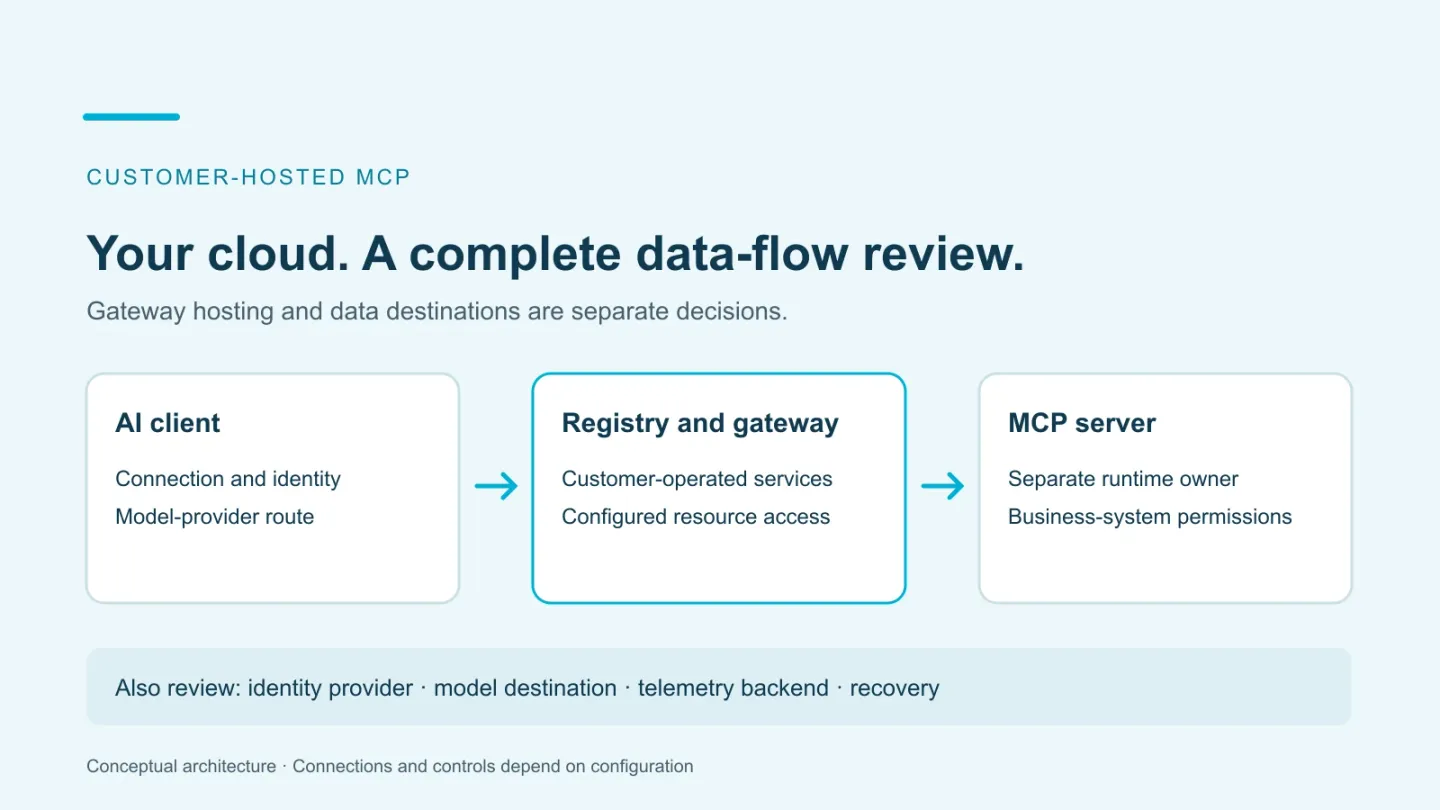
Client → Registry endpoint → permitted MCP server → business system
An identity provider establishes the caller. The server may use a per-user OAuth grant or a scoped service credential. Separately, the coding assistant may call a model provider, and configured telemetry may leave for an observability backend.
| Component | Location and ownership to record |
|---|---|
| AI client | Approved device or workload, connection settings and model provider |
| Registry and gateway | Account, cluster, ingress and resource-access configuration |
| Identity provider | Employee lifecycle, groups and application access |
| MCP server | Runtime, network route, updates and downstream credentials |
| Business system | Data permissions and permitted operations |
| Observability backend | Emitted signals, destination, reader access and retention |
Customer hosting gives you control over the gateway deployment. It does not prove that model processing, connected APIs and logs remain in the same account. Review the data each route sends rather than making a blanket “no data leaves” claim.
Plan the documented AWS or Azure deployment
The Jarvis production guide covers an existing Kubernetes cluster and Helm release. It includes frontend, backend and authentication services, persistence and cloud-specific integrations. This is a service architecture to operate, not a single forwarding endpoint.
For EKS, review the documented workload identity, load balancing, storage and secrets integrations with your AWS team. For AKS, do the same with Azure Workload Identity, ingress, persistent storage and secrets delivery. Keep the selected chart and application versions with the deployment record; do not copy a local Compose configuration into production without that review.
Use the separate local quick start for initial exploration. A working local sign-in does not validate cloud networking, identity, persistence or recovery.
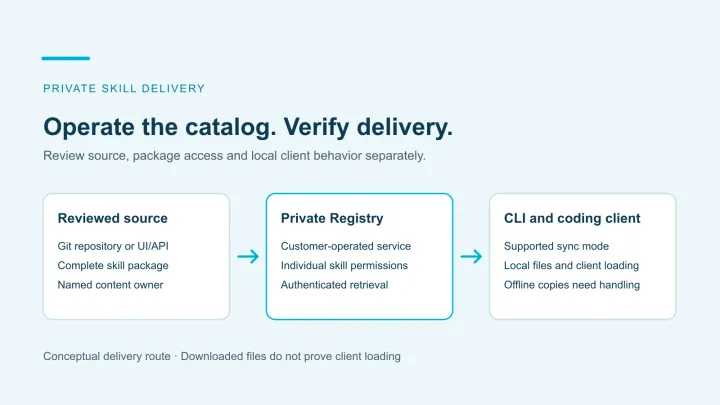
Server execution is another decision. Registering a remote endpoint does not move its process into Registry’s cluster. A local stdio server needs a supported adapter or a hosting route. Assign that work before assuming a cloud gateway replaces the developer’s local runtime.
Test the access route your client actually uses
Use one server, synthetic data and two test users. Define one user who should have access and one who should not. Record the exact client and request route before testing.
For Jarvis, the Registry’s tool-execution endpoint checks server access and the server-wide disabled-tool list. The transparent MCP proxy does not apply that disabled-tool list. Disabling a tool is not a per-user tool grant. These differences belong in the acceptance test, especially if a requirement depends on blocking one operation within a shared server.
Follow the published two-user walkthrough rather than inventing a second configuration procedure. Add the deployment checks that the walkthrough cannot decide for you:
- Can the intended client reach the endpoint from its real network?
- Does the allowed user discover and complete the permitted operation?
- What happens when the other user requests the same resource directly?
- Which downstream identity or credential does the business system see?
- What changes after access removal, including existing tokens or sessions?
- Can a direct server URL or another client route bypass the intended control?
These are proposed acceptance checks, not claims that we have tested your tenant. Preserve failures and unresolved requirements alongside successful results.
Assign operating owners before expanding
Agree who maintains the gateway configuration, who owns each server and who can change access. Include business-system owners when credentials affect production data.
| Responsibility | Record before rollout |
|---|---|
| Service updates | Registry/chart versions, update owner and rollback procedure |
| Identity and access | Group mappings, resource owners and access-review process |
| Secrets | Credential locations, rotation owner and recovery dependencies |
| Persistence | Backup scope, restore procedure and the last verified recovery result |
| Operations | Monitoring, incident response and client support |
The observability guide describes operational metrics and agent traces. Confirm what your deployment emits and retains. It does not automatically establish a complete audit record for every tool call or denial.
Include infrastructure, implementation, administration and support in the cost comparison. Customer-operated hosting is useful when the control it provides matches the team’s requirements and capacity to run it.
Decide using one supported workflow
Shortlist Jarvis when a shared MCP catalog, identity-based resource access and an EKS or AKS deployment fit your requirements. Compare the same workflow against other candidates and your existing infrastructure.
Bring your cloud environment, identity provider, intended users and first MCP resource to an ASCENDING MCP Gateway discussion. The useful outcome is an agreed deployment scope, tested access behavior and clear operating responsibilities.
References
- Jarvis production deployment, MCP Gateway guide and security design
- Jarvis two-user access walkthrough and observability
- Obot installation overview
- ContextForge deployment
- Docker MCP Enterprise Gateway deployment options
Documentation reviewed October 28, 2026. Deployment and acceptance examples are illustrative; no customer-environment test is claimed.
Running an MCP gateway in your cloud
Which MCP gateways can run in a customer's cloud?
Jarvis Registry documents EKS and AKS production deployment. Obot documents Kubernetes with EKS, AKS and GKE reference architectures, while ContextForge documents container and Kubernetes routes across cloud environments. This is a starting shortlist, not an exhaustive list or a hands-on ranking. Compare the exact deployment and operating responsibilities.
Does customer hosting keep every request inside our account?
No. Customer hosting controls where the gateway runs. A client can still send context to an external model, a tool can call an external service, and telemetry can go to a separate backend. Review each destination and the data it receives.
Does Jarvis also run every MCP server?
Registering a reachable MCP endpoint does not establish a runtime for every server. Identify where each server executes, how it is maintained and how the gateway reaches it. Local stdio servers need a supported transport or hosting route.
What should we test before a team rollout?
Use one non-sensitive workflow and two users with different intended access. Check discovery, permitted and denied requests, downstream credentials, access changes and direct routes that could bypass the gateway. Retain actual results and unresolved requirements; the two-user access walkthrough supplies the Jarvis checks.