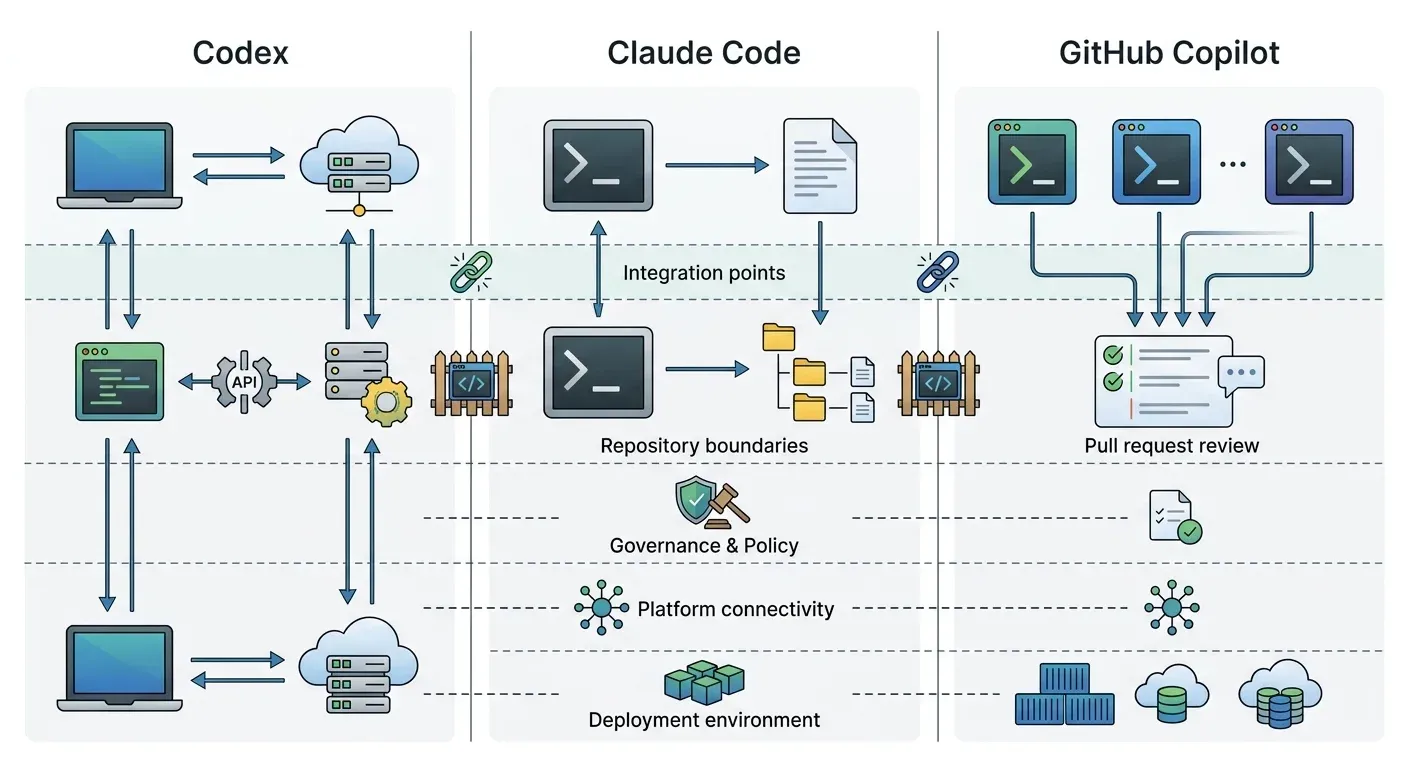
For enterprise engineers evaluating Codex alternatives, Claude Code and GitHub Copilot represent two distinct operating models, not one universal ranking. Codex fits OpenAI-centered organizations, Claude Code fits terminal-first agent workflows, and Copilot fits GitHub-native teams needing broad IDE coverage. Enterprises should compare governance boundaries, repository support, and integration portability rather than relying on model benchmarks alone.
Last verified: October 1, 2026. Coding-agent plans, product surfaces, limits, and administrative controls change frequently. Verify current vendor documentation before making a purchasing decision.
What Codex Business Means
Codex is OpenAI’s coding-agent family, available across local and hosted workflows. An enterprise rollout may include the ChatGPT desktop app, Codex CLI, the Codex IDE extension, and asynchronous tasks in Codex cloud.
There is no separate public plan named “Codex Business” on OpenAI’s current pricing page. Instead, ChatGPT Business includes ChatGPT, Work, and Codex features in its Standard and Premium seats. ChatGPT Enterprise uses custom pricing and adds controls such as SCIM, Enterprise Key Management, domain verification, role-based access control, custom retention, and data residency. For the workspace-level comparison, see ChatGPT Enterprise vs Claude Enterprise.
That commercial bundle does not create one automatic permission boundary. OpenAI’s enterprise rollout guide tells administrators to configure these areas separately:
- ChatGPT workspace membership, roles, and seats;
- local runtime policy for desktop, CLI, and IDE use;
- Codex cloud access and hosted environments;
- source-system installation and repository permissions;
- plugins, connected systems, and provider authorization;
- Platform API organizations and projects; and
- analytics, spending, compliance, and audit exports.
A ChatGPT seat does not automatically grant repository access. Local clients do not inherit every Codex cloud control, and cloud environments do not inherit every device or MDM policy. Enterprises evaluating Codex need to assess the full rollout model, not only whether the coding agent can complete a benchmark task.
How to Evaluate a Codex Alternative
Use the workflow your engineers and administrators will actually operate.
- Developer surface: Terminal, IDE, desktop, browser, pull request, or a combination?
- Repository boundary: GitHub only, multiple source hosts, monorepos, or cross-repository work?
- Execution model: Local synchronous pairing, hosted asynchronous tasks, or both?
- Identity and policy: Which controls come from the vendor workspace, the device, the repository, and the downstream tool?
- Integration model: Can the client use approved MCP servers, or must every integration be rebuilt in a vendor-specific format?
- Reusable guidance: How are instructions, rules, hooks, agents, and skills versioned and distributed?
- Audit and metrics: Can administrators reconstruct agent activity and measure accepted engineering outcomes?
- Migration friction: What must be rewritten if the organization changes clients or supports more than one?
This framework keeps preference grounded in workflow fit. It avoids claiming that one tool is most popular or best for every engineer without representative adoption and outcome data.
Codex Alternatives Compared: Claude Code vs GitHub Copilot
| Dimension | OpenAI Codex | Claude Code | GitHub Copilot |
|---|---|---|---|
| Best fit when | The organization is standardizing on ChatGPT and wants local plus OpenAI-hosted coding workflows | Engineers prefer terminal-first, agent-heavy work with Claude | The organization is GitHub-centered and needs broad IDE coverage |
| Primary workflow | Desktop, CLI, IDE extension, and Codex cloud | Terminal, IDE integrations, desktop, and automation | IDE agent mode plus GitHub-hosted cloud-agent and pull-request workflows |
| IDE reach | Codex IDE extension; plugin capabilities vary by surface | VS Code-family and JetBrains integrations plus terminal use | VS Code, Visual Studio, JetBrains, Xcode, Eclipse, and other documented clients |
| Asynchronous work | Codex cloud environments and repository tasks | Agent workflows and automation depend on the configured environment | GitHub cloud agent works in an ephemeral GitHub Actions environment |
| MCP | Supported in local Codex configuration and OpenAI platform tooling | Native MCP client support | MCP support across documented IDEs and GitHub repository configuration |
| Reusable guidance | Repository configuration, rules, skills, and plugins | CLAUDE.md, managed settings, hooks, and skills | Repository and organization instructions, custom agents, hooks, skills, and MCP |
| Enterprise center of gravity | ChatGPT workspace, Codex runtime policy, and OpenAI cloud | Claude Code policy and Anthropic ecosystem | GitHub identity, repositories, policies, Actions, and pull requests |
| Main advantage | One vendor relationship can cover general enterprise AI and coding workflows | Focused terminal-oriented agent experience with direct repository interaction | Broad IDE reach and transparent GitHub-native issue-to-PR workflow |
| Main tradeoff | Policy and plugin availability differ across local, IDE, cloud, and API surfaces | Teams must align Anthropic settings and integrations with their wider platform | Cloud-agent work requires GitHub-hosted repositories and inherits GitHub constraints |
Choose Codex When OpenAI Is the Enterprise Front Door
Codex is the natural fit when ChatGPT is already the organization’s AI workspace and administrators want coding access, general business AI, usage controls, and connected workflows under one commercial relationship.
Codex advantages
- Local and OpenAI-hosted coding surfaces within the broader ChatGPT portfolio.
- Business and Enterprise workspace administration, analytics, and spending controls.
- Repository-scoped configuration, rules, and skills for supported local clients.
- A path from interactive local work to asynchronous cloud tasks.
Codex disadvantages
- “One vendor” does not mean “one policy.” Local runtime, Codex cloud, repositories, connected systems, and Platform API projects remain separate boundaries.
- Plugin capabilities differ by surface. OpenAI documents plugins in Codex desktop and CLI workflows but not in the Codex IDE extension as of the verification date.
- Organizations standardizing integrations and skills only in OpenAI-specific packaging increase future migration work.
Choose Claude Code for Terminal-First Agent Work
Once Claude Code is on the shortlist, use the managed settings and SSO rollout guide to turn selection into an administrator-owned policy. It includes a minimal configuration, OS-specific deployment paths and tests for allowed work, denied operations and revoked access.
Claude Code fits teams that want an agent centered on the terminal and repository rather than a broader business-chat workspace. It supports MCP and integrates with common development environments, while enterprise administrators can use managed settings to constrain supported behavior.
Claude Code advantages
- A focused agent workflow built around direct repository and terminal interaction.
- Composable project instructions, hooks, skills, and MCP tools.
- A consistent workflow for engineers who move between terminal and supported IDE integrations.
- Strong fit for teams that already prefer Claude for complex agentic coding tasks.
Claude Code disadvantages
- Anthropic-specific configuration, identity, usage, and policy still need to connect to the organization’s broader platform controls.
- A terminal-centered operating model may not match teams that prefer issue assignment and pull-request automation as the primary interface.
- Skills and managed settings are not automatically portable to every competing client even when the underlying MCP tools are portable.
The enterprise question is not whether Claude Code can connect to a tool. It is whether ownership, policy, credentials, approvals, and audit evidence remain consistent when other engineering groups choose a different client.
Choose GitHub Copilot for IDE Reach and GitHub-Native Delivery
GitHub’s MCP documentation for Copilot covers VS Code, Visual Studio, JetBrains IDEs, Xcode, and Eclipse. For Copilot Business and Enterprise, administrators can enable or disable the MCP servers in Copilot policy. That breadth makes Copilot a strong fit when an enterprise cannot standardize on one IDE.
The Copilot cloud agent keeps asynchronous work visible in GitHub: it researches a repository, changes a branch, and can open a pull request from an ephemeral GitHub Actions environment.
GitHub Copilot advantages
- Broad documented IDE support across common enterprise development environments.
- GitHub-native identity, repository, issue, branch, review, and pull-request workflows.
- Agent activity is represented through commits, logs, and reviewable pull requests.
- Enterprise policies for Copilot features and MCP availability.
GitHub Copilot disadvantages
- The cloud agent works only with GitHub-hosted repositories.
- GitHub documents one repository, one branch, and one pull request per cloud-agent task.
- Cloud-agent sessions have a maximum execution time of 59 minutes as of the verification date.
- GitHub Actions minutes and AI credits become part of the cost and operating model.
Copilot is a less natural fit when repositories live outside GitHub or when one task must coordinate changes across several repositories without an external orchestration layer.
Avoid Rebuilding Every Integration for Every Coding Agent
Large organizations may reasonably support more than one AI coding tool. Platform teams want consistency, security, and auditability; engineers want the client that fits their language, IDE, and workflow.
The companion guide to ChatGPT connectors vs MCP explains the integration and governance boundary in detail. This article stays focused on coding-client selection.
The portable unit should be the approved capability, not a vendor-specific configuration file. A vendor-neutral design separates four responsibilities:
- Registry and catalog: Record approved MCP servers, tools, agents, and skills with owners, versions, environments, and lifecycle state.
- MCP gateway: Filter discovery, authorize individual tools, broker credentials, require approvals, route calls, and emit audit records.
- Agent gateway: Govern agent-to-agent routing and delegated identity when workflows cross runtimes or clouds.
- Governed skill distribution: Keep reusable engineering workflows private, versioned, reviewed, and synchronized into formats supported by each coding client.
MCP reduces integration lock-in because one tool contract can serve more than one client. It does not make prompts, skills, model behavior, sandbox policy, or administration identical. Those assets require an explicit translation and distribution strategy. For a worked example of that translation, see Cursor to Claude Code: what maps and what does not.
Where Jarvis Registry Fits
Jarvis Registry is ASCENDING’s product, and ASCENDING publishes this article. Treat this section as product positioning to verify in a proof of concept, not as an independent review.
Jarvis Registry combines a private capability catalog with MCP gateway and agent gateway controls. The intended enterprise value is:
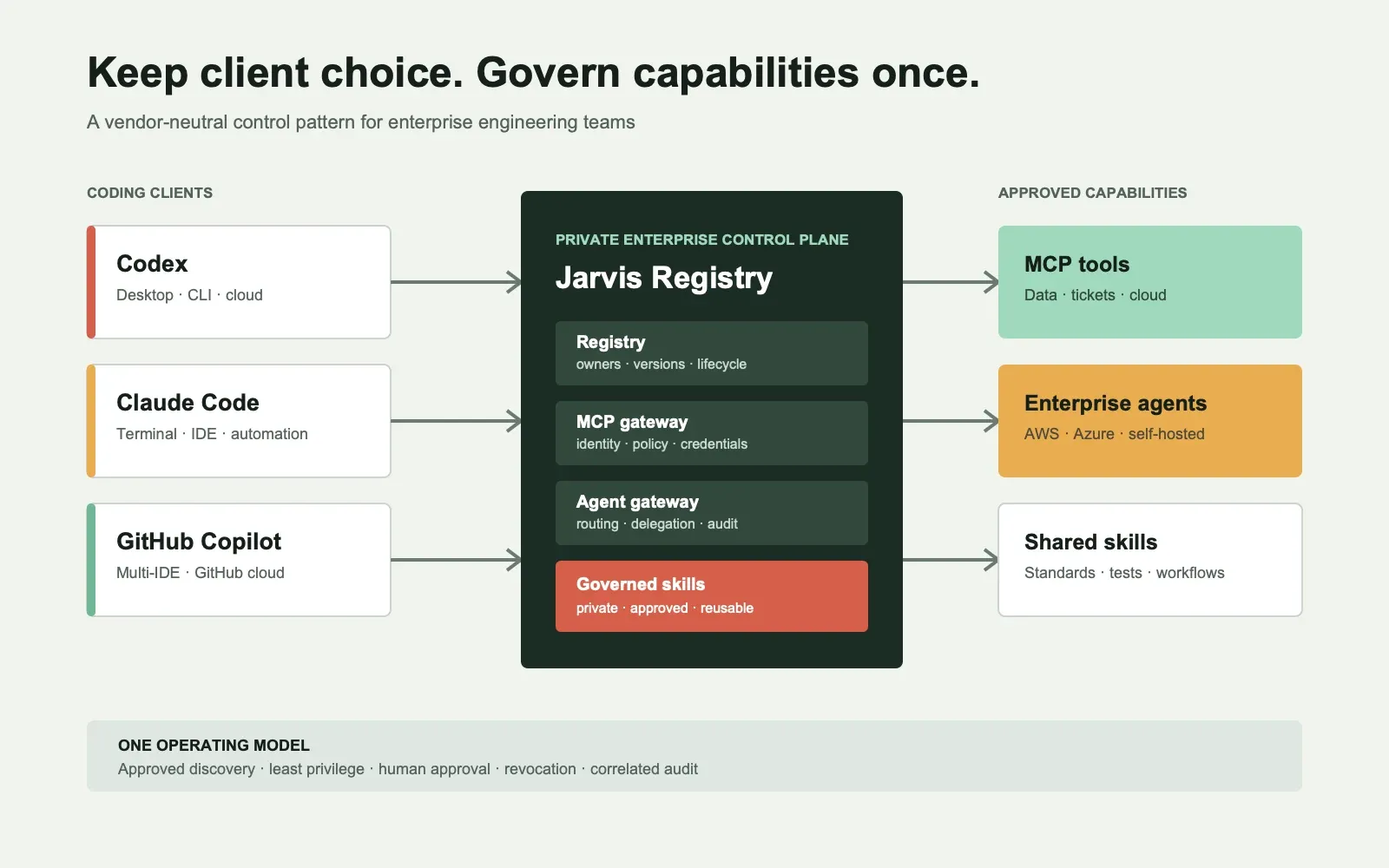
- Consistency: Codex, Claude Code, Copilot, and other approved clients discover the same governed capabilities.
- Efficiency: Teams reuse validated integrations and skills instead of rebuilding wrappers for every IDE.
- Governance: Ownership, versions, access policy, credentials, and audit records are managed centrally.
- Private hosting: The control plane and sensitive capability metadata can remain inside the organization’s infrastructure boundary.
Jarvis also treats reusable skills as governed organizational assets. The case for private hosting, version control, and approval workflows is described in organization-level skill management.
Run a Two-Client Enterprise Pilot
Select one real engineering workflow and run it through Codex and one alternative using the same approved tools.
Measure:
- time to complete the task and pass tests;
- accepted versus reverted changes;
- approval and sandbox interruptions;
- repository and tool access failures;
- revocation propagation;
- audit completeness;
- token, credit, and infrastructure cost; and
- developer review effort.
The goal is not to declare a benchmark winner. It is to determine which client fits each workflow and whether the organization can govern shared capabilities consistently across both.
ASCENDING can help design that proof of concept and evaluate where Jarvis Registry fits without requiring a company-wide migration to one coding agent.
References
- OpenAI. Business and Enterprise pricing.
- OpenAI. Enterprise admin rollout guide.
- OpenAI. Plugins in ChatGPT and Codex.
- OpenAI. MCP servers.
- Anthropic. Claude Code overview.
- GitHub. Extending GitHub Copilot Chat with MCP servers.
- GitHub. About GitHub Copilot cloud agent.
- Model Context Protocol. Introduction.
FAQ: Codex Alternatives for Enterprise Teams
What are the main Codex alternatives for enterprise engineers?
Claude Code and GitHub Copilot are the two enterprise Codex alternatives compared here. Claude Code fits terminal-first, agent-heavy workflows. GitHub Copilot fits GitHub-centered organizations that need broad IDE coverage. The right choice depends on repositories, engineering workflow, identity controls, and operating model.
Is Codex included in ChatGPT Business?
OpenAI's current Business pricing page includes ChatGPT, Work, and Codex features in both Standard and Premium seats. Availability and usage still depend on the selected seat, workspace settings, local runtime policy, Codex cloud access, and repository permissions.
Is Claude Code better than Codex?
Neither is universally better. Claude Code is a strong fit for terminal-first agent workflows, while Codex fits organizations standardizing on OpenAI across business and engineering use cases. Test both against representative repositories, policies, and acceptance criteria.
Is GitHub Copilot a Codex alternative?
Yes. GitHub Copilot combines IDE agent workflows with a GitHub-hosted cloud agent. It is especially relevant to enterprises that need broad IDE support and already govern repositories, pull requests, identity, and delivery through GitHub.
Can an enterprise support more than one AI coding agent?
Yes. A private registry and governed MCP gateway can expose the same approved tools to multiple compatible clients. Client-specific prompts, skills, sandbox controls, and administrative settings still require a deliberate distribution and governance strategy.