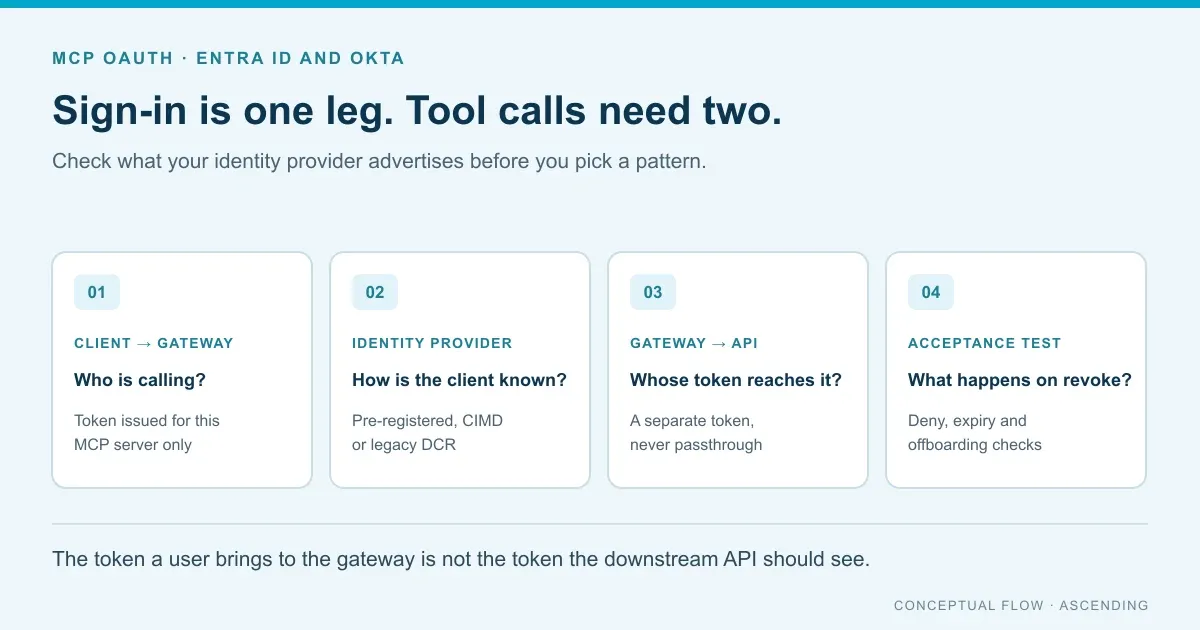
MCP OAuth is the authorization flow that makes each remote MCP server an OAuth resource server. The client finds the authorization server, signs the user in with PKCE and gets a token for that one server. On Entra ID, register an app for each non-Microsoft client. Okta adds Client ID Metadata Documents and Enterprise-Managed Authorization. Downstream APIs need their own token.
Most MCP servers aren’t there yet. About 88% of open-source MCP server repositories required credentials in a 5,205-repository review (Astrix Security, October 2025). Over half (53%) used static API keys or personal access tokens, and only 8.5% used OAuth (Astrix, 2025). Remote servers have a different gap: 40.55% of 7,973 live remote MCP servers expose tools with no authentication at all, according to a May 2026 study.
This guide is for identity owners and platform leads who must connect those servers to the identity provider (IdP) the company already runs. It compares what Entra ID and Okta offer today. Then it covers where to put the authorization server, how to set up each IdP and which tests to run before rollout. For the gateway layer itself, start with what an MCP gateway does and how to evaluate one.
Last verified: October 25, 2026, against MCP spec revision 2026-07-28 and the vendor pages linked below.
Key Takeaways
- Entra ID publishes no client registration endpoint. Claude, ChatGPT and similar clients need an app registration you create; VS Code and GitHub Copilot CLI ship with one.
- Okta’s metadata lists Client ID Metadata Document support. Okta was also the first IdP for MCP’s Enterprise-Managed Authorization.
- A client’s token is valid only for the MCP server it was issued for. The server must never forward it to Jira, Graph or any other API.
- Prove denial before rollout: wrong-audience tokens, replays at another server, removed users and revoked refresh tokens.
Disclosure: ASCENDING builds Jarvis Registry, an open source MCP registry and gateway. The setup steps apply to any gateway or MCP server; Jarvis claims are limited to its public documentation.
How does MCP OAuth work?
The current MCP spec (revision 2026-07-28) makes authorization optional. Servers that use it over HTTP should follow the flow below. Local stdio servers are out of scope; they read credentials from their environment. Three roles take part. The MCP server is the resource server and the AI client is the OAuth client. Your IdP or a broker is the authorization server.
- The client calls the server without a token and gets
401 Unauthorized. TheWWW-Authenticateheader points to the server’s protected resource metadata (RFC 9728). - That metadata names the authorization server. The client then reads that server’s own metadata (RFC 8414) or its OpenID Connect discovery document.
- The client gets a client ID through one of the registration paths described next.
- The user signs in with the authorization code flow and PKCE. Both the sign-in and token requests carry a
resourceparameter (RFC 8707) set to the MCP server’s URL. - The authorization server issues an access token. Its audience is that MCP server.
- The client sends the token as a bearer header on every request. The server checks it. If a tool needs more access, the server returns
403withinsufficient_scope.
Protected resource metadata is a small JSON document at /.well-known/oauth-protected-resource. It tells clients which authorization server to use. These are the rules identity teams most often need to check:
| Requirement | Spec level | What to check |
|---|---|---|
| Protected resource metadata (RFC 9728) | MUST for servers | /.well-known/oauth-protected-resource returns the correct resource and authorization_servers |
resource parameter (RFC 8707) | MUST for clients | The value matches the server’s canonical URL exactly |
| Audience validation | MUST for servers | Tokens issued for another resource are rejected |
PKCE with S256 | MUST for clients | The authorization server advertises code_challenge_methods_supported |
| Client ID Metadata Documents | SHOULD | Your IdP accepts an HTTPS URL as a client ID |
| Dynamic Client Registration (RFC 7591) | MAY, deprecated | Retained only for backward compatibility |
| Token passthrough | MUST NOT | The server never forwards the client’s token upstream |
Which client registration path applies?
The client registration rules set an order of preference:
- Pre-registered client details, if the client has them.
- A Client ID Metadata Document (CIMD), if the server’s metadata says it supports one.
- Dynamic Client Registration (DCR), if the server offers a registration endpoint.
- Client details the user types in by hand.
A Client ID Metadata Document (CIMD) is a JSON file at an HTTPS URL that describes the client, and that URL serves as the client ID. It suits clients and servers with no prior relationship. DCR is now deprecated in the spec, and open registration has proven error-prone. Registration flaws showed up in 96.6% of the 119 OAuth-enabled servers that the May 2026 study could test.
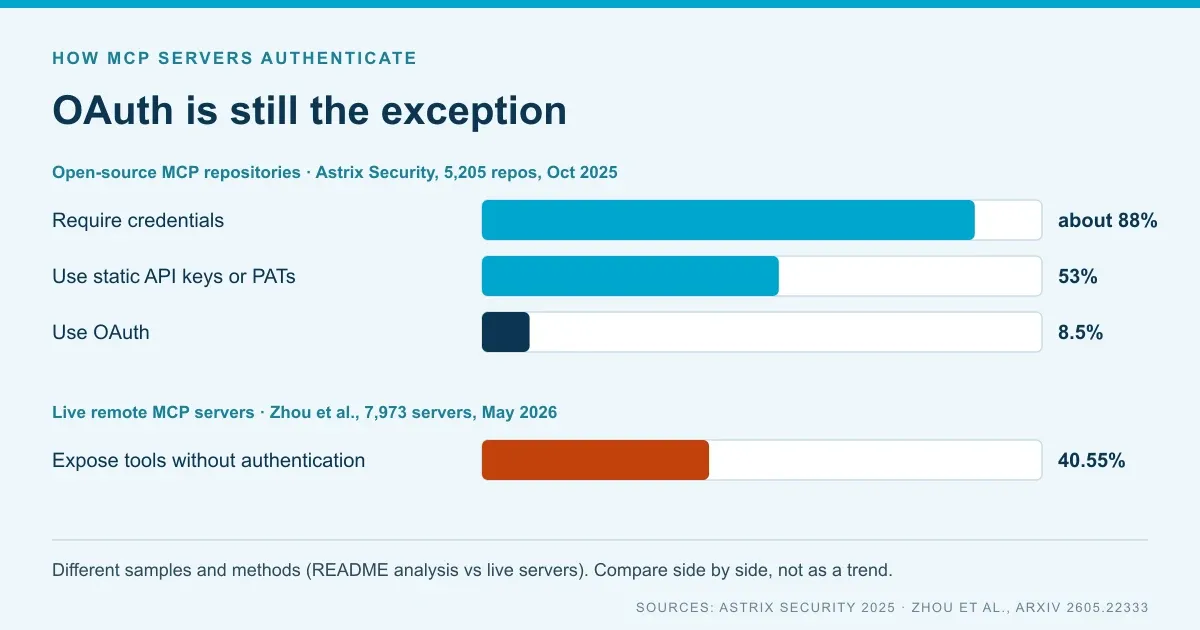
Sources: Astrix Security, 5,205 open-source repositories analyzed from README files (October 2025); Zhou et al., 7,973 live remote servers (May 2026). The studies use different samples and methods, so read them side by side, not as a trend.
What do Entra ID and Okta support today?
The two IdPs differ most on client registration. That decides which AI clients can connect before an admin sets anything up. We fetched each provider’s public discovery documents and compared the fields an MCP client reads.
| Field the client reads | Why it matters | Entra ID (v2.0 OpenID configuration) | Okta (Okta’s own org) |
|---|---|---|---|
registration_endpoint | Whether DCR is offered | Absent | Present (/oauth2/v1/clients); calls must be authenticated |
client_id_metadata_document_supported | Whether a CIMD URL works as a client ID | Absent | true |
code_challenge_methods_supported | Spec-strict clients refuse to continue without it | Absent | ["S256"] |
| RFC 8414 metadata path | Second discovery mechanism | 404; OpenID discovery only | Available |
| Token exchange or JWT bearer grants | Needed for downstream exchange and Enterprise-Managed Authorization | Grants not listed; on-behalf-of is documented separately | token-exchange on the org server, jwt-bearer on the default custom server |
Methodology. On October 25, 2026 at 04:11 UTC, we requested Entra ID’s v2.0 OpenID configuration for the common and organizations tenants, plus its RFC 8414 path. For Okta, we requested the org-level OpenID configuration and the RFC 8414 metadata for Okta’s own okta.okta.com org and its default custom server. We compared only the fields in the table. This tests public metadata, not runtime behavior. A provider can accept PKCE without advertising it, and another Okta org may have different features turned on.
To repeat the check for your own tenant and org, run:
curl -s https://login.microsoftonline.com/<tenant-id>/v2.0/.well-known/openid-configuration
curl -s https://<your-okta-domain>/oauth2/default/.well-known/oauth-authorization-server
Microsoft’s product teams describe the same gap. The Power BI MCP client guide says Entra ID “doesn’t currently support dynamic client registration.” VS Code and GitHub Copilot CLI ship with a preregistered Entra app; Claude Desktop and ChatGPT need an app registration you create.
The Azure DevOps remote MCP server announcement (August 5, 2026) goes further. It says Claude Desktop, Claude Code, ChatGPT and Cursor can’t connect to that server until Entra supports DCR or CIMD. Microsoft says it’s working with the Entra team on it.
On the Okta side, an administrator registers a client’s CIMD URL as an exact-match client ID; it isn’t open self-registration (Okta CIMD guide). The registration endpoint needs an API token or an access token with the okta.clients.register scope. Most AI clients can’t use it on their own.
One more detail affects strict clients. The security requirements say a client must stop when discovery metadata lacks code_challenge_methods_supported. Entra’s document leaves that field out, so client behavior varies. Test the exact clients and versions your employees use.
Step 1: Decide where the authorization server sits
First decide who issues the tokens. Either your IdP issues them for each MCP server directly, or a gateway’s authorization layer sits between clients and the IdP. The choice sets how many registrations you maintain and where downstream credentials live.
Direct to the IdP. Each MCP server publishes metadata that points at Entra ID or Okta. The IdP issues tokens whose audience is that server. Microsoft documents this model, and it works for a few first-party servers. The cost shows up on Entra: every non-Microsoft client needs an app registration, and each one needs access to every server’s scopes. Each server also checks its own tokens and holds its own downstream credentials.
Through a gateway. Clients connect to one gateway endpoint. The gateway signs users in through the IdP as a single app and accepts tokens issued for the gateway. It then calls each MCP server with credentials it manages. If the gateway’s own authorization layer supports the registration methods your clients expect, it can absorb the Entra gap. Check that for each product; don’t assume it.
| Question | Points to direct IdP | Points to a gateway |
|---|---|---|
| How many MCP servers? | A few, owned by one team | Many, owned by different teams |
| Which clients? | Mostly clients with a built-in registration | A mix of Claude, ChatGPT, Cursor and IDEs |
| Who approves access? | Each server owner | A central platform or security team |
| Where do downstream credentials live? | Inside each server | In one managed store |
| What breaks if it fails? | One server | Every tool behind it, so plan for availability |
The MCP gateway buyer’s guide covers hosting, tenancy and evidence questions for the gateway option.
Step 2: Configure Entra ID
With Entra ID as the authorization server, register the MCP server as an API and switch it to v2 access tokens. Make its Application ID URI identical to the server URL. Then register each client that can’t bring its own registration. Microsoft’s guide to securing an MCP server with Entra ID is the reference for these steps.
Register the MCP server
- Create an app registration. The Application Developer role is enough. If the server sits behind an API that already has a registration and scopes, you can reuse it.
- Set
requestedAccessTokenVersionto2first. Microsoft calls this the step “most people miss.” Without v2 tokens, the Application ID URI can’t match the server URL. - Set the Application ID URI to the server’s canonical URL, such as
https://mcp.contoso.com. If clients can reach the server at more than one URL, add each one toidentifierUris. - Expose scopes such as
tools.readandtools.execute. Set consent to Admins only for scopes that unlock write tools. - Publish protected resource metadata. Set
authorization_serversto your tenant’s v2.0 issuer,https://login.microsoftonline.com/<tenant-id>/v2.0. The v1 issuer doesn’t match what clients discover.
Register the clients
- Check for a built-in registration. VS Code and GitHub Copilot CLI ship with a preregistered Entra app. It still needs consent to your server’s scopes.
- Create an app registration for every other client, such as Claude Desktop or ChatGPT. Add the client’s documented redirect URI under the mobile and desktop platform. For Claude, that’s
https://claude.ai/api/mcp/auth_callback. - Grant the delegated scopes, then give the application ID to the client as its OAuth client ID.
- Use client credentials for agents without a signed-in user. Assign app roles to the agent’s identity and have it request
https://mcp.contoso.com/.default.
If token requests fail with AADSTS9010010, the resource value doesn’t match an Application ID URI exactly. A trailing slash is the usual cause, because an Application ID URI can’t end with one. The error also appears when a requested scope belongs to a different app registration than the resource.
Signing in only identifies the caller. To restrict which tools each Entra group can call, see per-tool MCP access control with Entra ID.
Step 3: Configure Okta
With Okta, use a custom authorization server whose token audience is the MCP server URL. Then decide how each client gets its ID: an admin-registered CIMD, a pre-registered app or Enterprise-Managed Authorization.
- Create or reuse a custom authorization server and set its audience to the MCP server’s canonical URL. Check how it treats the
resourceparameter the client sends. The token’saudmust match what the server checks. - Define scopes and access policies that limit read and write tools to the right groups and clients.
- Choose a registration path for each client. For a CIMD-capable client, an admin registers its metadata URL. Okta’s guide requires an org with CIMD turned on and a super admin, or an app and org admin, role. For other clients, create an OpenID Connect app with the client’s redirect URI. Keep authenticated DCR for a broker you control.
- Fetch your own metadata. Confirm that
code_challenge_methods_supported,client_id_metadata_document_supportedand the issuer match what clients will see.
What is Enterprise-Managed Authorization?
Enterprise-Managed Authorization is an MCP extension that became stable on June 18, 2026. It lets the IdP grant MCP server access centrally. Users get connected servers on first login, without a separate OAuth consent for each app.
Here’s the flow. The client trades the user’s sign-in for an Identity Assertion JWT Authorization Grant (ID-JAG) at the IdP, using token exchange (RFC 8693). The IdP applies admin policy. The client then presents the grant to the MCP server’s authorization server as a JWT bearer assertion (RFC 7523). It gets back a token limited to that server.
Okta was the first supported IdP, through its Cross App Access feature. Launch clients were Claude, Claude Code, Cowork and VS Code. Launch servers included Asana, Atlassian, Canva, Figma, Granola, Linear and Supabase. The announcement doesn’t name Microsoft Entra ID, so Entra tenants should plan on the registration steps above for now.
Step 4: Keep the downstream token separate
The token a client presents is issued for the MCP server and nothing else. When a tool calls Jira, Salesforce or Microsoft Graph, the server needs a separate token from that system. Token passthrough means forwarding the client’s token to another API, and the spec says the server must not do it.
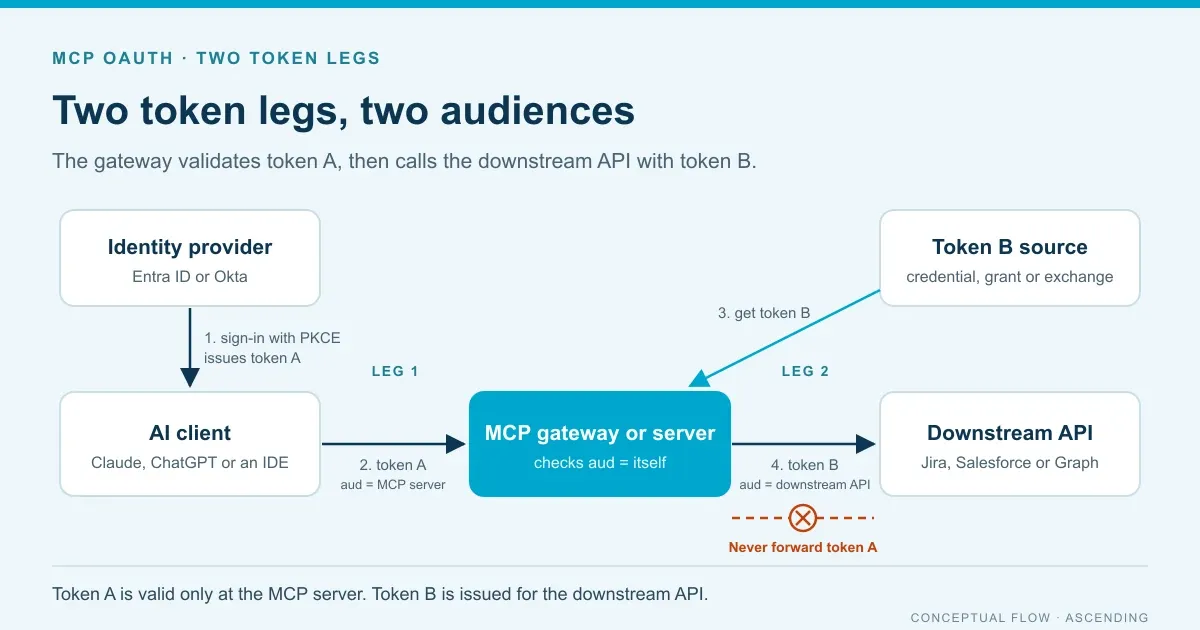
Why it matters: a forwarded token asks the downstream API to trust a token that was never issued for it. It also defeats audience checks and takes the MCP server out of the audit trail. Check proxy and gateway settings as well as server code. Many reverse proxies pass the inbound Authorization header to the backend unless told not to.
| Option | What the downstream API sees | Consent and revocation | Fits when |
|---|---|---|---|
| Service credential | The MCP server’s own identity | Admin-managed; revoking it affects every user | Low-risk or read-only data, with per-user limits enforced in the gateway |
| Stored per-user OAuth grant | The individual user, through that system’s own OAuth | Each user consents once; revoke in the SaaS app or delete the stored grant | SaaS APIs with their own authorization server, such as Jira or Salesforce |
| Token exchange or on-behalf-of | The user, with a new token issued for the downstream audience | IdP policy decides; follows the user’s account status | APIs protected by the same IdP, such as Microsoft Graph |
Entra ID offers the third option as its on-behalf-of flow, which uses only delegated scopes. Microsoft’s guidance says a token issued to a middle tier must go only to its intended audience. For stored per-user grants, encrypt the refresh tokens, renew them before they expire and delete them at offboarding.
Step 5: Run these acceptance tests before rollout
A successful sign-in proves very little. Before rollout, show that the wrong tokens fail and that access ends when it should. The expected 401 and 403 results follow the spec’s error handling rules. Run each test with the real clients your employees will use.
| Test | Expected result |
|---|---|
| Call the server with no token | 401 with a WWW-Authenticate header pointing to protected resource metadata |
| Present a valid token issued for a different MCP server | Rejected with 401; the audience check fails |
| Replay a token from server A at server B behind the same gateway | Rejected; the token is bound to one resource |
| Call a write tool with a read-only token | 403 with insufficient_scope and the required scope |
| Remove the user from the granting group | New tokens are denied; record how long existing tokens still work |
| Revoke the user’s refresh token or session | The client can’t obtain a new access token |
| Inspect the downstream request | The downstream API receives its own token, never the client’s |
| Review records for every test above | Each allowed and denied call is attributable to a user, client and tool |
Pay attention to the group-removal test. Access tokens usually stay valid until they expire, so removing a group may not stop a token already issued. Measure the real window and set token lifetimes to match your risk tolerance. Pair these tests with the MCP tool-call audit evidence checklist. Assign owners through the MCP governance checklist.
Where does Jarvis Registry fit?
ASCENDING publishes this blog and maintains Jarvis Registry, an open source MCP registry and gateway. The capabilities below come from its public product page (last verified October 9, 2026) and docs. They still need testing with your IdP and clients.
The Jarvis MCP gateway page lists OpenID Connect Core 1.0 and SAML 2.0 for identity federation. It also lists OAuth 2.0 with PKCE, token exchange (RFC 8693) and resource indicators (RFC 8707). The page says Jarvis can store per-user OAuth credentials for a downstream service, encrypted at rest and refreshed near expiry. It checks a per-tool access list on every call and emits OpenTelemetry data for each one. That’s the gateway pattern from Step 1.
Two gaps matter for this guide. The identity provider docs cover Entra ID and Keycloak and say any OIDC-compliant IdP can be integrated. They don’t name Okta. The public docs also don’t say which registration methods AI clients use to connect.
Bring your client list and one downstream API to a Jarvis demo, and run the Step 5 tests against it.
References
- MCP authorization specification, revision 2026-07-28
- MCP client registration
- MCP authorization security considerations
- Enterprise-Managed Authorization announcement
- Microsoft: Secure an MCP server with Microsoft Entra ID
- Microsoft: Register Power BI MCP servers for MCP clients
- Microsoft: Azure DevOps remote MCP server general availability
- Microsoft identity platform on-behalf-of flow
- Okta: Register apps with a Client ID Metadata Document
- Okta: Dynamic Client Registration API
- Okta: Cross App Access
- Astrix Security: State of MCP Server Security 2025
- Zhou et al.: A First Measurement Study on Authentication Security in Real-World Remote MCP Servers
MCP OAuth questions from identity teams
How do we set up MCP OAuth with Entra ID or Okta?
Make each remote MCP server publish protected resource metadata that names your IdP, and make the token audience match the server's canonical URL. On Entra ID, register the server with v2 access tokens and register an app for each client that lacks one. On Okta, use a custom authorization server and an admin-registered Client ID Metadata Document or app per client. Downstream APIs need their own token. See the MCP authorization specification.
Does Microsoft Entra ID support dynamic client registration for MCP clients?
No. Entra ID's discovery document has no registration endpoint, and Microsoft's Power BI MCP documentation says Entra ID doesn't currently support dynamic client registration. VS Code and GitHub Copilot CLI ship with a preregistered Entra app. For Claude Desktop, ChatGPT and similar clients, an administrator creates an app registration and gives its client ID to the client.
Can an MCP server forward the user's access token to a downstream API?
No. The MCP specification says a server must not pass through the token it received from the client. To call Jira, Salesforce or Microsoft Graph, the server needs a separate token: its own service credential, a stored per-user grant from that system, or a token from an exchange such as Entra's on-behalf-of flow.
What is Enterprise-Managed Authorization for MCP?
It's a stable MCP extension that lets the company identity provider grant MCP server access centrally, so users get connected servers on first login without per-app OAuth consent. The client exchanges the user's sign-in for an identity assertion grant (ID-JAG) and presents it to the server's authorization server. Okta was the first supported identity provider when the extension went stable on June 18, 2026.