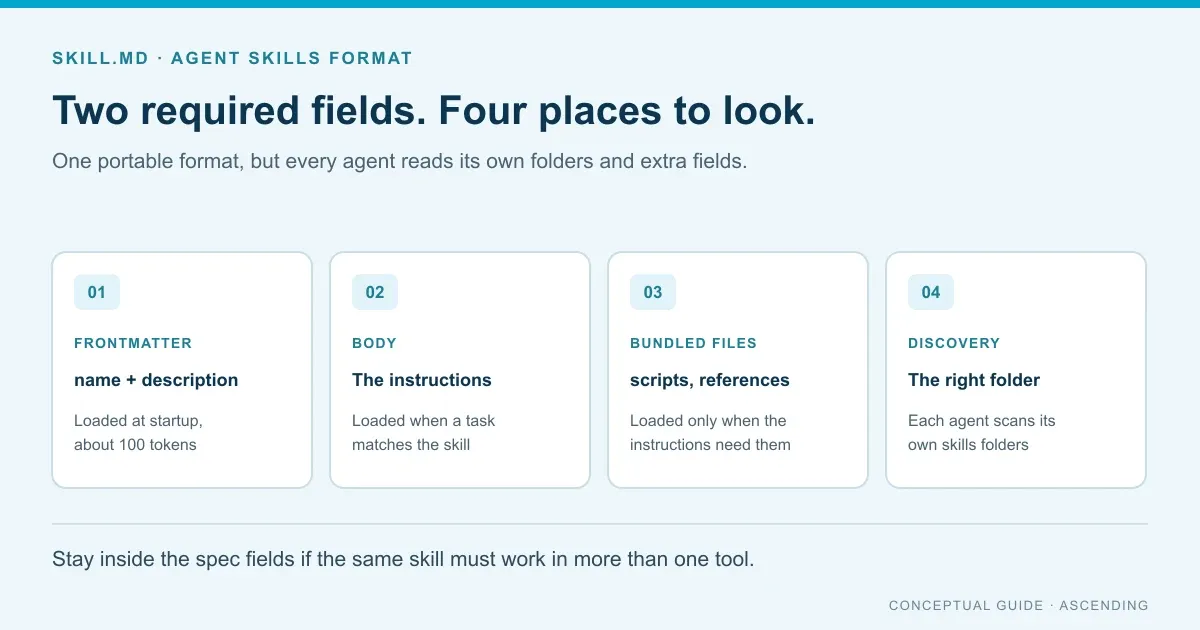
SKILL.md is the required file in an Agent Skills folder. Its YAML frontmatter gives the skill a name and a description, and its Markdown body holds the instructions. Agents read only the name and description at startup, then load the body when a task matches. The format is portable, but each agent scans different folders.
The format was originally developed by Anthropic and released as an open standard. Claude Code, OpenAI Codex, Cursor and GitHub Copilot now document support for it. That makes one skill reusable across tools, as long as you stay inside the shared spec and put the file where each client looks.
This guide covers the fields, the folder layout and how skills load into context. It then shows where each major client looks, with lessons from auditing the skills our own team uses. For how teams distribute and govern skills at scale, see what a private skill marketplace is.
Last verified: October 25, 2026, against the Agent Skills specification and each vendor’s documentation linked below.
Key Takeaways
- Only
nameanddescriptionare required. The name must match the folder, and the description should say what the skill does and when to use it. - Spec fields are portable. Fields such as
argument-hintordisable-model-invocationare vendor extensions that other clients may ignore. - Claude Code reads
.claude/skills, Codex reads.agents/skills, and Cursor and GitHub Copilot read both. No single project folder reaches all four. - Treat a skill like software you install. Scripts and instructions both run with the agent’s permissions.
Disclosure: ASCENDING builds Jarvis Registry, which includes a Skill Gateway for distributing skills. The format guidance applies to any tool; Jarvis claims are limited to its public pages.
What goes in a SKILL.md file?
A SKILL.md file has two parts: frontmatter between --- lines and a Markdown body. Here’s a minimal, valid example with notes.
---
name: release-notes            # required; must match the folder name
description: Drafts release notes from merged pull requests. Use when the user asks for release notes or a changelog.
license: Apache-2.0            # optional
metadata:                      # optional; string keys and values
  owner: platform-team
  version: "1.2"
---

# Release notes

1. List pull requests merged since the last tag.
2. Group them by feature, fix and breaking change.
3. Follow the template in assets/release-template.md.
The body has no required format. The specification suggests step-by-step instructions, input and output examples, and common edge cases. The agent loads the whole body once it decides to use the skill, so keep it focused.
Which frontmatter fields does the spec define?
The Agent Skills specification defines six fields. Two are required.
| Field | Required | Limit | Notes |
|---|---|---|---|
name | Yes | 1 to 64 characters | Lowercase letters, numbers and hyphens; no leading, trailing or double hyphens; must match the folder name |
description | Yes | 1 to 1,024 characters | Say what the skill does and when to use it |
license | No | None stated | A license name or a bundled license file |
compatibility | No | 1 to 500 characters | Environment needs, such as required tools or network access |
metadata | No | None stated | A map of string keys to string values |
allowed-tools | No | None stated | Pre-approved tools; marked experimental, and support varies |
Some products add stricter rules. For skills used with the Claude API, Anthropic’s docs say the name can’t contain XML tags or the reserved words “anthropic” and “claude”. The description can’t contain XML tags either.
Vendor extension fields
Vendor extension fields are frontmatter keys that one product reads and the spec doesn’t define. Claude Code adds argument-hint, disable-model-invocation, user-invocable, context, hooks, paths and others. Cursor adds paths, disable-model-invocation, icon and color. Codex keeps its extras in a separate agents/openai.yaml file instead of the frontmatter.
These fields are useful inside one tool. Just don’t count on them elsewhere. A skill that relies on disable-model-invocation to stay manual in Claude Code may be picked up automatically by a client that ignores the field.
How should you lay out the skill folder?
A skill is a folder named after the skill. SKILL.md is the only required file; three optional folders hold everything else.
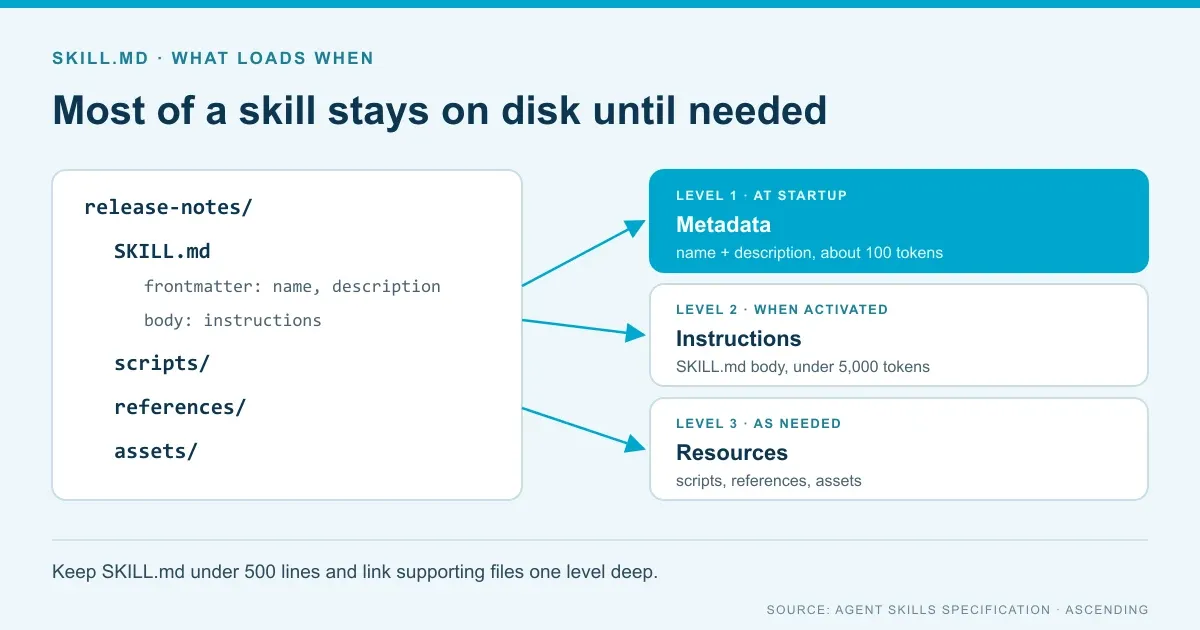
scripts/holds code the agent can run, such as a validation or extraction script.references/holds extra documentation the agent reads when needed.assets/holds templates, images and data files.
The spec recommends keeping SKILL.md under 500 lines and moving detail into separate files. It also asks for file references one level deep from SKILL.md, with relative paths, so agents don’t follow long chains.
How does a skill load into context?
Progressive disclosure is the loading model that keeps skills cheap until they’re needed. The specification describes three stages:
- Metadata, about 100 tokens per skill. The name and description load at startup for every installed skill.
- Instructions, under 5,000 tokens recommended. The full SKILL.md body loads when the skill is activated.
- Resources, as needed. Files in
scripts/,references/orassets/load only when the instructions call for them.
Clients also cap the startup listing. Claude Code cuts each skill’s description and when_to_use text at 1,536 characters (Claude Code docs). Codex budgets 8,000 characters or 2% of the context window for its skill list by default (Codex docs). Put the trigger words early in the description so a cut doesn’t remove them.
Where does each agent look for skills?
Each client documents its own folders. We checked each vendor’s docs on October 25, 2026.
| Client | Project folders | Personal folders | How to call a skill | Source |
|---|---|---|---|---|
| Claude Code | .claude/skills (also nested and plugin skills) | ~/.claude/skills | Automatic, or /skill-name | Claude Code docs |
| OpenAI Codex | .agents/skills, from the working folder up to the repo root | ~/.agents/skills; admins can use /etc/codex/skills | Automatic, $skill-name or /skills | Codex docs |
| Cursor | .agents/skills, .cursor/skills, plus .claude/skills and .codex/skills for compatibility | ~/.agents/skills, ~/.cursor/skills and the Claude and Codex equivalents | Automatic, or / in Agent chat | Cursor docs |
| GitHub Copilot | .github/skills, .claude/skills, .agents/skills | ~/.copilot/skills, ~/.agents/skills | Loaded when relevant | GitHub docs |
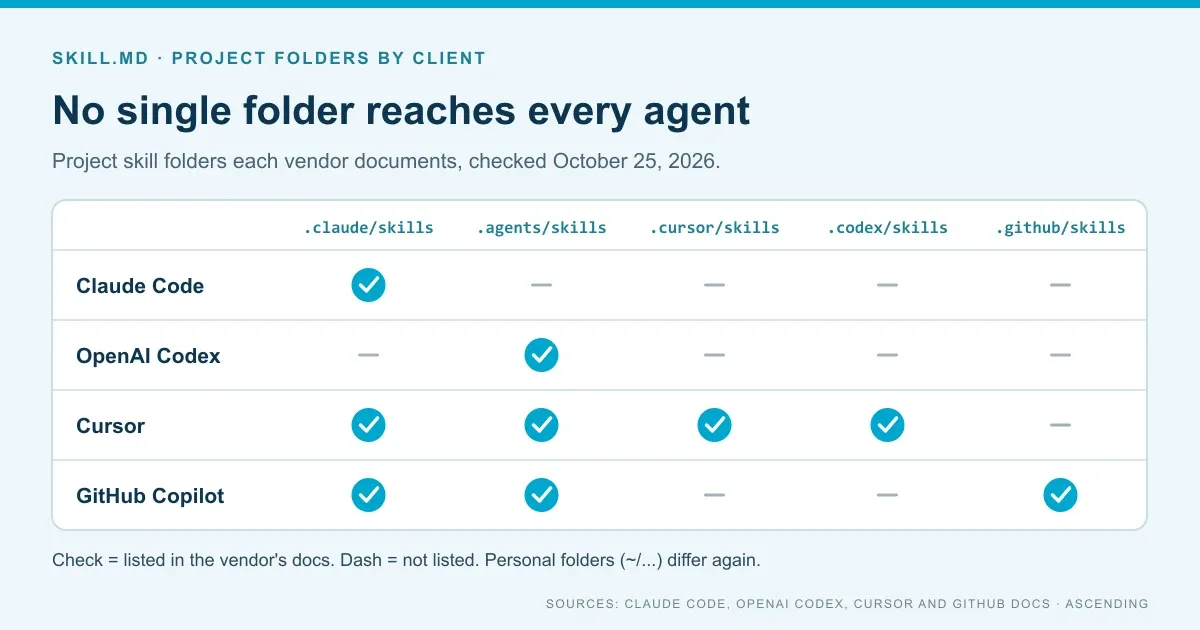
The table shows a gap. .claude/skills reaches Claude Code, Cursor and Copilot, but Codex doesn’t list it. .agents/skills reaches Codex, Cursor and Copilot, but Claude Code’s docs don’t list it. A team using all four tools needs one source copy synced into both folders. A copy step, a symlink or a distribution tool can do it. Test symlinks on Windows before you rely on them.
Lessons from auditing our own SKILL.md files
Methodology. On October 25, 2026, we inspected the four skills our team uses to run this blog’s repository: blog-seo, format-blog, generate-llms-txt and seo-geo-strategy-builder. We checked each SKILL.md against the spec limits and the client folder table above. We counted lines and description characters, and looked for non-spec fields and bundled folders.
Here’s the frontmatter of one of them, unchanged:
---
name: format-blog
description: "Format supplied Markdown for this Astro blog's content schema, frontmatter, headings, images, FAQs, and breadcrumb routes while preserving the author's content."
argument-hint: "Format a supplied post draft or existing post path for this repo"
---
What the audit found:
- All four names pass the spec. Each uses lowercase letters and hyphens and matches its folder.
- Descriptions range from 160 to 835 characters. All are under the 1,024 limit and well under Claude Code’s 1,536-character listing cap.
- Bodies are 90 to 138 lines. That’s far below the 500-line guidance. Two skills move detail into
references/(one file and four files). - Three of four use
argument-hint. It’s a Claude Code field, so other clients will likely ignore it. - Codex can’t see any of them. They live in
.claude/skills. Cursor and Copilot can read that folder, but Codex scans only.agents/skills.
Two fixes follow. We’d add a “use when” clause to format-blog, the only description that doesn’t say when to use it. And if Codex joins the toolset, we’d sync the folder into .agents/skills rather than keep two hand-edited copies.
How do you write a description that triggers?
The description is what an agent matches against your request. It decides whether the skill loads at all. The spec asks for both what the skill does and when to use it, with specific keywords.
Compare the spec’s own examples. “Helps with PDFs.” is too vague. “Extracts text and tables from PDF files, fills PDF forms, and merges multiple PDFs. Use when working with PDF documents or when the user mentions PDFs, forms, or document extraction.” works because it names the tasks and the trigger words.
A few habits help:
- Lead with the action and the object, such as “Drafts release notes from merged pull requests.”
- Add a “Use when” sentence with the words people actually type.
- Name the file types, systems or commands involved.
- Keep it short enough that the trigger words survive any listing cut.
What should you check before installing a skill?
Treat a skill like software. Its instructions steer the agent, and its scripts can run with the agent’s permissions. In a January 2026 study of 31,132 skills from two marketplaces, 26.1% contained at least one vulnerability and 5.2% showed high-severity patterns that suggest malicious intent (Liu et al., arXiv 2601.10338). The same study found that skills bundling scripts were 2.12 times more likely to be vulnerable than instruction-only skills (Liu et al., 2026).
Anthropic’s guidance is to use skills only from trusted sources and to audit every bundled file. Before a skill reaches your team:
- Read SKILL.md and every script, and look for network calls or file access the description doesn’t explain.
- Validate the frontmatter with the spec’s
skills-ref validatetool. - Pin the version you reviewed, and review again when it changes.
The research and a review checklist are in is it safe to use public agent skills?. For how skills differ from tools an agent calls, see AI skills vs MCP tools.
Where does Jarvis Registry fit?
ASCENDING publishes this blog and maintains Jarvis Registry. The claims below come from its public Skill Gateway page and AI Skills CLI docs (updated September 23, 2026). Test them against your own clients.
The Skill Gateway page says teams can create and edit skills in the Registry UI or API, track versions and attach supporting files. Skills can be imported one way from a Git provider. Each skill is checked before the batch is applied, and errors are reported per skill. Skills are private by default, with view, edit, delete and share permissions per user and group.
The AI Skills CLI syncs approved skills to Claude Code, Codex and GitHub Copilot with jarvis-registry skills sync. The docs say it handles each tool’s local layout and updates the set when access changes. That addresses the folder gap above. Cursor isn’t listed as a sync target, so test it before you plan on it.
For the approval, update and offboarding side, see private AI skill management for developer teams. To check the sync against your own client mix, bring two or three real skills to a Jarvis demo.
References
- Agent Skills specification
- Agent Skills overview
- Anthropic: Agent Skills overview
- Claude Code: Skills
- OpenAI Codex: Build skills
- Cursor: Agent Skills
- GitHub Docs: About agent skills
- Liu et al.: Agent Skills in the Wild (arXiv 2601.10338)
- Jarvis Skill Gateway
- Jarvis AI Skills CLI
SKILL.md questions from engineering teams
What is a SKILL.md file?
It's the one required file in an Agent Skills folder. YAML frontmatter gives the skill a name and a description, and the Markdown body holds the instructions an agent loads when a task matches. The format is defined in the Agent Skills specification.
Which frontmatter fields are required in SKILL.md?
Only name and description. The name can be 1 to 64 lowercase letters, numbers and hyphens and must match the folder name. The description can be up to 1,024 characters and should say what the skill does and when to use it. License, compatibility, metadata and allowed-tools are optional.
Where should we put skills so Claude Code, Codex and Cursor all find them?
No single project folder is documented for all three today. Claude Code reads .claude/skills, Codex reads .agents/skills, and Cursor reads both. Keep one source copy and sync it into each folder, or use a tool that writes each client's layout. Check the Cursor and Claude Code docs before relying on a path.
Do installed skills use context when they aren't used?
A little. Agents load each skill's name and description at startup, about 100 tokens per skill according to the specification. The full SKILL.md body loads only when the skill is activated, and bundled files load only when the instructions call for them.